Question: Use this WBS to create a tabular form in Microsoft Project using Word's SmartArt Tool. 1. Plan Wedding 1.1 Set Date 12 Location 1.3 Budget
Use this WBS to create a tabular form in Microsoft Project using Word's SmartArt Tool.
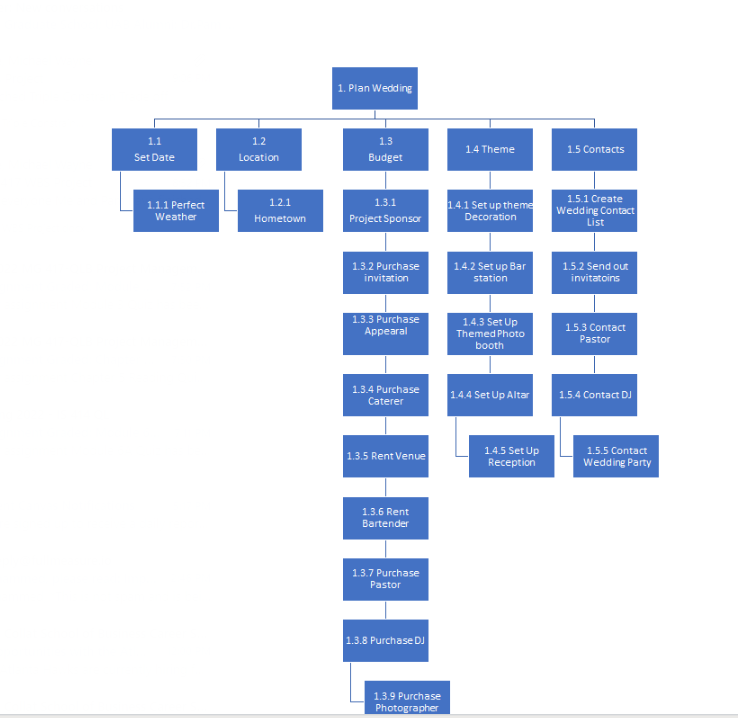
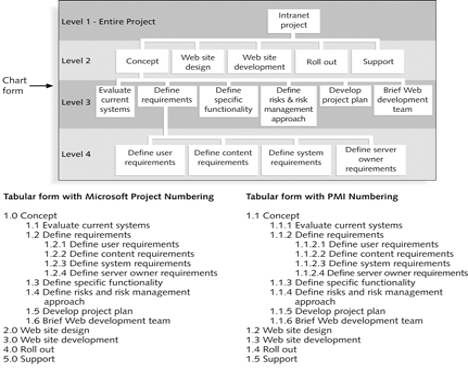
1. Plan Wedding 1.1 Set Date 12 Location 1.3 Budget 1.4 Theme 1.5 Contacts 1.1.1 Perfect Weather 1.2.1 Hometown 1.3.1 Project Sponsor 1.4.1 Set up theme Decoration 1.5.1 Create Wedding Contact List 1.3.2 Purchase invitation 1.4.2 Set up Bar station 1.5.2 Send out invitatoins 1.3.3 Purchase Appearal 1.4.3 Set Up Themed Photo booth 1.5.3 Contact Pastor 1.3.4 Purchase Caterer 1.4.4 Set Up Altar 1.5.4 Contact DJ 1.3.5 Rent Venue 1.4.5 Set Up Reception 1.5.5 Contact Wedding Party 1.3.6 Rent Bartender 1.3.7 Purchase Pastor 1.3.8 Purchase DJ 1.3.9 Purchase Photographer 1. Project Objective a. For planning the wedding, we have a budget of $25,000 which we are utilizing to purchase all needed requirements. We have a date set of April 25+ which is due to weather. Our Location is set to our hometown due to traveling constraints and we have our theme and contacts which we will contact people attending. 2. Product Scope Description a. The scope includes our Complete wedding package. We have a date set with the location of our hometown on April 25 which will most likely be a sunny yet cool day of about 75 degrees. Our project sponsor donated $25k which covers cost of our Decorations for the theme, The DJ and Pastor, also included will be the photographer and caterer. We also had cost to cover invitations, apparel, and the venue. 3. Justification a. The project is constructed by the bride and groom, which is sponsored by the project sponsor which is the groom's father-in-law for the spring wedding of his daughter. 4. Deliverables a. There will be miles stones for each phase which will be contacting venue, DJ, Photographer, pastor, and caterer to set the date. We hold a meeting to go over things such as food, photo styles, pastor descriptions, and music. Once wedding party is contacted, we will discuss dates to purchase apparel and wedding walk thru. Once all parties have been contacted and have completed theirtask, we will host wedding. 5. Milestones a. The milestones will be contacting our contacts will be done by April 5, Testing and discussing photos, food, music, and descriptions will be done by April 10h. We will have pick for appareland wedding walk thru April 20th - 24h. The setup and actual wedding will take place April 25th. 6. Technical Requirements a. Decorations, Caterers, photographer, and DJ will test and setup April 5 as well as April 25h Prior to the wedding. 7. Limits and exclusions a. Decoration will only be set by the theme for the wedding and only decorators will install. The DJ will test equipment that will only be used by the wedding party and the DJ. The Photographer will test and set up equipment prior to wedding which she will be the only person utilizing it to shoot photos. The caterers will set up food and give out portions to contacts on the wedding list. This will take place after the initial wedding has been completed. Pastor will be allowed in venue at 12pm noon to prepare and speak with bride and groom. The Venue will be open at 7am for everyone to come in and set up their equipment. They will begin breaking down equipment around 9pm due to the venue closing at 11pm. 8. Acceptance Criteria a. All task and milestones have been completed. All invitations were sent and accepted. The technical requirements passed the venues required expectations. The decorations and settings have been approved by the Bride and Groom. Level 1 - Entire Project Intranet project Level 2 Concept Web site design Web site development Roll out Support Chart form Evaluate Define Level 3 current requirements systems Define Define Develop Brief Web specific risks & risk project plan development functionality management team approach Level 4 4 Define user requirements Define content requirements Define system requirements Define server owner requirements Tabular form with Microsoft Project Numbering 1.0 Concept 1.1 Evaluate current systems 1.2 Define requirements 1.2.1 Define user requirements 1.2.2 Define content requirements 1.2.3 Define system requirements 1.2.4 Define server owner requirements 1.3 Define specific functionality 1.4 Define risks and risk management approach 1.5 Develop project plan 1.6 Brief Web development team 2.0 Web site design 3.0 Web site development 4.0 Roll out 5.0 Support Tabular form with PMI Numbering 1.1 Concept 1.1.1 Evaluate current systems 1.1.2 Define requirements 1.1.2.1 Define user requirements 1.1.2.2 Define content requirements 1.1.2.3 Define system requirements 1.1.2.4 Define server owner requirements 1.1.3 Define specific functionality 1.1.4 Define risks and risk management approach 1.1.5 Develop project plan 1.1.6 Brief Web development team 1.2 Web site design 1.3 Web site development 1.4 Roll out 1.5 Support









 Study Help