







Question: Use vba and give me the final code H9 X so b) Deletes the entire row below the active cell B C D E F
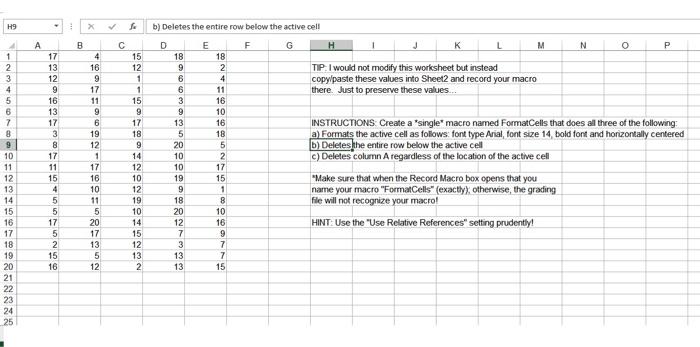
H9 X so b) Deletes the entire row below the active cell B C D E F G H 1 J K L M N 0 P 4 16 18 2 4 11 16 10 16 18 TIP. I would not modify this worksheet but instead copy/paste these values into Sheet2 and record your macro there. Just to preserve these values... DOO 1 2 3 4 5 6 7 8 9 10 11 12 13 14 15 16 17 18 19 20 21 22 23 24 25 17 13 12 9 16 13 17 3 8 17 11 15 4 5 5 17 5 2 15 16 19 12 1 17 16 10 11 5 20 17 13 15 12 1 1 15 9 17 18 9 14 12 10 12 19 10 14 15 12 13 2 18 9 6 6 3 9 13 5 20 10 10 19 9 18 20 12 7 3 13 13 2 17 15 1 8 10 16 INSTRUCTIONS Create a 'single' macro named FormatCells that does all three of the following a) Formats the active cell as follows: font type Arial, font size 14, bold font and horizontally centered b) Deletes the entire row below the active cell c) Deletes column Aregardless of the location of the active cell "Make sure that when the Record Macro box opens that you name your macro "Format Cells" (exactly), otherwise, the grading file will not recognize your macro! HINT: Use the "Use Relative References" setting prudently! 7 15
Step by Step Solution
There are 3 Steps involved in it

Get step-by-step solutions from verified subject matter experts
 Study Help