







Question: Use VBA in excel. Goal: Compute the time required for either a forklift or a person in our warehouse to travel between any two named
Use VBA in excel.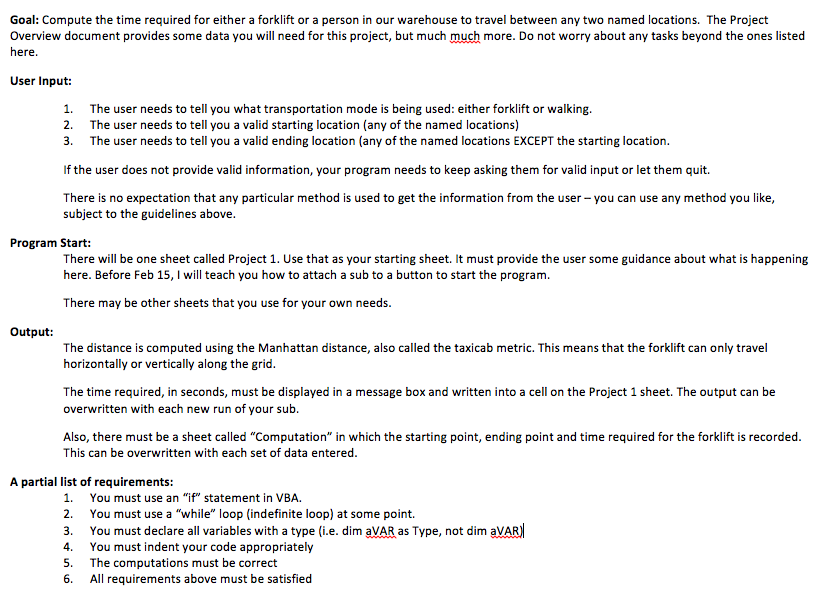
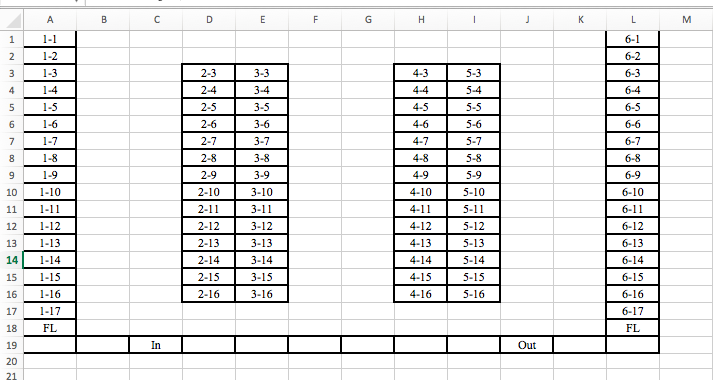
Goal: Compute the time required for either a forklift or a person in our warehouse to travel between any two named locations. The Project Overview document provides some data you will need for this project, but much much more. Do not worry about any tasks beyond the ones listed here User Input: 1. 2. 3. The user needs to tell you what transportation mode is being used: either forklift or walking. The user needs to tell you a valid starting location (any of the named locations) The user needs to tell you a valid ending location (any of the named locations EXCEPT the starting location. If the user does not provide valid information, your program needs to keep asking them for valid input or let them quit. There is no expectation that any particular method is used to get the information from the user -you can use any method you like, subject to the guidelines above Program Start There will be one sheet called Project 1. Use that as your starting sheet. It must provide the user some guidance about what is happening here. Before Feb 15, I will teach you how to attach a sub to a button to start the program. There may be other sheets that you use for your own needs. Output: The distance is computed using the Manhattan distance, also called the taxicab metric. This means that the forklift can only travel horizontally or vertically along the grid. The time required, in seconds, must be displayed in a message box and written into a cell on the Project 1 sheet. The output can be overwritten with each new run of your sub. Also, there must be a sheet called "Computation" in which the starting point, ending point and time required for the forklift is recorded. This can be overwritten with each set of data entered. A partial list of requirements: 1. You must use an "if" statement in VBA. 2. You must use a "while" loop (indefinite loop) at some point. 3. You must declare all variables with a type (i.e. dim aVAR as Type, not dim aVAR 4. You must indent your code appropriately 5. The computations must be correct 6. All requirements above must be satisfied Goal: Compute the time required for either a forklift or a person in our warehouse to travel between any two named locations. The Project Overview document provides some data you will need for this project, but much much more. Do not worry about any tasks beyond the ones listed here User Input: 1. 2. 3. The user needs to tell you what transportation mode is being used: either forklift or walking. The user needs to tell you a valid starting location (any of the named locations) The user needs to tell you a valid ending location (any of the named locations EXCEPT the starting location. If the user does not provide valid information, your program needs to keep asking them for valid input or let them quit. There is no expectation that any particular method is used to get the information from the user -you can use any method you like, subject to the guidelines above Program Start There will be one sheet called Project 1. Use that as your starting sheet. It must provide the user some guidance about what is happening here. Before Feb 15, I will teach you how to attach a sub to a button to start the program. There may be other sheets that you use for your own needs. Output: The distance is computed using the Manhattan distance, also called the taxicab metric. This means that the forklift can only travel horizontally or vertically along the grid. The time required, in seconds, must be displayed in a message box and written into a cell on the Project 1 sheet. The output can be overwritten with each new run of your sub. Also, there must be a sheet called "Computation" in which the starting point, ending point and time required for the forklift is recorded. This can be overwritten with each set of data entered. A partial list of requirements: 1. You must use an "if" statement in VBA. 2. You must use a "while" loop (indefinite loop) at some point. 3. You must declare all variables with a type (i.e. dim aVAR as Type, not dim aVAR 4. You must indent your code appropriately 5. The computations must be correct 6. All requirements above must be satisfied
Step by Step Solution
There are 3 Steps involved in it

Get step-by-step solutions from verified subject matter experts
 Study Help