





Question: Use very basic java only, intro. JAVA. Use error checking such as hasNextlnt0, and follow instructions exactly Assignment 15.2: More Sentences (10 pts) Write a
Use very basic java only, intro.  Use very basic java only, intro. JAVA. Use error checking such
as hasNextlnt0, and follow instructions exactly Assignment 15.2: More Sentences (10 pts)

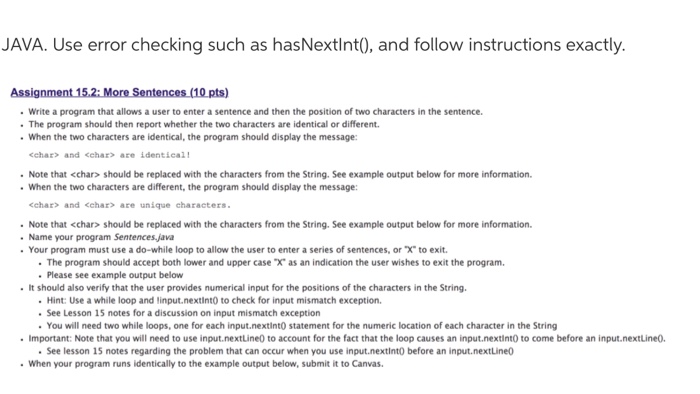
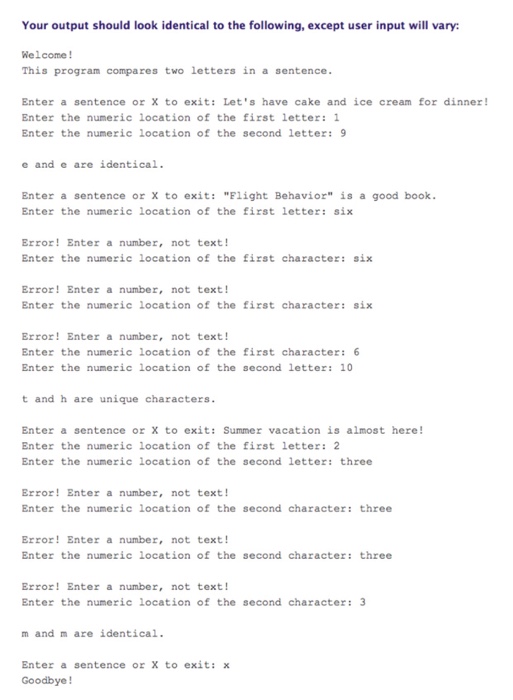
JAVA. Use error checking such as hasNextlnt0, and follow instructions exactly Assignment 15.2: More Sentences (10 pts) Write a program that allows a user to enter a sentence and then the position of two characters in the sentence. . The program should then report whether the two characters are identical or different. When the two characters are identical, the program should display the message: cchar> and cchar>are identieall Note that should be replaced with the characters from the String. See example output below for more information. When the two characters are different, the program should display the message ehar> and cchar> are unique characters Note that should be replaced with the characters from the String. See example output below for more information. Name your program Sentences java . Your program must use a do-while loop to allow the user to enter a series of sentences, or X to exit. . The program should accept both lower and upper case "X, as an indication the user wishes to exit the program. Please see example output below It should also verify that the user provides numerical input for the positions of the characters in the String. Hint: Use a while loop and linput.nextint0 to check for input mismatch exception. See Lesson 15 notes for a discussion on input mismatch exception . You will need two while loops, one for each input.nextintO statement for the numeric location of each character in the String . Important: Note that you will need to use input.nextLine0 to account for the fact that the loop causes an input.nextint0 to come before an input.nextLine0. See lesson 15 notes regarding the problem that can occur when you use input.nextint0 before an input.nextLine0 When your program runs identically to the example output below, submit it to Canvas

Step by Step Solution

There are 3 Steps involved in it

1 Expert Approved Answer
Step: 1 Unlock blur-text-image
Question Has Been Solved by an Expert!

Get step-by-step solutions from verified subject matter experts

Step: 2 Unlock
Step: 3 Unlock

Students Have Also Explored These Related Databases Questions!