







Question: Use Visual Basic please and look at the end of the last page in the left it says what to use Calculate the minimum required
Use Visual Basic please and look at the end of the last page in the left it says what to use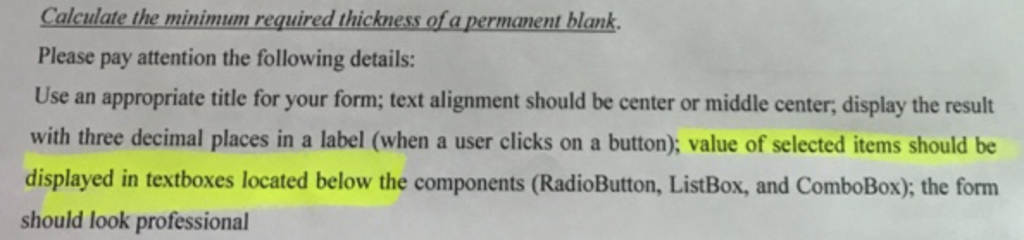
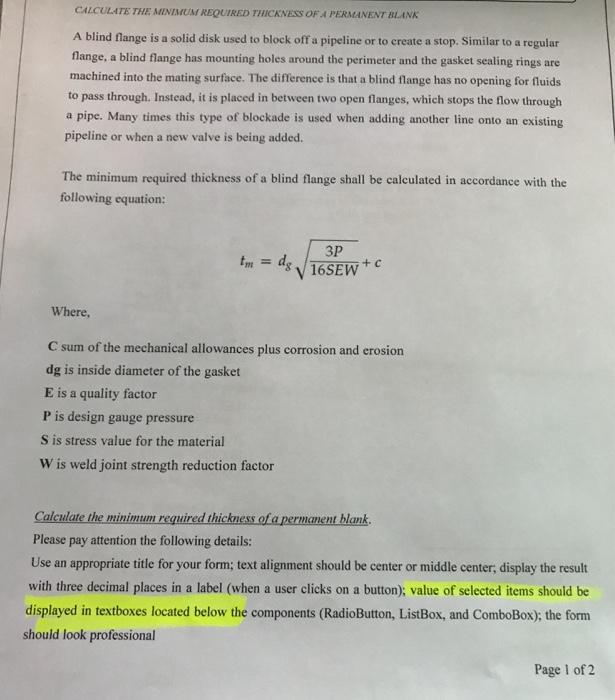
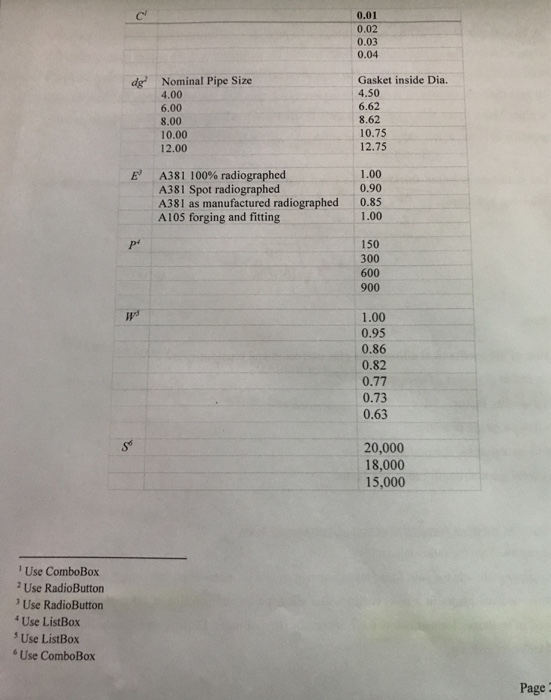
Calculate the minimum required thickness of apermanent blank. Please pay attention the following details: Use an appropriate title for your form; text alignment should be center or middle center, display the result with three decimal places in a label (when a user clicks on a button); value of selected items should be displayed in textboxes located below the components (RadioButton, ListBox, and ComboBox); the form should look professional Calculate the minimum required thickness of apermanent blank. Please pay attention the following details: Use an appropriate title for your form; text alignment should be center or middle center, display the result with three decimal places in a label (when a user clicks on a button); value of selected items should be displayed in textboxes located below the components (RadioButton, ListBox, and ComboBox); the form should look professional
Step by Step Solution
There are 3 Steps involved in it

Get step-by-step solutions from verified subject matter experts
 Study Help