





Question: Use-Case Description Use Case Name: Make appointment ID: 2 Importance Level: High Primary Actor: Patient Use Case Type: Detail, essential Stakeholders and Interests: Patient -

Use-Case Description Use Case Name: MakeUse-Case Description Use Case Name: Make

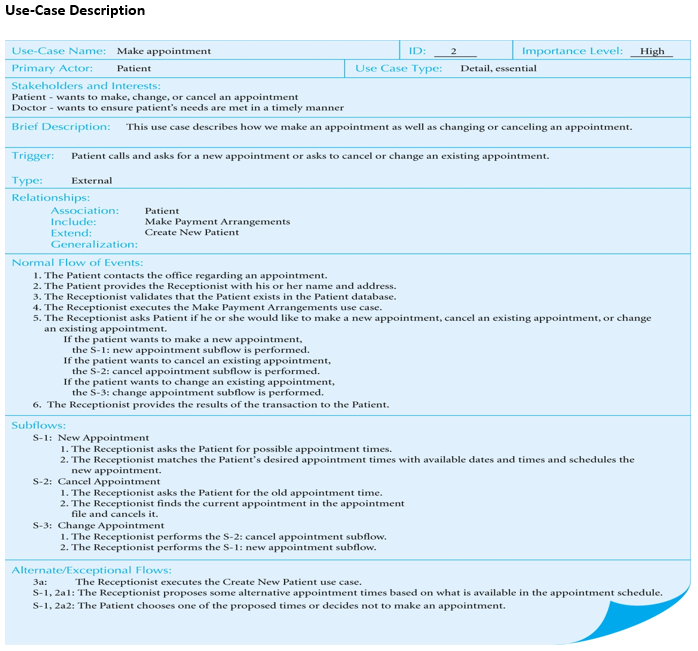
Use-Case Description Use Case Name: Make appointment ID: 2 Importance Level: High Primary Actor: Patient Use Case Type: Detail, essential Stakeholders and Interests: Patient - wants to make change, or cancel an appointment Doctor - wants to ensure patient's needs are met in a timely manner Brief Description: This use case describes how we make an appointment as well as changing or canceling an appointment. Trigger: Patient calls and asks for a new appointment or asks to cancel or change an existing appointment. Type: External Relationships: Association: Patient Include: Make Payment Arrangements Extend: Create New Patient Generalization: Normal Flow of Events: 1. The Patient contacts the office regarding an appointment. 2. The Patient provides the Receptionist with his or her name and address. 3. The Receptionist validates that the Patient exists in the Patient database. 4. The Receptionist executes the Make Payment Arrangements use case. 5. The Receptionist asks Patient if he or she would like to make a new appointment, cancel an existing appointment, or change an existing appointment. If the patient wants to make a new appointment, the S-1: new appointment subflow is performed. If the patient wants to cancel an existing appointment, the S-2: cancel appointment subflow is performed. If the patient wants to change an existing appointment, the S-3: change appointment subflow is performed. 6. The Receptionist provides the results of the transaction to the patient. Subflows: S-1: New Appointment 1. The Receptionist asks the Patient for possible appointment times. 2. The Receptionist matches the patient's desired appointment times with available date and times and schedules the new appointment. S-2: Cancel Appointment 1. The Receptionist asks the Patient for the old appointment time. 2. The Receptionist finds the current appointment in the appointment file and cancels it. S-3: Change Appointment 1. The Receptionist performs the S-2: cancel appointment subflow. 2. The Receptionist performs the S-1: new appointment subflow. Alternate/Exceptional Flows: 3a: The Receptionist executes the Create New Patient use case. S-1,2a1: The Receptionist proposes some alternative appointment times based on what is available in the appointment schedule. S-1, 2a2: The Patient chooses one of the proposed times or decides not to make an appointment. Q1.R1. Use the above description to describe the importance of this document in the Verifying and Validating the analysis models

Step by Step Solution

There are 3 Steps involved in it

1 Expert Approved Answer
Step: 1 Unlock blur-text-image

Question Has Been Solved by an Expert!

Get step-by-step solutions from verified subject matter experts

Step: 2 Unlock
Step: 3 Unlock

Students Have Also Explored These Related General Management Questions!