







Question: Using a button and a RGB led, write a code in Arduino using c++ that does the following action. Push button that when pressed changes
Using a button and a RGB led, write a code in Arduino using c++ that does the following action. Push button that when pressed changes the color and debounce the button signal.
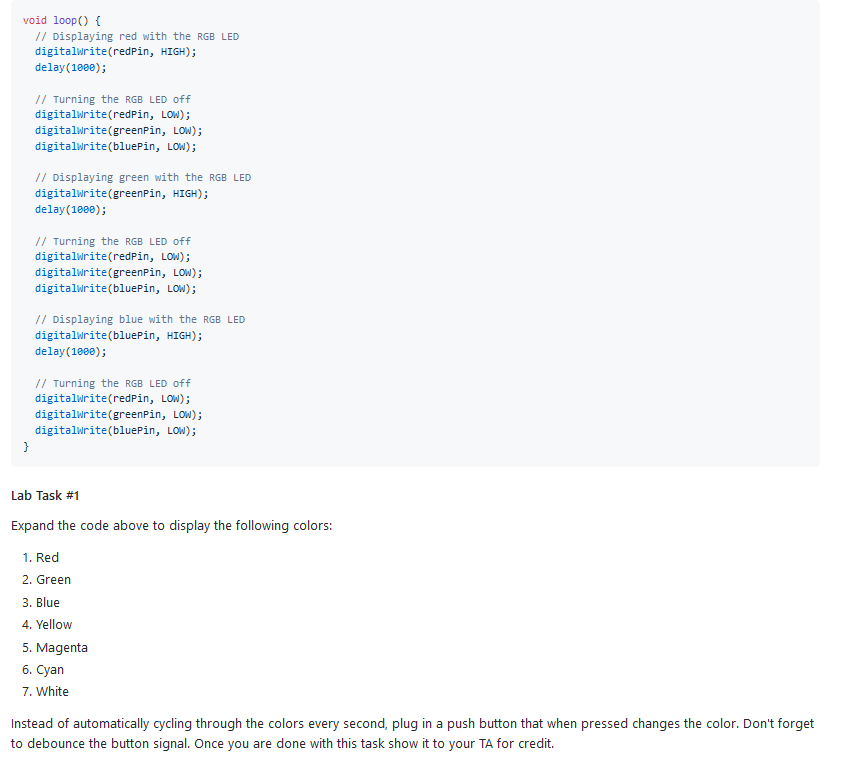
void loop() { // Displaying red with the RGB LED digitalWrite(redPin, HIGH); delay(1000); // Turning the RGB LED off digitalWrite(redPin, LOW); digitalWrite(greenPin, LOW); digitalWrite(bluePin, LOW); // Displaying green with the RGB LED digitalWrite(greenPin, HIGH); delay(1000); 1/ Turning the RGB LED off digitalWrite(redPin, LOW); digitalWrite(greenPin, LOW); digitalWrite(bluePin, LOW); // Displaying blue with the RGB LED digitalWrite(bluePin, HIGH); delay(1000); // Turning the RGB LED off digitalWrite(redPin, LOW); digitalWrite(greenPin, LOW); digitalWrite(bluePin, LOW); } Lab Task #1 Expand the code above to display the following colors: 1. Red 2. Green 3. Blue 4. Yellow 5. Magenta 6. Cyan 7. White Instead of automatically cycling through the colors every second, plug in a push button that when pressed changes the color. Don't forget to debounce the button signal. Once you are done with this task show it to your TA for credit. void loop() { // Displaying red with the RGB LED digitalWrite(redPin, HIGH); delay(1000); // Turning the RGB LED off digitalWrite(redPin, LOW); digitalWrite(greenPin, LOW); digitalWrite(bluePin, LOW); // Displaying green with the RGB LED digitalWrite(greenPin, HIGH); delay(1000); 1/ Turning the RGB LED off digitalWrite(redPin, LOW); digitalWrite(greenPin, LOW); digitalWrite(bluePin, LOW); // Displaying blue with the RGB LED digitalWrite(bluePin, HIGH); delay(1000); // Turning the RGB LED off digitalWrite(redPin, LOW); digitalWrite(greenPin, LOW); digitalWrite(bluePin, LOW); } Lab Task #1 Expand the code above to display the following colors: 1. Red 2. Green 3. Blue 4. Yellow 5. Magenta 6. Cyan 7. White Instead of automatically cycling through the colors every second, plug in a push button that when pressed changes the color. Don't forget to debounce the button signal. Once you are done with this task show it to your TA for credit
Step by Step Solution
There are 3 Steps involved in it

Get step-by-step solutions from verified subject matter experts
 Study Help