







Question: Using an HTML file with an EXTERNAL CSS file, how would I create a page like this? Requirements: You should use HTML and CSS to
Using an HTML file with an EXTERNAL CSS file, how would I create a page like this?
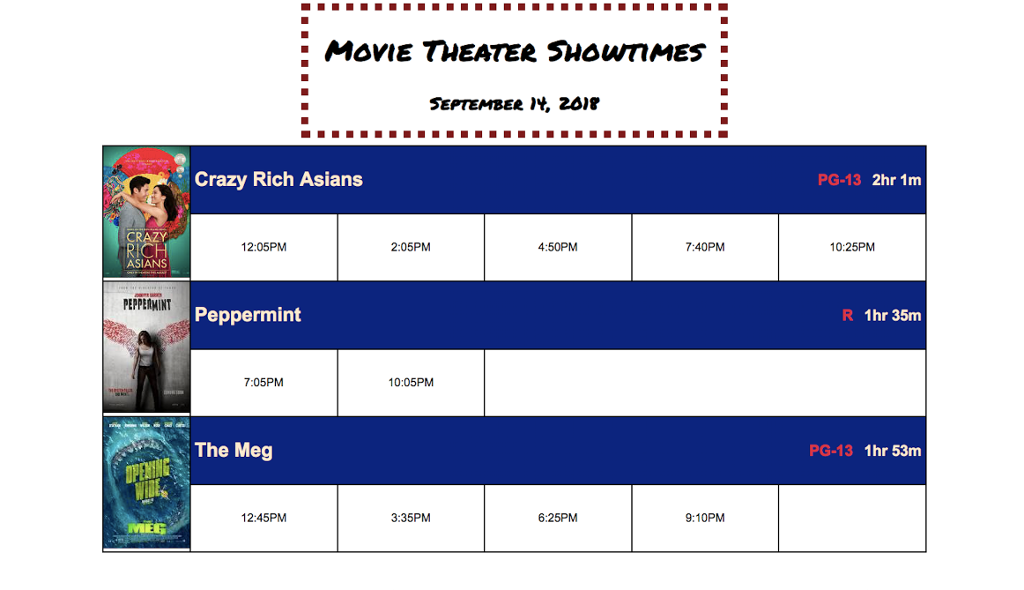
Requirements: You should use HTML and CSS to create the table and complete the following requirements:
Select 3 movies from the attached document, which is attached to this challenge in the
make a table with the poster, movie name, rating, length of
movie, all of the show times, and amenities for that specific movie
the posters are below
o If you want to go out and find your own movies, that is fine, just make sure everything in the submission is school appropriate, otherwise your submission will be rejected.
Follow the example given to you. Your page should look similar to the example.
3. Use a single table, do NOT nest multiple tables within one another
Not fulfilling this will result in zero points on the total score
Use the colspan attribute to make a
width of the table. For this challenge, you will need to look up the attribute used to stretch
across rows and use it.
Headers:
1. Create a h1 with text: Movie Theater Showtimes Font size should be 2.5em
2. Create a h2 with the current date you checked the movie times Font size should be 1.5em
3. Both Headers:
Font family should be Permanent Marker
o Youcanlinkfromgoogle,asshowninclass
Backup font should be cursive
Should be centered inside a horizontally centered div
The div should have some sort of border of your choosing.
6. Table requirement:
The border should be 2px solid black and collapsed
The poster for each movie should span both rows and have a fixed width of 120px
o Look at the example to see how it will look
The title cell for each movie should span all columns and be left aligned with 10vh height
The rating and movie length should be in the same row as the title but right aligned
The first font family should be "Arial", the backups should be Helvetica and Sans-serif
Movie time cells should be evenly spaced
2
CS2830 Challenge: Tables
Remember to center the text in all of the movie time cells
The table width should be 80% of the page
7. Colors requirements:
Change the movie title text to some color and have the background be a contrasting color (have one light color and one dark color) other than the default o Change the font color of the movie rating to crimson
8. Poster images width is 120px and do not define the height
You can find poster images in Posters zip file attached to this challenge on Canvas
o If you want to use your own images, that will be fine, but make sure they are appropriate, otherwise your submission will be rejected.
Poster should row span 2 cells (follow the example).



Step by Step Solution
There are 3 Steps involved in it

Get step-by-step solutions from verified subject matter experts
 Study Help