







Question: using blueJ and those are the style guid Java 1 Barry Project 1: Earth Element Histogram Report 1 Task Write as program to produce a
using blueJ 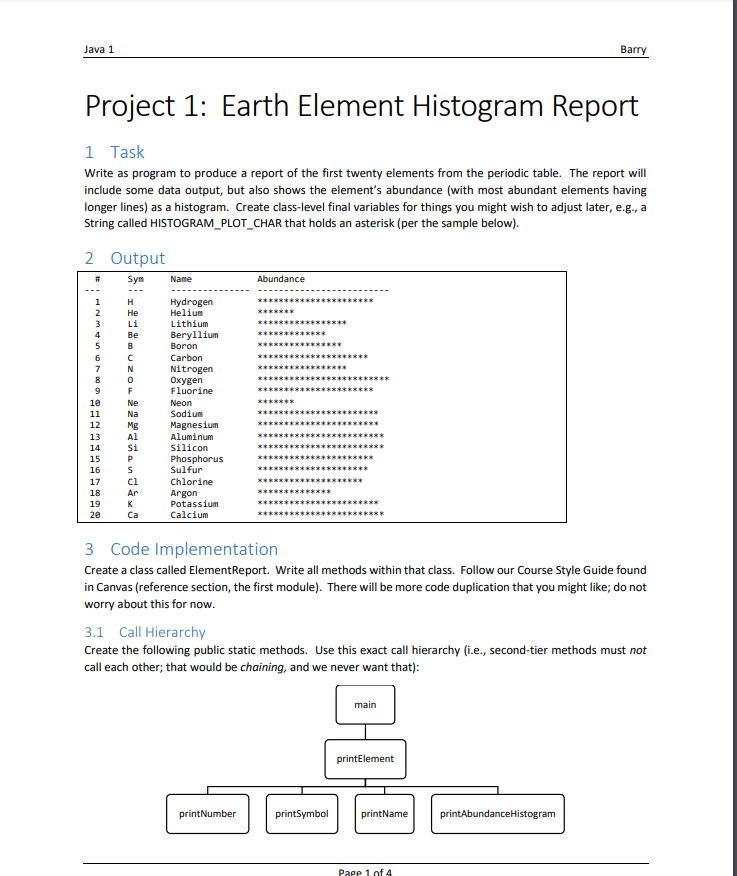
 and those are the style guid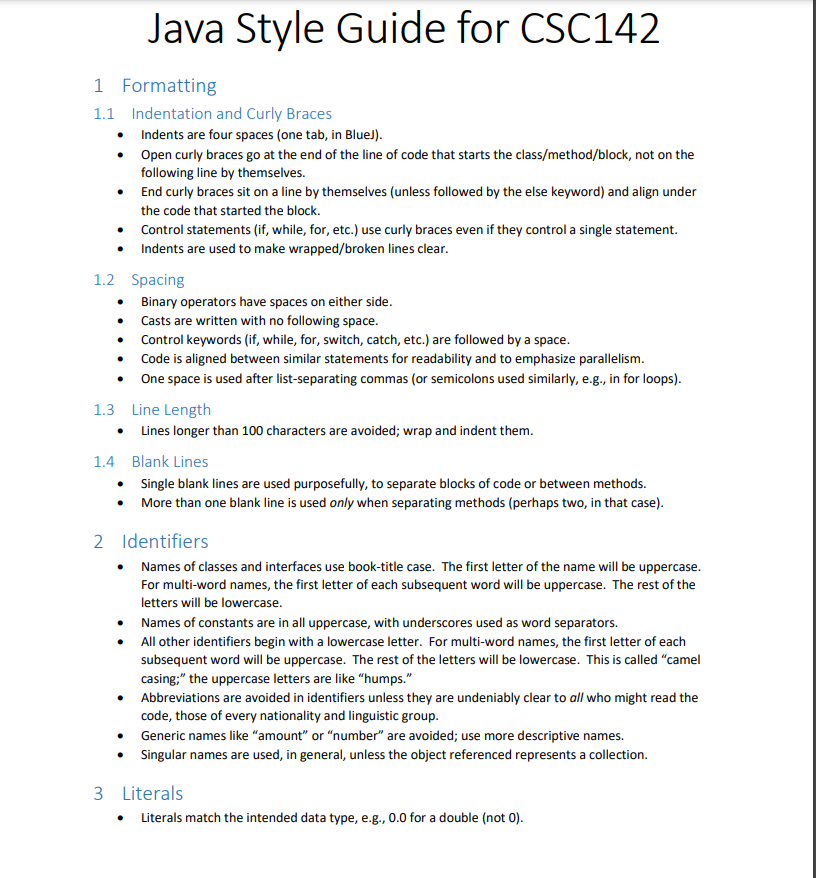
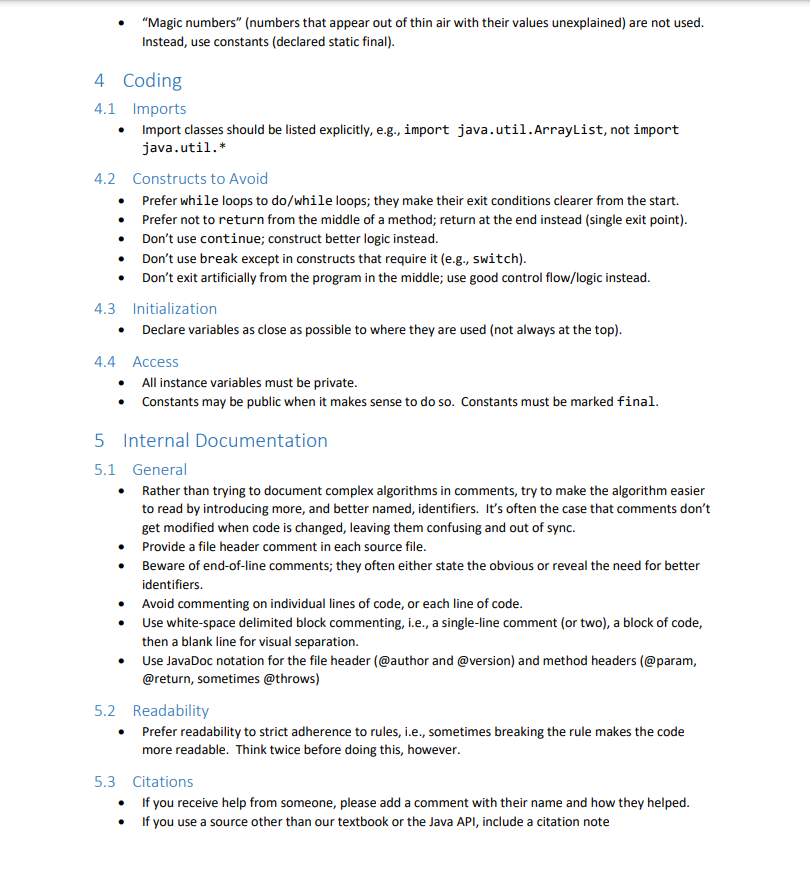
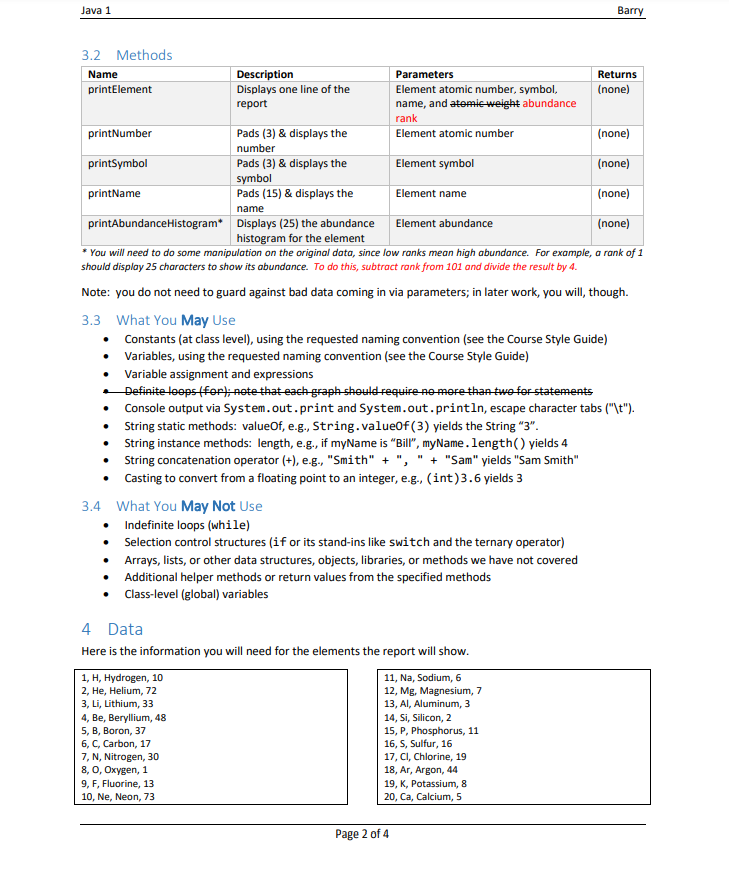
Java 1 Barry Project 1: Earth Element Histogram Report 1 Task Write as program to produce a report of the first twenty elements from the periodic table. The report will include some data output, but also shows the element's abundance with most abundant elements having longer lines) as a histogram. Create class-level final variables for things you might wish to adjust later, e.g., a String called HISTOGRAM_PLOT_CHAR that holds an asterisk (per the sample below). 2 Output # Sym Name Abundance ********************** ***************** ************* *********** 6 GUES DOWN 10 11 12 13 14 15 16 17 18 19 20 * TOZ H He Li B C N 0 F Ne Na Mg Al Si P S ci Ar K Hydrogen Helium Lithium Beryllium Boron Carbon Nitrogen Oxygen Fluorine Neon Sodium Magnesium Aluminum Silicon Phosphorus Sulfur Chlorine Argon Potassium Calcium ***************** ************************ ********************** ******* *********************** *********************** ************************ ***************** ********************** ********************* ******************** *********************** 3 Code Implementation Create a class called ElementReport. Write all methods within that class. Follow our Course Style Guide found in Canvas (reference section, the first module). There will be more code duplication that you might like; do not worry about this for now. 3.1 Call Hierarchy Create the following public static methods. Use this exact call hierarchy (i.e., second-tier methods must not call each other; that would be chaining, and we never want that): main printElement print Number printSymbol printName printAbundanceHistogram Pape 1 of 4 Java 1 Barry 3.2 Methods Name printElement Description Displays one line of the report Returns (none) Parameters Element atomic number, symbol, name, and atomic weight abundance rank Element atomic number print Number (none) printSymbol Pads (3) & displays the number Pads (3) & displays the symbol Pads (15) & displays the Element symbol (none) printName Element name (none) name printAbundance Histogram* Displays (25) the abundance Element abundance (none) histogram for the element * You will need to do some manipulation on the original data, since low ranks mean high abundance. For example, a rank of 1 should display 25 characters to show its abundance. To do this, subtract rank from 101 and divide the result by 4. Note: you do not need to guard against bad data coming in via parameters; in later work, you will, though. 3.3 What You May Use Constants (at class level), using the requested naming convention (see the Course Style Guide) Variables, using the requested naming convention (see the Course Style Guide) Variable assignment and expressions Definite loopsfor); note that each graph should require no more than two for statements Console output via System.out.print and System.out.println, escape character tabs ("\t"). String static methods: valueOf, e.g., String.valueof(3) yields the String "3". String instance methods: length, e.g., if myName is "Bil", myName.length() yields 4 String concatenation operator (+), e.g., "Smith" + ", " "Sam" yields "Sam Smith" Casting to convert from a floating point to an integer, e.g., (int)3.6 yields 3 3.4 What You May Not Use Indefinite loops (while) Selection control structures (if or its stand-ins like switch and the ternary operator) Arrays, lists, or other data structures, objects, libraries, or methods we have not covered Additional helper methods or return values from the specified methods Class-level (global) variables 4 Data Here is the information you will need for the elements the report will show. 1, H, Hydrogen, 10 11, Na, Sodium, 6 2. He, Helium, 72 12, Mg, Magnesium, 7 3, Li, Lithium, 33 13, Al, Aluminum, 3 4, Be, Beryllium, 48 14, Si, Silicon, 2 5, B, Boron, 37 15, P, Phosphorus, 11 6, C, Carbon, 17 16, S, Sulfur, 16 7, N, Nitrogen, 30 17, CI, Chlorine, 19 8,0, Oxygen, 1 18, Ar, Argon, 44 9, F, Fluorine, 13 19, K, Potassium, 8 10, Ne, Neon, 73 20, Ca, Calcium, 5 Page 2 of 4 Java Style Guide for CSC142 1 Formatting 1.1 Indentation and Curly Braces Indents are four spaces (one tab, in Blue)). Open curly braces go at the end of the line of code that starts the class/method/block, not on the following line by themselves. End curly braces sit on a line by themselves (unless followed by the else keyword) and align under the code that started the block. Control statements (if, while, for, etc.) use curly braces even if they control a single statement. Indents are used to make wrapped/broken lines clear. 1.2 Spacing Binary operators have spaces on either side. Casts are written with no following space. Control keywords (if, while, for, switch, catch, etc.) are followed by a space. Code is aligned between similar statements for readability and to emphasize parallelism. One space is used after list-separating commas (or semicolons used similarly, e.g., in for loops). 1.3 Line Length Lines longer than 100 characters are avoided; wrap and indent them. 1.4 Blank Lines Single blank lines are used purposefully, to separate blocks of code or between methods. More than one blank line is used only when separating methods (perhaps two, in that case). 2 Identifiers Names of classes and interfaces use book-title case. The first letter of the name will be uppercase. For multi-word names, the first letter of each subsequent word will be uppercase. The rest of the letters will be lowercase. Names of constants are in all uppercase, with underscores used as word separators. All other identifiers begin with a lowercase letter. For multi-word names, the first letter of each subsequent word will be uppercase. The rest of the letters will be lowercase. This is called "camel casing;" the uppercase letters are like "humps." Abbreviations are avoided in identifiers unless they are undeniably clear to all who might read the code, those of every nationality and linguistic group. Generic names like "amount" or "number" are avoided; use more descriptive names. Singular names are used, in general, unless the object referenced represents a collection. 3 Literals Literals match the intended data type, e.g., 0.0 for a double (not 0). "Magic numbers" (numbers that appear out of thin air with their values unexplained) are not used. Instead, use constants (declared static final). . 4 Coding 4.1 Imports Import classes should be listed explicitly, e.g., import java.util.ArrayList, not import java.util.* 4.2 Constructs to Avoid Prefer while loops to do/while loops; they make their exit conditions clearer from the start. Prefer not to return from the middle of a method; return at the end instead (single exit point). Don't use continue; construct better logic instead. Don't use break except in constructs that require it (e.g., switch). Don't exit artificially from the program in the middle; use good control flow/logic instead. 4.3 Initialization Declare variables as close as possible to where they are used (not always at the top). 4.4 Access All instance variables must be private. Constants may be public when it makes sense to do so. Constants must be marked final. 5 Internal Documentation 5.1 General Rather than trying to document complex algorithms in comments, try to make the algorithm easier to read by introducing more, and better named, identifiers. It's often the case that comments don't get modified when code is changed, leaving them confusing and out of sync. Provide a file header comment in each source file. Beware of end-of-line comments; they often either state the obvious or reveal the need for better identifiers. Avoid commenting on individual lines of code, or each line of code. Use white-space delimited block commenting, i.e., a single-line comment (or two), a block of code, then a blank line for visual separation. Use JavaDoc notation for the file header (@author and @version) and method headers (@param, @return, sometimes @throws) 5.2 Readability Prefer readability to strict adherence to rules, i.e., sometimes breaking the rule makes the code more readable. Think twice before doing this, however. 5.3 Citations If you receive help from someone, please add a comment with their name and how they helped. If you use a source other than our textbook or the Java API, include a citation
Step by Step Solution
There are 3 Steps involved in it

Get step-by-step solutions from verified subject matter experts
 Study Help