







Question: Using C# make changes to the current code code. Add Item - The user must fill-in all four vertical items. ( On Order does not
Using C# make changes to the current code code.
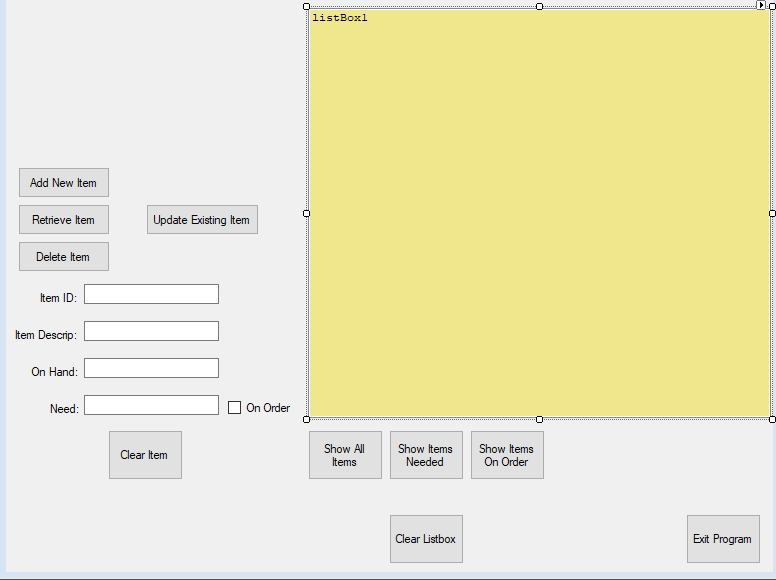
Add Item - The user must fill-in all four vertical items. (On Order does not have to be checked.) If there is an error, show a general error message in a message box. Do not erase any items. Let the user either fix the problem OR depress the Clear Item button.
Retrieve - The user must enter an Item ID or an Item Descrip. You must find the record and show the information in the five fields. If they enter both fields, then just search on Item ID. It does not matter if the other fields have something in them. If the record is not found, give an error message with a message box. Let the user either fix the problem OR depress the Clear Item button.
Update Existing - Must be done after a Retrieve Item. If any other button was done before the Update Existing Item, then give an error message with a message box. Update all five fields with the information in the five fields on the form. If any of the 4 vertical fields are blank, give an error message with a message box. Let the user either fix the problem OR depress the Clear Item button.
Delete - Either the Item ID or Item Descrip field must be filled in. For error checking, it does not matter if the other fields have something in them. If they enter both fields, then just delete on Item ID. You should retrieve all the fields and show them to the user. (If the key does not exist, then give an error message.) You must use the Interaction.InputBox (from visual basic) to ask the user for a yes or no answer to delete the record.
The three show buttons near the bottom: For all three buttons use the string.Format to show all five fields per record. The must align vertically.
Show All Items: Show all the records
Show Items Needed: Show only the records that have a numeric value greater than zero for need.
Show Items On Order: Show only the records that have On Order checkmarked.
Current code
namespace hardwareList { public partial class Form1 : Form { List
public Form1() { InitializeComponent(); }
private void clearButton_Click(object sender, EventArgs e) { listBox1.Items.Clear(); }
private void Form1_Load(object sender, EventArgs e) { StreamReader inputFile = File.OpenText("Inventory.txt"); while (!inputFile.EndOfStream) { invID.Add(int.Parse(inputFile.ReadLine())); invDescrip.Add(inputFile.ReadLine()); invOnHand.Add(int.Parse(inputFile.ReadLine())); invNeed.Add(int.Parse(inputFile.ReadLine())); invIsOnOrder.Add(bool.Parse(inputFile.ReadLine())); } inputFile.Close(); }
private void showAllBTN_Click(object sender, EventArgs e) { for (int i = 0; i
} }
Step by Step Solution
There are 3 Steps involved in it

Get step-by-step solutions from verified subject matter experts
 Study Help