







Question: Using C, Need help with the following assignment please! Assignment Purpose: Learning the basics of a C program and how to write quality code Effort:
Using C, Need help with the following assignment please!
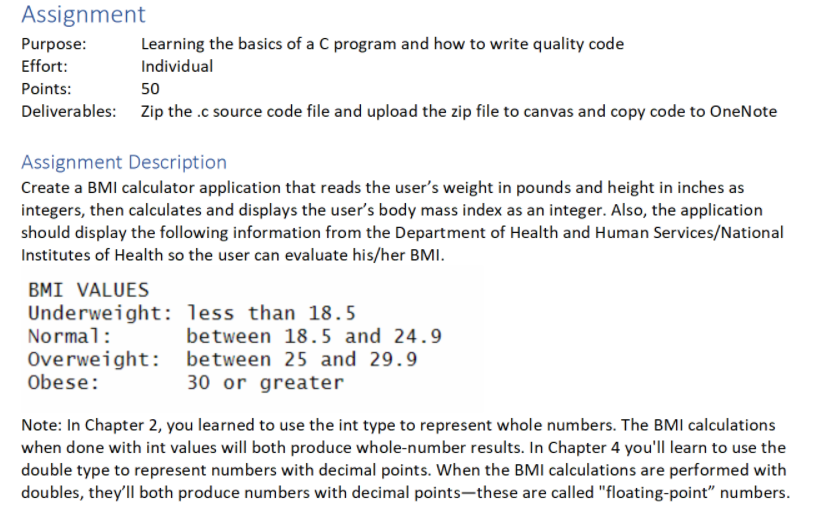
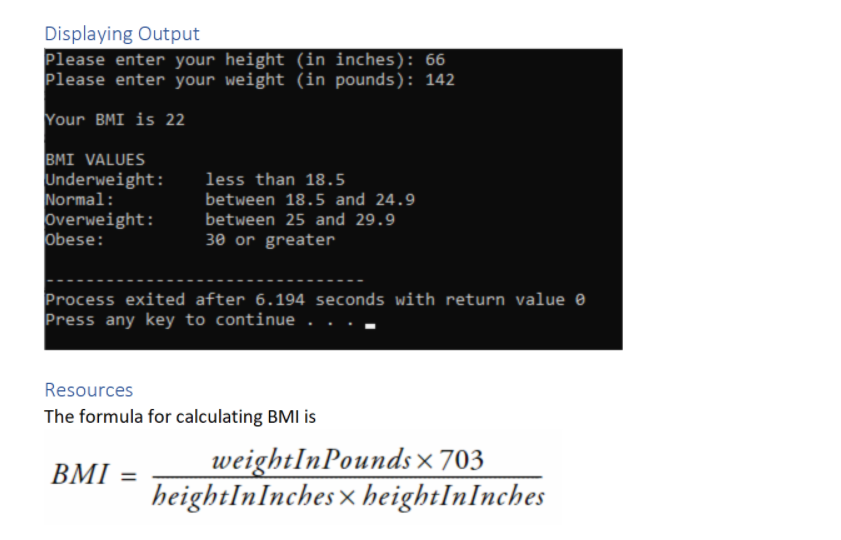
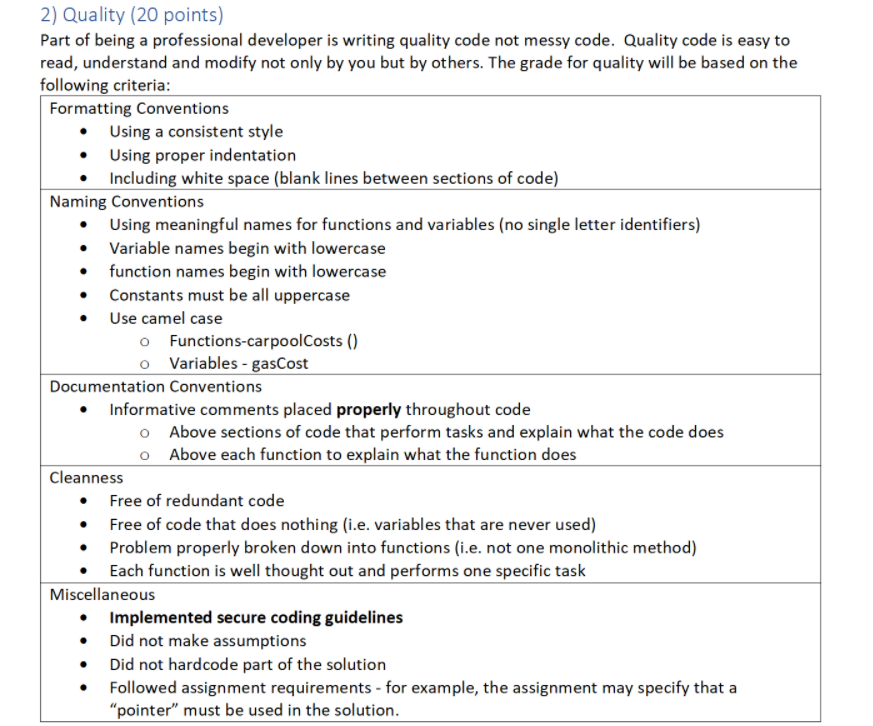
Assignment Purpose: Learning the basics of a C program and how to write quality code Effort: Individual Points: 50 Deliverables: Zip the .c source code file and upload the zip file to canvas and copy code to OneNote Assignment Description Create a BMI calculator application that reads the user's weight in pounds and height in inches as integers, then calculates and displays the user's body mass index as an integer. Also, the application should display the following information from the Department of Health and Human Services/National Institutes of Health so the user can evaluate his/her BMI. BMI VALUES Underweight: less than 18.5 Normal: between 18.5 and 24.9 Overweight: between 25 and 29.9 Obese: 30 or greater Note: In Chapter 2, you learned to use the int type to represent whole numbers. The BMI calculations when done with int values will both produce whole-number results. In Chapter 4 you'll learn to use the double type to represent numbers with decimal points. When the BMI calculations are performed with doubles, they'll both produce numbers with decimal points-these are called "floating-point numbers. Displaying Output Please enter your height (in inches): 66 Please enter your weight (in pounds): 142 Your BMI is 22 BMI VALUES Underweight: Normal: overweight: Obese: less than 18.5 between 18.5 and 24.9 between 25 and 29.9 30 or greater Process exited after 6.194 seconds with return value Press any key to continue . Resources The formula for calculating BMI is BMI = weightInPounds x 703 heightIn Inches x heightInInches 2) Quality (20 points) Part of being a professional developer is writing quality code not messy code. Quality code is easy to read, understand and modify not only by you but by others. The grade for quality will be based on the following criteria: Formatting Conventions Using a consistent style Using proper indentation Including white space (blank lines between sections of code) Naming Conventions Using meaningful names for functions and variables (no single letter identifiers) Variable names begin with lowercase function names begin with lowercase Constants must be all uppercase Use camel case o Functions-carpoolCosts() o Variables - gasCost Documentation Conventions Informative comments placed properly throughout code o Above sections of code that perform tasks and explain what the code does O Above each function to explain what the function does Cleanness Free of redundant code Free of code that does nothing (i.e. variables that are never used) Problem properly broken down into functions (i.e. not one monolithic method) Each function is well thought out and performs one specific task Miscellaneous Implemented secure coding guidelines Did not make assumptions Did not hardcode part of the solution Followed assignment requirements - for example, the assignment may specify that a "pointer" must be used in the solution
Step by Step Solution
There are 3 Steps involved in it

Get step-by-step solutions from verified subject matter experts
 Study Help