







Question: using C program to make a CS Frogger game - trying to get your Frogger to the other side of the river the Base code:
using C program to make a CS Frogger game
- trying to get your Frogger to the other side of the river
the Base code:
#include
#define SIZE 9
#define TRUE 1
#define FALSE 0
enum tile_type { LILLYPAD, BANK, WATER, TURTLE, LOG };
struct board_tile {
enum tile_type type;
int occupied;
};
void print_board(struct board_tile board[SIZE][SIZE]);
char type_to_char(enum tile_type type);
int main(void) {
printf("Welcome to CSE Frogger! ");
// Initialize game board
struct board_tile game_board[SIZE][SIZE];
for (int row = 0; row
for (int col = 0; col
if (row == SIZE - 1) {
// Set bottom row to BANK with Frogger in the middle
if (col == SIZE / 2) {
game_board[row][col].type = BANK;
game_board[row][col].occupied = TRUE;
} else {
game_board[row][col].type = WATER;
game_board[row][col].occupied = FALSE;
}
} else if (row == 0) {
// Set top row to alternating LILLYPADs
if (col % 2 == 0) {
game_board[row][col].type = LILLYPAD;
game_board[row][col].occupied = FALSE;
} else {
game_board[row][col].type = WATER;
game_board[row][col].occupied = FALSE;
}
} else {
// Set other tiles to WATER
game_board[row][col].type = WATER;
game_board[row][col].occupied = FALSE;
}
}
}
printf("How many turtles? ");
// TODO (Stage 1.2): Scan in the turtles, and place them on the map.
printf("Game Started ");
print_board(game_board);
printf("Enter command: ");
// TODO (Stage 1.3): Create a command loop, to read and execute commands!
printf("Thank you for playing CSE Frogger! ");
return 0;
}
void print_board(struct board_tile board[SIZE][SIZE]) {
for (int row = 0; row
for (int col = 0; col
char type_char = '\0';
if (board[row][col].occupied) {
type_char = 'F';
} else {
type_char = type_to_char(board[row][col].type);
}
printf("%c ", type_char);
}
printf(" ");
}
}
char type_to_char(enum tile_type type) {
char type_char = ' ';
if (type == LILLYPAD) {
type_char = 'o';
} else if (type == BANK) {
type_char = 'x';
} else if (type == WATER) {
type_char = '~';
} else if (type == TURTLE) {
type_char = 'T';
} else if (type == LOG) {
type_char = 'L';
}
return type_char;
}
I just finish the Stage 1
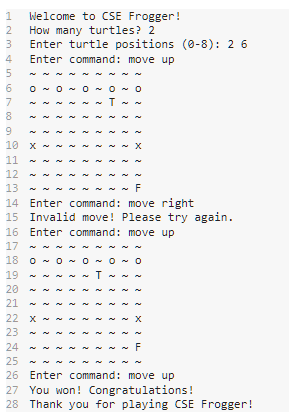
next we go for the Stage 2:
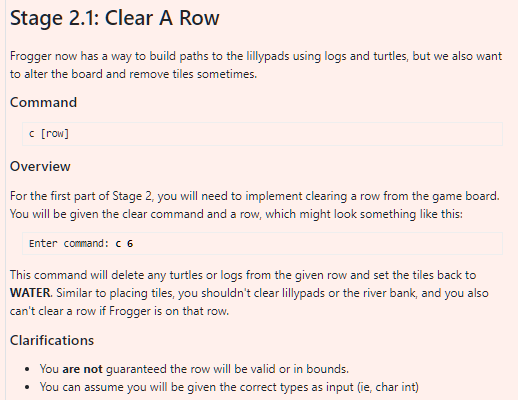
for 2.1.1
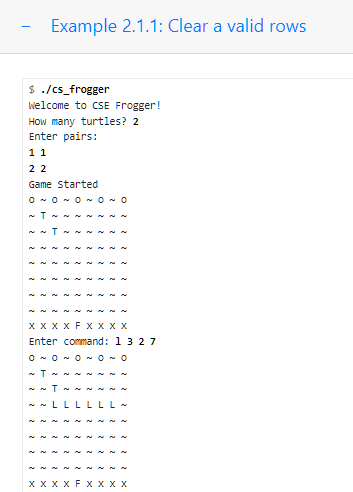
for 2.1.2
![tile_type type; int occupied; }; void print_board(struct board_tile board[SIZE][SIZE]); char type_to_char(enum tile_type](https://dsd5zvtm8ll6.cloudfront.net/si.experts.images/questions/2024/09/66effa2d83aa4_18166effa2d32885.jpg)
and next we go for Stage 2.2: Delete a Log
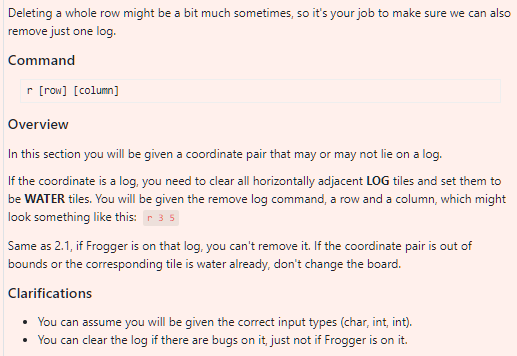
for 2.21
![board struct board_tile game_board[SIZE][SIZE]; for (int row = 0; row for (int](https://dsd5zvtm8ll6.cloudfront.net/si.experts.images/questions/2024/09/66effa2e87c7f_18266effa2e35793.jpg)
for 2.22
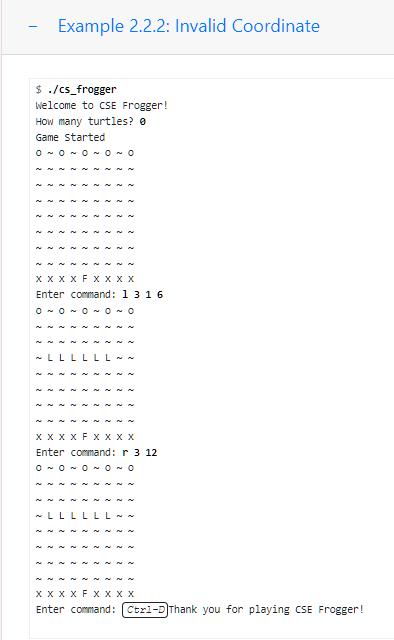
for 2.23
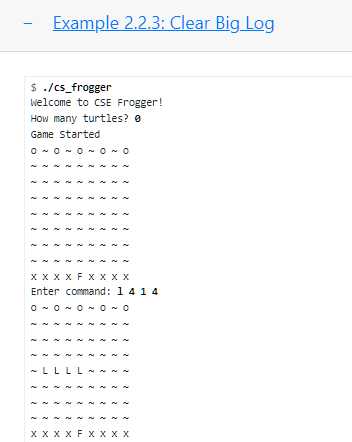
and next we go for Stage 2.3: Moving Frogger
![== SIZE / 2) { game_board[row][col].type = BANK; game_board[row][col].occupied = TRUE; }](https://dsd5zvtm8ll6.cloudfront.net/si.experts.images/questions/2024/09/66effa30695ae_18366effa2fce503.jpg)
![else { game_board[row][col].type = WATER; game_board[row][col].occupied = FALSE; } } else if](https://dsd5zvtm8ll6.cloudfront.net/si.experts.images/questions/2024/09/66effa3110b2f_18466effa30abf7c.jpg)
Thank you very much :)
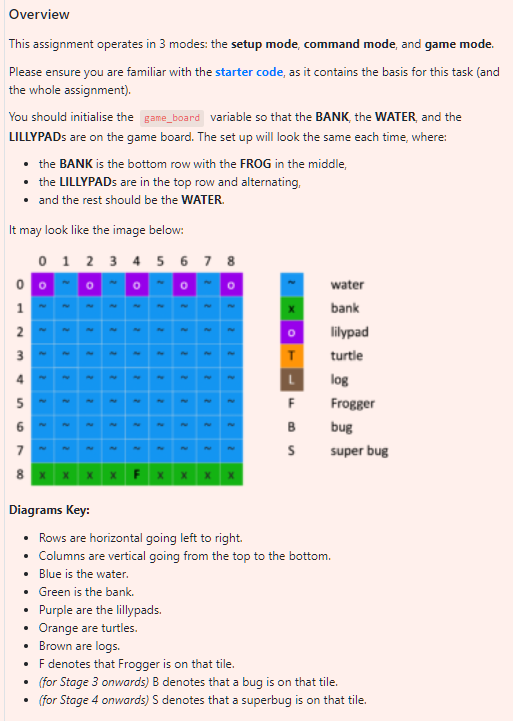
Overview This assignment operates in 3 modes: the setup mode, command mode, and game mode. Please ensure you are familiar with the starter code, as it contains the basis for this task (and the whole assignment). You should initialise the variable so that the BANK, the WATER, and the LILLYPADs are on the game board. The set up will look the same each time, where: - the BANK is the bottom row with the FROG in the middle, - the LILLYPADs are in the top row and alternating. - and the rest should be the WATER. It may look like the image below: Diagrams Key: - Rows are horizontal going left to right. - Columns are vertical going from the top to the bottom. - Blue is the water. - Green is the bank. - Purple are the lillypads. - Orange are turtles. - Brown are logs. - F denotes that Frogger is on that tile. - (for Stage 3 onwards) B denotes that a bug is on that tile. - (for Stage 4 onwards) S denotes that a superbug is on that tile. Frogger now has a way to build paths to the lillypads using logs and turtles, but we also want to alter the board and remove tiles sometimes. Command Overview For the first part of Stage 2, you will need to implement clearing a row from the game board. You will be given the clear command and a row, which might look something like this: This command will delete any turtles or logs from the given row and set the tiles back to WATER. Similar to placing tiles, you shouldn't clear lillypads or the river bank, and you also can't clear a row if Frogger is on that row. - Example 2.1.1: Clear a valid rows $./c5 frogger Welcome to CSE Frogger! How many turtles? 2 Enter pairs: 11 22 Game started 00000 T T XXXXXXX Enter command: 1327 00000 T T LLLLLL xFxx Example 2.1.2: Out of bounds rows Deleting a whole row might be a bit much sometimes, so it's your job to make sure we can also remove just one log. Command Overview In this section you will be given a coordinate pair that may or may not lie on a log. If the coordinate is a log, you need to clear all horizontally adjacent LOG tiles and set them to be WATER tiles. You will be given the remove log command, a row and a column, which might look something like this: Same as 2.1, if Frogger is on that log. you can't remove it. If the coordinate pair is out of bounds or the corresponding tile is water already, don't change the board. Clarifications - You can assume you will be given the correct input types (char, int, int). - You can clear the log if there are bugs on it, just not if Frogger is on it. - Example 2.2.1: Clear Small Log $./ cs_frogger Welcome to CSE Frogger! How many turtles? 0 Game started 00000 xFxx Enter command: 1524 00000 LLL xF Enter command: r53 00000 XFXX Enter command: Thank you for playing CSE Frogger! - Example 2.2.2: Invalid Coordinate $./ cs_frogger Welcome to CSE Frogger! How many turtles? 0 Game started 00000 xFxx Enter command: 1316 00000 LLLLLL xF Enter command: r312 00000 LLLLLL xF Enter command: Thank you for playing CSE Frogger! - Example 2.2.3: Clear Big Log $./cs frogger welcome to CSE Frogger! How many turtles? 0 Game started 00000 xFxx Enter command: 1414 00000 LLLL x Commands - i up one tile - : Ileft one tile Overview In this part of Stage 2, your program needs to be able to move and display Frogger when given directional commands. We also bring in the win and lose conditions so you know when the game is over, this will be explained later. The directional commands are outlined above and are single letter commands. These move Frogger from one tile to another (so the occupied status of the previous tile is set to , and the tile you are going to is set to ). If Frogger is at the edge of the board and you attempt to move them off the board, they will not move. This means you should always be able to see Frogger on the board. Clarifications - Frogger moves (or attempts to move) only one space per command - Example 2.3.1: Valid Movement
Step by Step Solution
There are 3 Steps involved in it

Get step-by-step solutions from verified subject matter experts
 Study Help