







Question: using C + + solve Problem 4 : The image box can be rotated and resized by dragging its upper - left or lower -
using C solve
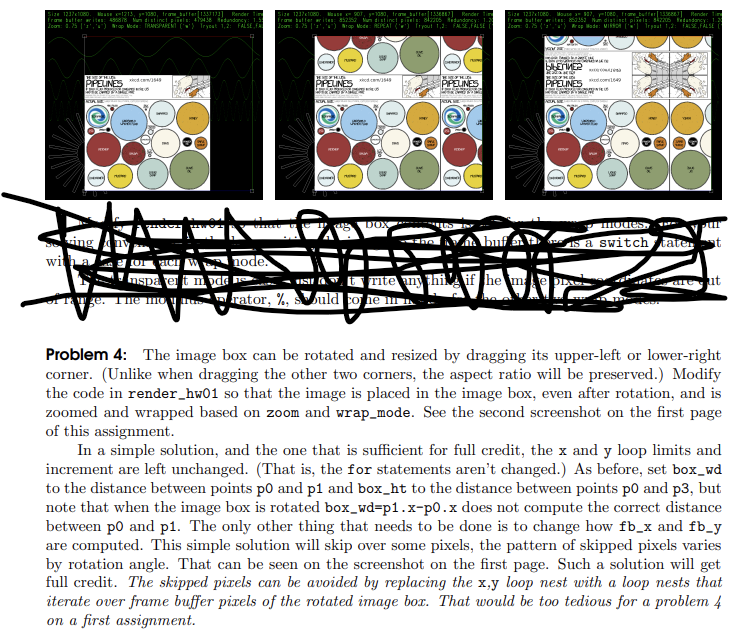
Problem : The image box can be rotated and resized by dragging its upperleft or lowerright
corner. Unlike when dragging the other two corners, the aspect ratio will be preserved. Modify
the code in renderhw so that the image is placed in the image box, even after rotation, and is
zoomed and wrapped based on zoom and wrapmode. See the second screenshot on the first page
of this assignment.
In a simple solution, and the one that is sufficient for full credit, the x and y loop limits and
increment are left unchanged. That is the for statements aren't changed. As before, set boxwd
to the distance between points p and p and boxht to the distance between points p and p but
note that when the image box is rotated boxwdpxpx does not compute the correct distance
between p and p The only other thing that needs to be done is to change how and
are computed. This simple solution will skip over some pixels, the pattern of skipped pixels varies
by rotation angle. That can be seen on the screenshot on the first page. Such a solution will get
full credit. The skipped pixels can be avoided by replacing the loop nest with a loop nests that
iterate over frame buffer pixels of the rotated image box. That would be too tedious for a problem
on a first assignment.
Step by Step Solution
There are 3 Steps involved in it
1 Expert Approved Answer
Step: 1 Unlock

Question Has Been Solved by an Expert!
Get step-by-step solutions from verified subject matter experts
Step: 2 Unlock
Step: 3 Unlock
 Study Help