







Question: using c++ Tutorial Amoy.pdf X + C O File /Users/Aljaso/Downloads/Tutorial :204%20Array.pdf to Would you like to set Microsoft Edge as you deteult browser Set as
using c++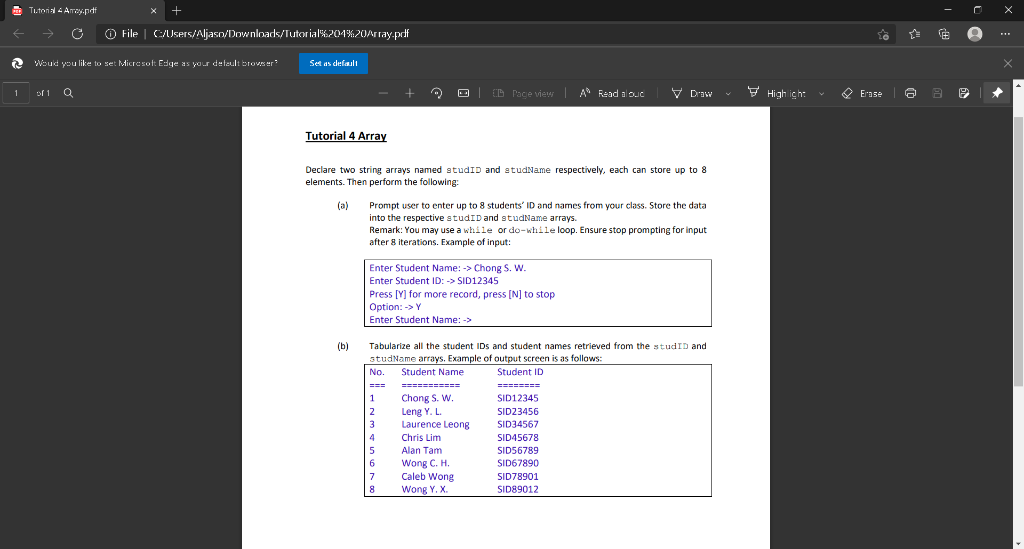
Tutorial Amoy.pdf X + C O File /Users/Aljaso/Downloads/Tutorial :204%20Array.pdf to Would you like to set Microsoft Edge as you deteult browser Set as default 1 of 1 Q + LED CD Pageview A Read a ouc V Draw High ich: Erase a Tutorial 4 Array Declare two string arrays named studID and a tudName respectively, each can store up to 8 elements. Then perform the following: (a) Prompt user to enter up to 8 students' ID and names from your class. Store the data into the respective studID and studName arrays. Remark: You may use a while or do-while loop. Ensure stop prompting for input after 8 iterations. Example of input: Enter Student Name: -> Chong S. W. Enter Student ID: -> SID12345 Press [V] for more record, press [N] to stop Option: -> Y Enter Student Name: -> (b) Tabularize all the student IDs and student names retrieved from the studID and studName arrays. Example of output screen is as follows: No. Student Name Student ID ======== 1 Chong S. W. SID12345 2 Leng Y.L. SID23456 3 Laurence Leong SID34567 4 Chris Lim SID45678 5 Alan Tam SID56789 6 Wong C. H. SID67890 7 Caleb Wong SID78901 8 Wong Y.X SID89012
Step by Step Solution
There are 3 Steps involved in it

Get step-by-step solutions from verified subject matter experts
 Study Help