







Question: using classes // Client.java import java.util.Date; // importing the date library public class Client { private int ID; private int port; private String Name; Client(){}
using classes
// Client.java
import java.util.Date; // importing the date library public class Client { private int ID; private int port; private String Name; Client(){} Client (int id){ this.ID = id; } Client (int id, int p){ this.ID = id; this.port = p; } Client (int id, int p, String n){ this.ID = id; this.port = p; this.Name = n; } public int getID() { return ID; } public void setID(int ID) { this.ID = ID; } public int getPort() { return port; } public void setPort(int port) { this.port = port; } public String getName() { return Name; } public void setName(String name) { Name = name; } public void PrintDate(){ System.out.println(new Date()); } } // PrintClient.java
public class PrintClient extends Client { private String Location; public String getLocation() { return Location; } public void setLocation(String location) { Location = location; } public void PrintDate(){ if(this.Location == null) super.PrintDate(); else System.out.println("Location : "+Location+" no printDate can be viewed"); } } //testClient.java
public class testClient { public static void main(String[] args) { // created object PrintClient pc = new PrintClient(); pc.PrintDate(); // setting the location pc.setLocation("Classroom"); pc.PrintDate(); } }//OUTPUT
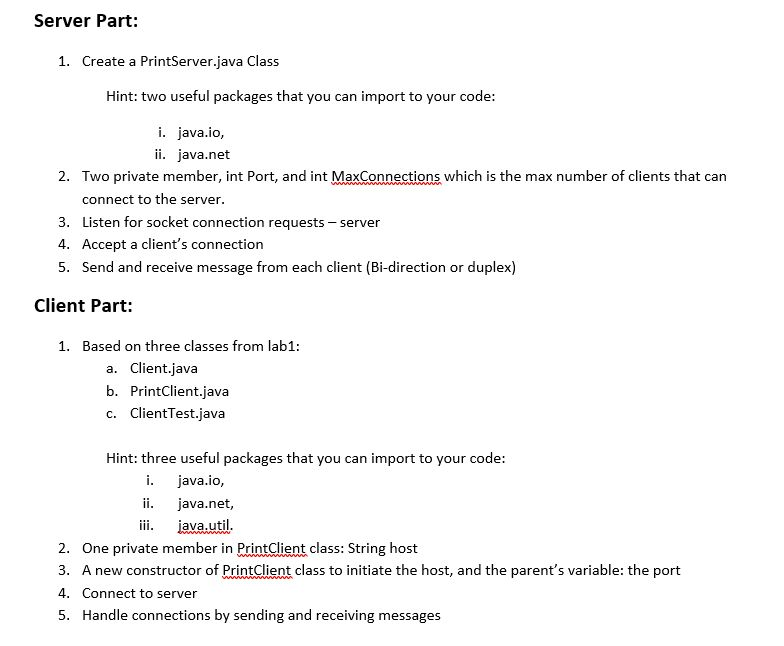
Server Part: 1. Create a PrintServer.java Class Hint: two useful packages that you can import to your code: i. java.io, ii. java.net Two private member, int Port, and int MaxConnections which is the max number of clients that can connect to the server Listen for socket connection requests - server Accept a client's connection Send and receive message from each client (Bi-direction or duplex) 2. 3. 4. 5. Client Part: 1, Based on three classes from lab1: a. Client.java b. PrintClient.java c. ClientTest.java Hint: three useful packages that you can import to your code i. java.io, java.net, ii. javautil 2. One private member in PrintClient class: String host 3. A new constructor of PrintCli class to initiate the host, and the parent's variable: the port 4. Connect to server 5. Handle connections by sending and receiving messages
Step by Step Solution
There are 3 Steps involved in it

Get step-by-step solutions from verified subject matter experts
 Study Help