







Question: using CUSTOM VALIDATION FORMULA to accept only Y or N in the prefered customer input area. i need help entering a formula wothout using a
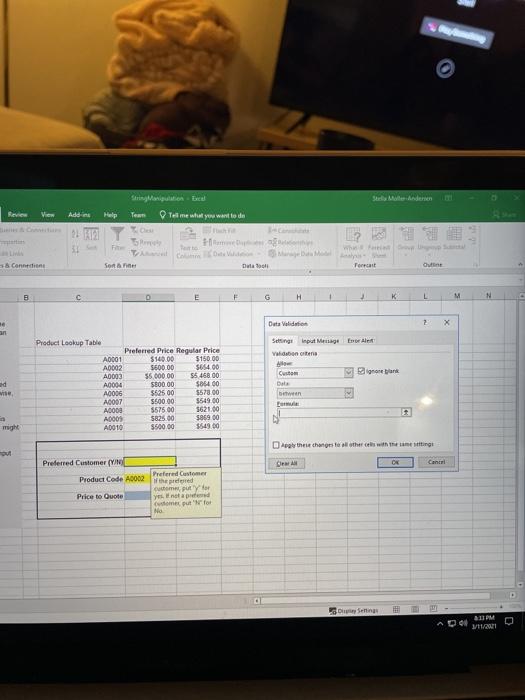
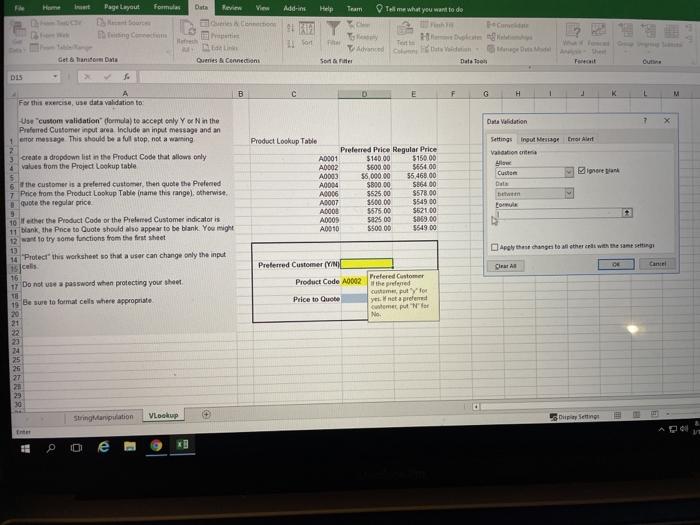
o Review View Addi Help Team Tal me what you want to do 22 31 Www - Content Sort Dla Format Outline C B 0 E F H 1 K L M N Data Valid 2 X an Sige Input Menge EA Vaisbonne ad Product Lookup Table Preferred Price Regular Price A0001 $149.00 5150.00 A0002 S600.00 S65400 A0003 $5.000.00 55 468 00 A0004 $800 00 $85400 A0005 562500 $57800 A0007 550000 $549 00 A0000 $575.00 5621.00 A0001 $825.00 $069 00 A0010 550000 $549.00 Custom Date between NY might the channels with the same ting C Canti Preferred Customer (YNE Product Code A0002 Werdered Prefered Customer compty Price to Quote yet Come put for No Senin 3:11 PM 11/2011 Home but Page Layout Formes Duta Kevin View Add-ins Help Team Tell me what you want to do IL th Malam Tet Adred at den Sortie Date Too Get & Tan DMS Queries Connect DIS B D F G H 1 K L M A For this exerceuse data validation to Validation 7 X Use custom validation formula) to accept only Yo Ninthe Preferred Customer input area include an input message and an 1 entor message This should be a full stop, not a warming create a dropdown list in the Product Code that allows only values from the Project Lookup table the customer is a preferred customer, then quote the Pretened 7 Price from the Product Lopkop Table name this range), otherwise quote the regular price 10 father the Product Code or the Preferred Customer indicatoris 11 blank, the Price to Quote should also appear to be blank. You might 12 want to try some functions from the first sheet 13 16 "Protect this worksheet so that a user can change only the input Product Lookup Table Preferred Price Regular Price AD001 $140.00 $150.00 A0002 560000 5654.00 A0003 $5,000.00 55,468.00 A0004 $800 00 $864.00 A0006 $525.00 $578.00 A0007 $500.00 $549 00 A0000 $575 00 $52100 AD009 502500 5063.00 A0010 550000 5549 00 Settings Input Meninge tror VaR How C Det Eor Apply these changes to the end with the same 15 cal Clear Preferred Customer (WWL Product Code A0002 16 17 Do not be a password when protecting your sheet TE 19 Be sure to formal cells where appropriate Price to Quote Prefered Customer the pred chme, put you opreme customer put No 921 22 23 24 25 26 27 20 29 30 0 Strigapilation MLee MP + Dupleting 0 D
Step by Step Solution
There are 3 Steps involved in it

Get step-by-step solutions from verified subject matter experts
 Study Help