Question: Using Data Set Supplied on this page (below): (Note: there are 4 printouts to turn in!] 1. Complete the Milk Bone exercise below - Entering,
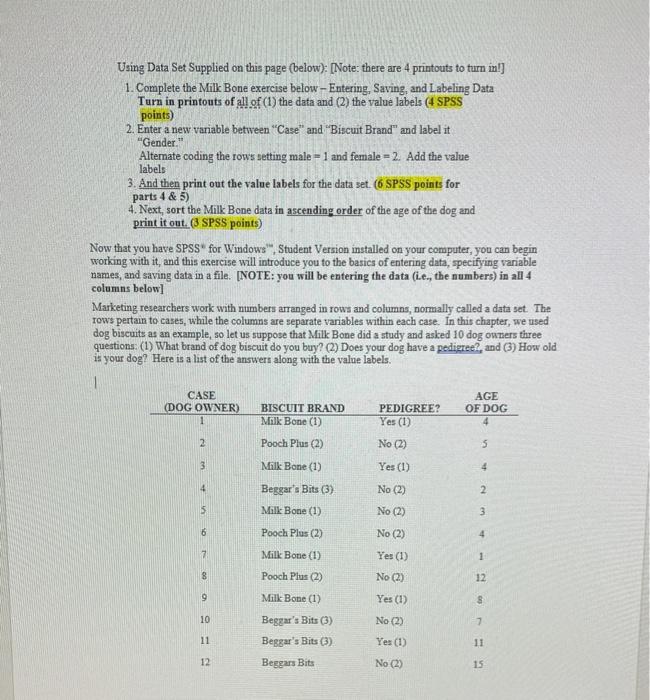
Using Data Set Supplied on this page (below): (Note: there are 4 printouts to turn in!] 1. Complete the Milk Bone exercise below - Entering, Saving, and Labeling Data Turn in printouts of all of (1) the data and (2) the value labels (4 SPSS points) 2. Enter a new variable between "Case" and "Biscuit Brand" and label it "Gender Alternate coding the rows setting male = 1 and female = 2. Add the value labels 3. And then print out the value labels for the data set (6 SPSS points for parts 4 & 5) 4. Next, sort the Milk Bone data in ascending order of the age of the dog and print it out.(3 SPSS points) Now that you have SPSS for Windows, Student Version installed on your computer, you can begin working with it, and this exercise will introduce you to the basics of entering data, specifying variable names, and saving data in a file. [NOTE: you will be entering the data (Lc., the numbers) in all 4 columns below] Marketing researchers work with numbers arranged in rows and columns, normally called a data set. The tows pertain to cases, while the columns are separate variables within each case. In this chapter, we used dog biscuits as an example, so let us suppose that Milk Bone did a study and asked 10 dog owners three questions: (1) What brand of dog biscuit do you buy? (2) Does your dog have a pedigree, and (3) How old is your dog? Here is a list of the answers along with the value labels 1 CASE AGE (DOG OWNER) BISCUIT BRAND PEDIGREE? OF DOG Milk Bone (1) Yes (1) 1 4 2 Pooch Plus (2) No (2) 5 3 Milk Bone (1) Yes (1) 4 4 Beggar's Bits (3) No (2) Milk Bone (1) No (2) 6 Pooch Plus (2) No (2) 7 Milk Bone (1) Yes (1) 8 Pooch Plus (2) No (2) 9 Milk Bone (1) Yes (1) 8 10 No (2) 7 11 Beggar's Bits (3) Beggar's Bits (3) Beggars Bits Yes (1) 12 No (2) Using Data Set Supplied on this page (below): (Note: there are 4 printouts to turn in!] 1. Complete the Milk Bone exercise below - Entering, Saving, and Labeling Data Turn in printouts of all of (1) the data and (2) the value labels (4 SPSS points) 2. Enter a new variable between "Case" and "Biscuit Brand" and label it "Gender Alternate coding the rows setting male = 1 and female = 2. Add the value labels 3. And then print out the value labels for the data set (6 SPSS points for parts 4 & 5) 4. Next, sort the Milk Bone data in ascending order of the age of the dog and print it out.(3 SPSS points) Now that you have SPSS for Windows, Student Version installed on your computer, you can begin working with it, and this exercise will introduce you to the basics of entering data, specifying variable names, and saving data in a file. [NOTE: you will be entering the data (Lc., the numbers) in all 4 columns below] Marketing researchers work with numbers arranged in rows and columns, normally called a data set. The tows pertain to cases, while the columns are separate variables within each case. In this chapter, we used dog biscuits as an example, so let us suppose that Milk Bone did a study and asked 10 dog owners three questions: (1) What brand of dog biscuit do you buy? (2) Does your dog have a pedigree, and (3) How old is your dog? Here is a list of the answers along with the value labels 1 CASE AGE (DOG OWNER) BISCUIT BRAND PEDIGREE? OF DOG Milk Bone (1) Yes (1) 1 4 2 Pooch Plus (2) No (2) 5 3 Milk Bone (1) Yes (1) 4 4 Beggar's Bits (3) No (2) Milk Bone (1) No (2) 6 Pooch Plus (2) No (2) 7 Milk Bone (1) Yes (1) 8 Pooch Plus (2) No (2) 9 Milk Bone (1) Yes (1) 8 10 No (2) 7 11 Beggar's Bits (3) Beggar's Bits (3) Beggars Bits Yes (1) 12 No (2)









 Study Help