







Question: Using E - Blocks - Flowcode v 5 Using E - Blocks - Flowcode v 5 Create a flowcode program which turns on all pins
Using EBlocks Flowcode v Using EBlocks Flowcode v
Create a flowcode program which turns on all pins on PORTB sequentially for
second.
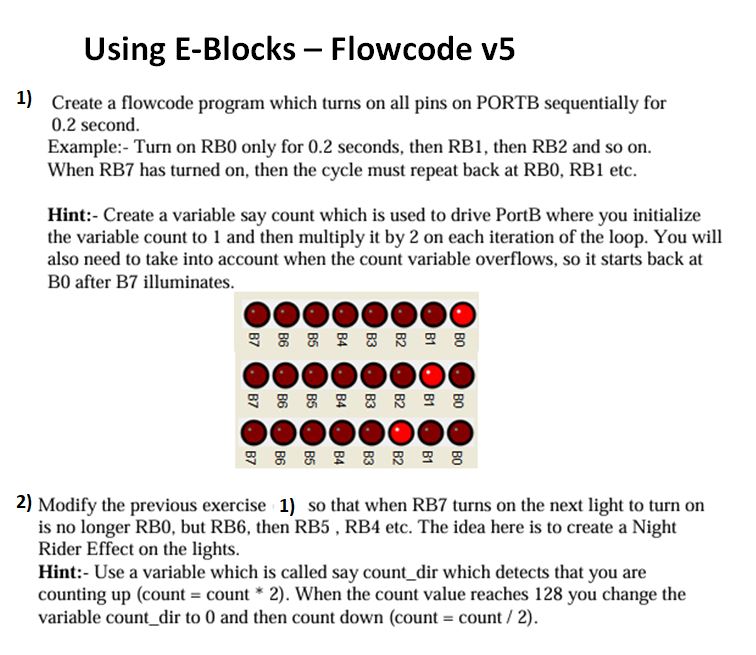
Example: Turn on RB only for seconds, then RB then RB and so on
When RB has turned on then the cycle must repeat back at RB RB etc.
Hint: Create a variable say count which is used to drive PortB where you initialize
the variable count to and then multiply it by on each iteration of the loop. You will
also need to take into account when the count variable overflows, so it starts back at
B after B illumina
Modify the previous exercise so that when RB turns on the next light to turn on
is no longer RB but RB then RB RB etc. The idea here is to create a Night
Rider Effect on the lights.
Hint: Use a variable which is called say countdir which detects that you are
counting up count count When the count value reaches you change the
variable countdir to and then count down count count
Create a flowcode program which turns on all pins on PORTB sequentially for
second.
Example: Turn on RB only for seconds, then RB then RB and so on
When RB has turned on then the cycle must repeat back at RB RB etc.
Hint: Create a variable say count which is used to drive PortB where you initialize
the variable count to and then multiply it by on each iteration of the loop. You will
also need to take into account when the count variable overflows, so it starts back at
B after B illumina
Modify the previous exercise so that when RB turns on the next light to turn on
is no longer RB but RB then RB RB etc. The idea here is to create a Night
Rider Effect on the lights.
Hint: Use a variable which is called say countdir which detects that you are
counting up count count When the count value reaches you change the
variable countdir to and then count down count count
Step by Step Solution
There are 3 Steps involved in it
1 Expert Approved Answer
Step: 1 Unlock

Question Has Been Solved by an Expert!
Get step-by-step solutions from verified subject matter experts
Step: 2 Unlock
Step: 3 Unlock
 Study Help