







Question: Using eclipse java oxygen to write the code of an application that allow the Whole Sale Store can use to calculate and print out the
Using eclipse java oxygen to write the code of an application that allow the Whole Sale Store can use to calculate and print out the receipt when the store sales some numbers of a product. To make the easy program, for now, all the following information should be read from the keyboard: the name of the product, transaction id, product id, product price, the number of product sold, the money the customer pays
The subtotal and the total, the sale tax and the total are calculated as follows:
Subtotal = product price * number of products
Sale tax = subtotal * 8.25%
Total = subtotal + sale tax
Balance = amount paid total
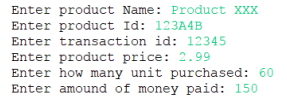
When you run the program you read input as below:
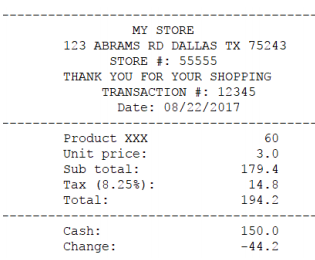
The receipt should be printed out in the following format:
provide UML of the data type class and the pseudo-code
Create the project named SP2018LAB1_yourLastName then add two classes: data type class named SP2018LAB1_Receipt_yourLastName and driver class named SP2018LAB1_MyStore_yourLastName -Write the code for data type class SP2018LAB1_Receipt_yourLastName that contains data members, no-argument constructor, parameter constructor, some methods to calculate all the amount that needs for the receipt, methods to display the receipt.
-Based on the pseudo-code, write the code for driver class SP2018LAB1_MyStore_yourLastName that at least contains creating the object of class SP2018LAB1_Receipt_yourLastName and use that object call methods of class SP2018LAB1_Receipt_yourLastName to display the receipt
Enter product ta: 1:3303ct 00 Enter transaction id: 12345 Enter product price: 2.99 Enter how many unit purchased: 60 Enter amound of money paid: 150
Step by Step Solution
There are 3 Steps involved in it

Get step-by-step solutions from verified subject matter experts
 Study Help