







Question: using eclipse java oxygen Write a program using Object Oriented Design to provide an application that allows users to select a sorting method from the
using eclipse java oxygen Write a program using Object Oriented Design to provide an application that allows users to select a sorting method from the menu by typing a number:
SORTING TOOL JAMES SMITH
1. BUBBLE SORT
2. SELECTION SORT
3. INSERTING SORT
0. EXIT
Enter a number to select a sorting method: _ Then display the message to ask for a list of integer numbers to sort. Users make their decision how many numbers they want to sort. After read the list of numbers, the program should display the output that includes the selected sorting method name, the original list of numbers and the sorted list of numbers in ascending order (as in the picture)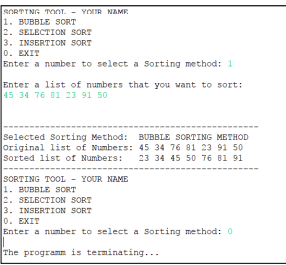
The application should allow users to continue choosing a sorting method and terminates when users choose to exit
Provide UML of data type class -provide pseudo-code of main(): Psuedo-code is written in English that lists what you have to do step by step in the main such that your program is qualified to the requirement. Write the pseudo-code in notepad and save with the file name as PART1_Pseudocode_yourLastName
Create the project name SP2018LAB2_PART2 2. Add three classes: one is data type class name as SP2018LAB2_ArrayInteger_YourLastName, a driver class named as SP2018LAB2_SortingListOfInteger_YourLastName and class StarticSortingMethod (that is provided you can download from the pae lab2) 3. The data type class maintains two data members: an integer array and a sorting method type. Based on the UML, write the code for data type class Based on the pseudo-code write the code for main()
compile and run
------------------------------------------------------------StarticSortingMethod-------------------------------------------------------------------------------------------------------------------
public class StaticSortingMethods { //BUBBLE SORTING public static void bubbleSort(int[] array) { int n = array.length; for (int pass=1; pass (array[i+1])) { // exchange elements int temp = array[i]; array[i] = array[i+1]; array[i+1] = temp; } } } } //where array is an array with size = n //INSERTION SORTING public static void insertionSort(int[ ] array ) { for (int i = 1; i 0 && array[j-1]>temp) { array[j] = array[j-1]; j--; } array[j] = temp; }//where array is an array with size = n } //SELECTION SORTING public static void selectionSort(int[] array) { for (int i=0; i array[j]) { //... Exchange elements int temp = array[i]; array[i] = array[j]; array[j] = temp; } } } } //where array is an array with size = n } 1. BUBBLE SORT SELECTION SORT INSERTION SORT . EXIT Enter a number to select a Sorting method:1 Enter a list of numbers that you vant to sort 5 34 76 81 23 91 50 Selected Sorting Method BUBBLE SORTING METHOD Original list of Numbers: 45 34 76 81 23 91 50 Sorted list of Numbers: 23 34 45 50 76 81 91 SORTING TOOL-YOUR NAME BUBBLE SORT SELECTION SORT INSERTION SORT Enter a number to select a Sorting method: The programn is terminating
Step by Step Solution
There are 3 Steps involved in it

Get step-by-step solutions from verified subject matter experts
 Study Help