



Question: Using Excel, I am trying to get the balance and FV function For the columns of Payment, Interest, and Principal, a FUNCTION should be written
Using Excel, I am trying to get the balance and FV function
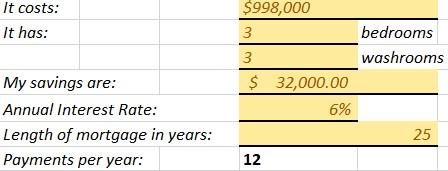
For the columns of Payment, Interest, and Principal, a FUNCTION should be written in the first row and then selected and dragged down to autofill the rest of the rows. There is a FUNCTION for each of these three in Microsoft Excel (PMT/PPMT/IPMT). - In order for the FUNCTIONS to be dragged down, cell references must be absolute if they come from the Yellow form. Cells referenced from WITHIN the green table can be a mix of relative and absolute as needed. - For the Balance column you will use a formula in the first cell, and a formula in the second cell, then drag the second cell down to the bottom to autofill the rest.
For the orange table, you will use the FV FUNCTION to autofill the table: Only the first cell requires an FV FUNCTION that can be dragged down to fill the rest of the cells (including the pink cell at the bottom). The last (pink) cell should result in $0, as this is the year that your mortgage ends. Do not edit the dark pink cell at the bottom, it has a cell reference from the Yellow form. Use absolute/relative referencing to ensure the FUNCTION can be dragged down without error.
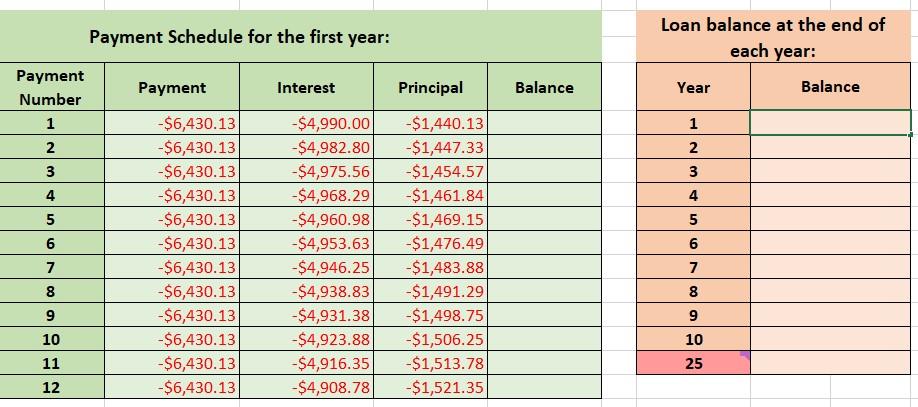
Loan balance at the end of Payment Schedule for the first year: each year: \begin{tabular}{|c|c|c|c|c|} \hline PaymentNumber & Payment & \multicolumn{1}{|c|}{ Interest } & \multicolumn{1}{|c|}{ Principal } & Balance \\ \hline 1 & $6,430.13 & $4,990.00 & $1,440.13 & \\ \hline 2 & $6,430.13 & $4,982.80 & $1,447.33 & \\ \hline 3 & $6,430.13 & $4,975.56 & $1,454.57 & \\ \hline 4 & $6,430.13 & $4,968.29 & $1,461.84 & \\ \hline 5 & $6,430.13 & $4,960.98 & $1,469.15 & \\ \hline 6 & $6,430.13 & $4,953.63 & $1,476.49 & \\ \hline 7 & $6,430.13 & $4,946.25 & $1,483.88 & \\ \hline 8 & $6,430.13 & $4,938.83 & $1,491.29 & \\ \hline 9 & $6,430.13 & $4,931.38 & $1,498.75 & \\ \hline 10 & $6,430.13 & $4,923.88 & $1,506.25 & \\ \hline 11 & $6,430.13 & $4,916.35 & $1,513.78 & \\ \hline 12 & $6,430.13 & $4,908.78 & $1,521.35 & \\ \hline \end{tabular} \begin{tabular}{|c|c|} \hline Year & Balance \\ \hline 1 & \\ \hline 2 & \\ \hline 3 & \\ \hline 4 & \\ \hline 5 & \\ \hline 6 & \\ \hline 7 & \\ \hline 8 & \\ \hline 9 & \\ \hline 10 & \\ \hline 25 & \\ \hline \end{tabular}
Step by Step Solution
There are 3 Steps involved in it

Get step-by-step solutions from verified subject matter experts