







Question: Using Excel VBA, complete this Here is the data: 1.880235 1.607906 0.94467 2.83283 2.563171 4.935134 3.359523 4.433127 2.34505 1.285914 1.059056 0.799739 1.550859 1.473528 0.715118 2.029645
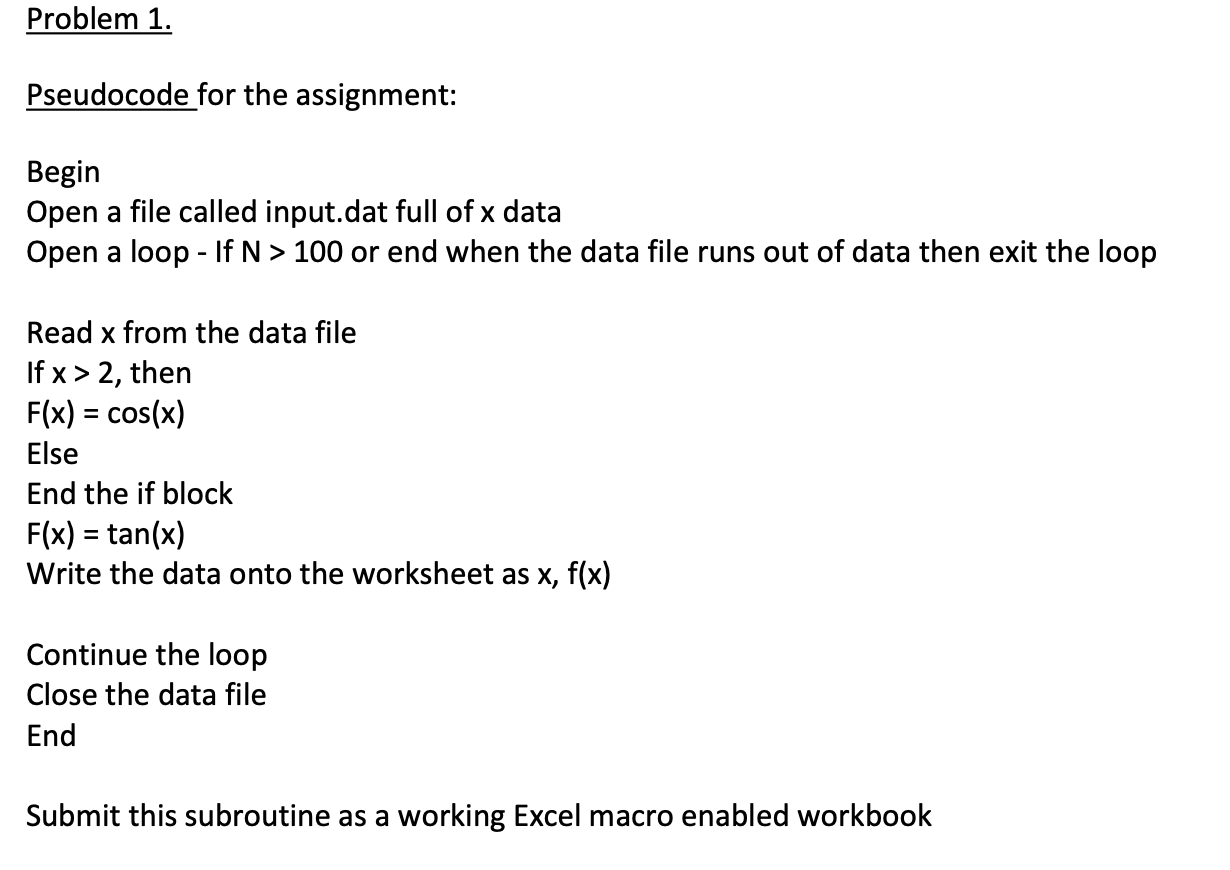
Using Excel VBA, complete this
Here is the data:
| 1.880235 |
| 1.607906 |
| 0.94467 |
| 2.83283 |
| 2.563171 |
| 4.935134 |
| 3.359523 |
| 4.433127 |
| 2.34505 |
| 1.285914 |
| 1.059056 |
| 0.799739 |
| 1.550859 |
| 1.473528 |
| 0.715118 |
| 2.029645 |
| 3.216502 |
| 4.751039 |
| 3.411579 |
| 4.217259 |
| 3.350113 |
| 2.668981 |
| 1.870218 |
| 2.182656 |
| 0.320112 |
| 3.20604 |
| 1.074954 |
| 0.627219 |
| 1.422064 |
| 4.844346 |
| 3.306734 |
| 2.519689 |
| 3.85108 |
| 1.628997 |
| 4.992234 |
| 1.441085 |
| 0.183963 |
| 0.821686 |
| 0.231486 |
| 0.175739 |
| 0.913229 |
| 2.804817 |
| 2.928386 |
| 0.867119 |
| 3.346206 |
| 0.75706 |
| 1.330049 |
| 4.320416 |
| 2.500276 |
| 1.651225 |
| 0.004727 |
| 4.685166 |
| 3.498939 |
| 1.930323 |
| 2.104494 |
| 0.278324 |
| 4.215936 |
| 4.969269 |
| 3.731896 |
| 2.512027 |
| 3.910682 |
| 3.091254 |
| 1.409368 |
| 4.347676 |
| 3.597258 |
| 0.258135 |
| 2.522245 |
| 2.009397 |
| 2.957595 |
| 4.387054 |
| 2.53272 |
| 1.931823 |
| 2.795903 |
| 4.154572 |
| 2.75166 |
| 2.182005 |
| 4.829251 |
| 3.923196 |
| 4.039941 |
| 3.777513 |
| 3.610975 |
| 0.692382 |
| 0.420585 |
| 2.932013 |
| 0.112364 |
| 3.670995 |
| 1.852853 |
| 0.075557 |
| 2.609122 |
| 1.550235 |
| 4.894751 |
| 2.880707 |
| 0.75201 |
| 3.43355 |
| 4.098683 |
| 3.03556 |
| 1.478562 |
| 3.674456 |
| 2.317206 |
| 4.071693 |
| 4.614473 |
| 0.948953 |
| 3.299864 |
| 3.67311 |
| 1.484577 |
| 3.714861 |
| 3.133269 |
| 3.30633 |
| 4.553557 |
| 2.961252 |
| 4.521885 |
| 4.581608 |
| 0.426917 |
| 1.540782 |
| 4.605243 |
| 0.397436 |
| 2.031991 |
| 1.345311 |
| 2.952818 |
| 1.847954 |
| 1.397014 |
| 1.380787 |
| 3.421114 |
| 0.391069 |
| 1.500785 |
| 2.275541 |
| 0.245144 |
| 1.788403 |
| 3.830422 |
| 3.104392 |
| 1.87182 |
| 3.069348 |
| 4.808656 |
| 3.627356 |
| 0.688789 |
| 1.324718 |
| 0.610391 |
| 4.165246 |
| 0.128413 |
| 2.865334 |
| 3.560388 |
| 1.122312 |
| 3.839598 |
| 1.668147 |
| 0.703803 |
| 0.277464 |
| 4.609669 |
| 0.525814 |
| 4.599683 |
| 2.261262 |
| 2.00645 |
| 0.936876 |
| 0.972435 |
| 1.548386 |
| 2.774258 |
| 4.379688 |
| 3.421671 |
| 1.238496 |
| 4.381503 |
| 4.332152 |
| 3.662182 |
| 0.261123 |
| 3.720961 |
| 4.804984 |
| 1.343985 |
| 4.798723 |
| 2.677348 |
| 3.210227 |
| 1.811417 |
| 1.853617 |
| 4.859789 |
| 0.380496 |
| 2.604095 |
| 3.275786 |
| 3.867433 |
| 4.882404 |
| 0.683585 |
| 1.421674 |
| 3.038706 |
| 1.437034 |
| 4.516583 |
| 3.288038 |
| 4.769166 |
| 4.594938 |
| 2.509006 |
| 4.848545 |
| 2.429857 |
Problem 1. Pseudocode for the assignment: Begin Open a file called input.dat full of x data Open a loop - If N> 100 or end when the data file runs out of data then exit the loop Read x from the data file If x> 2, then F(x) = cos(x) Else End the if block F(x) = tan(x) Write the data onto the worksheet as x, f(x) Continue the loop Close the data file End Submit this subroutine as a working Excel macro enabled workbook
Step by Step Solution
There are 3 Steps involved in it
1 Expert Approved Answer
Step: 1 Unlock

Question Has Been Solved by an Expert!
Get step-by-step solutions from verified subject matter experts
Step: 2 Unlock
Step: 3 Unlock
 Study Help