







Question: using html and javaScript, make this! PLEASE put coding!!! PLEASE put coding!! Group 1 - Select 2 1. Read the input from the document, if
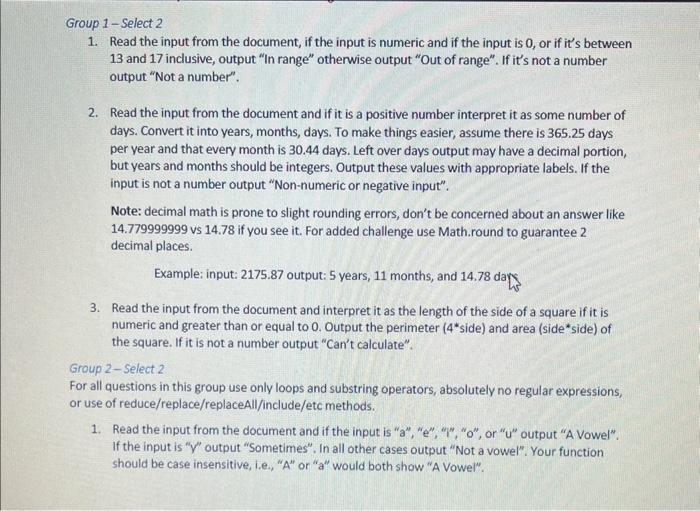
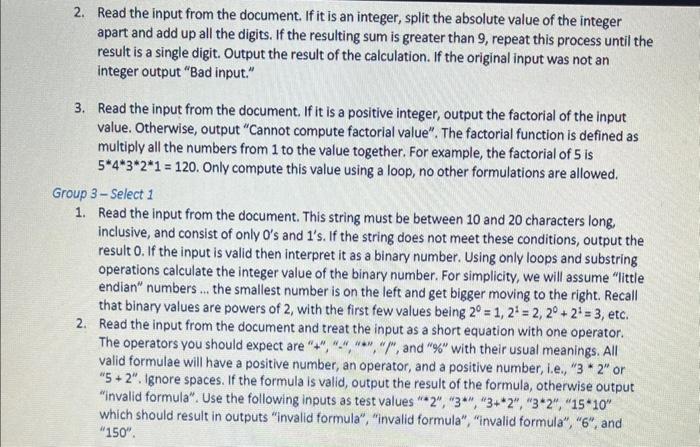
Group 1 - Select 2 1. Read the input from the document, if the input is numeric and if the input is 0 , or if it's between 13 and 17 inclusive, output "In range" otherwise output "Out of range". If it's not a number output "Not a number". 2. Read the input from the document and if it is a positive number interpret it as some number of days. Convert it into years, months, days. To make things easier, assume there is 365.25 days per year and that every month is 30.44 days. Left over days output may have a decimal portion, but years and months should be integers. Output these values with appropriate labels. If the input is not a number output "Non-numeric or negative input". Note: decimal math is prone to slight rounding errors, don't be concerned about an answer like 14.779999999 vs 14.78 if you see it. For added challenge use Math.round to guarantee 2 decimal places. Example: input: 2175.87 output: 5 years, 11 months, and 14.78 dary 3. Read the input from the document and interpret it as the length of the side of a square if it is numeric and greater than or equal to 0 . Output the perimeter (4 side) and area (side* side) of the square. If it is not a number output "Can't calculate". Group 2 - Select 2 For all questions in this group use only loops and substring operators, absolutely no regular expressions, or use of reduce/replace/replaceAll/include/etc methods. 1. Read the input from the document and if the input is " a ", "e", " i ", " o ", or " u " output "A Vowel". If the input is " v " output "Sometimes". In all other cases output "Not a vowel". Your function should be case insensitive, i.e., "A" or "a" would both show "A Vowel". 2. Read the input from the document. If it is an integer, split the absolute value of the integer apart and add up all the digits. If the resulting sum is greater than 9 , repeat this process until the result is a single digit. Output the result of the calculation. If the original input was not an integer output "Bad input." 3. Read the input from the document. If it is a positive integer, output the factorial of the input value. Otherwise, output "Cannot compute factorial value". The factorial function is defined as multiply all the numbers from 1 to the value together. For example, the factorial of 5 is 54321=120. Only compute this value using a loop, no other formulations are allowed. Group 3 - Select 1 1. Read the input from the document. This string must be between 10 and 20 characters long, inclusive, and consist of only 0 's and 1 's. If the string does not meet these conditions, output the result 0 . If the input is valid then interpret it as a binary number. Using only loops and substring operations calculate the integer value of the binary number. For simplicity, we will assume "little endian" numbers ... the smallest number is on the left and get bigger moving to the right. Recall that binary values are powers of 2 , with the first few values being 2=1,21=2,20+21=3, etc. 2. Read the input from the document and treat the input as a short equation with one operator. The operators you should expect are "+", "*,"*", "l", and "\%" with their usual meanings. All valid formulae will have a positive number, an operator, and a positive number, i.e., " 3 * 2 " or " 5+2 ". Ignore spaces. If the formula is valid, output the result of the formula, otherwise output "invalid formula". Use the following inputs as test values "* 2","3,"3+2","32",1510 which should result in outputs "invalid formula", "invalid formula", "invalid formula", "6", and
Step by Step Solution
There are 3 Steps involved in it
To create an HTML and JavaScript program that addresses the requirements from the images f... View full answer

Get step-by-step solutions from verified subject matter experts
 Study Help