







Question: using html5 and css3 design below image Spotify Search SUBSCRIPTION OPTIONS Premium Family Account & Payment Account Help Payment Help Subscription Options Premium Family Premium
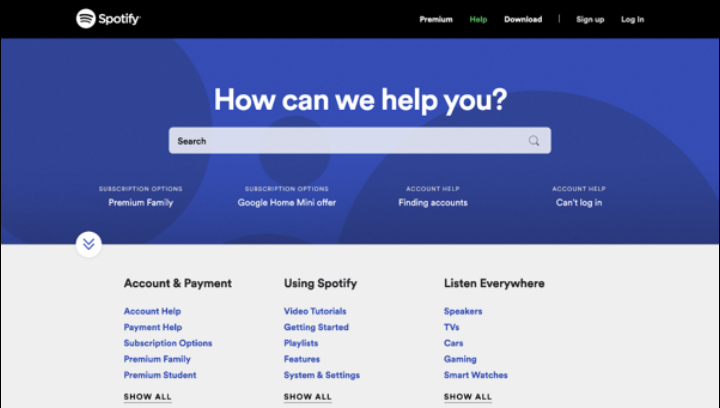
using html5 and css3 design below image
Spotify Search SUBSCRIPTION OPTIONS Premium Family Account & Payment Account Help Payment Help Subscription Options Premium Family Premium Student SHOW ALL How can we help you? SUBSCRIPTION OPTIONS Google Home Mini offer Premium Help Download | Sign up Log in Using Spotify Video Tutorials Getting Started Playlists Features System & Settings SHOW ALL ACCOUNT HELP Finding accounts Listen Everywhere Speakers TVs Cars Gaming Smart Watches SHOW ALL ACCOUNT HELP Can't log in
Step by Step Solution
3.49 Rating (149 Votes )
There are 3 Steps involved in it
Code import urlhttpsfontsgoogleapiscomcss2familyRobotowght300displayswap margin 0 padding 0 fontfamily Roboto sansserif navbar width 100 height 80px j... View full answer

Get step-by-step solutions from verified subject matter experts
 Study Help