







Question: Using HTML5 code, create cart_checkout.html as shown in the below given picture. Fill the checkout form with all necessary details and add a screenshot to
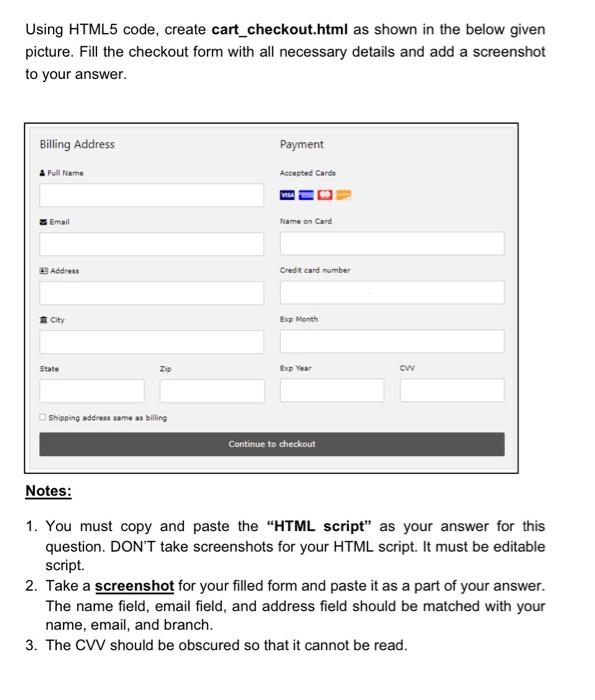
Using HTML5 code, create cart_checkout.html as shown in the below given picture. Fill the checkout form with all necessary details and add a screenshot to your answer. Notes: 1. You must copy and paste the "HTML script" as your answer for this question. DON'T take screenshots for your HTML script. It must be editable script. 2. Take a screenshot for your filled form and paste it as a part of your answer. The name field, email field, and address field should be matched with your name, email, and branch. 3. The CVV should be obscured so that it cannot be read
Step by Step Solution
There are 3 Steps involved in it
1 Expert Approved Answer
Step: 1 Unlock

Question Has Been Solved by an Expert!
Get step-by-step solutions from verified subject matter experts
Step: 2 Unlock
Step: 3 Unlock
 Study Help