







Question: USING IF, IF(AND), IF(OR), COUNT, COUNTA, ETC... Steps to Take Duplicate the Payroll worksheet in one of the following ways: With the control key held
USING IF, IF(AND), IF(OR), COUNT, COUNTA, ETC...
Steps to Take
-
Duplicate the Payroll worksheet in one of the following ways: With the control key held down, drag the "Payroll" worksheet tab to right to create a duplicate sheet, or use the sheet menu to copy a sheet, or copy and paste all the data to new sheets. **Make sure your print settings copy over as well
-
Add new headings as shown below:

-
Fill in the data in columns C & D as follows
-
Randomly assign employees a status of either Full or Part for Full-time or Part-time. (Remember you can copy/paste cells for ease of input.)
-
Randomly assign employees a number of years worked ranging from 1-10.
-
-
Complete the formulas for Columns E - I according to the different scenarios listed below. Note: For full style credit, put the constant, absolute value for each formula in its own cell, so you use cell addresses in formulas, not raw values.
-
Health Care: Employees who are full time AND have worked more than five years are eligible to receive health care benefits. Either Yes they are eligible or No they are not.
-
Retirement: Only full time employees receive benefits. If they are eligible write "RET" in the cell or else leave the cell blank.
-
Vacation: All employees who have worked more than five years, receive $200 per year they have worked as a vacation credit, or else they get nothing. Be sure you calculate the full vacation credit for each employee.
-
Dental-Vision: Employees can buy their dental and vision insurance if they are already receiving Health Care benefits for a $20 payroll deduction. Either they pay out $20 or nothing.
- Discount: Employees who have worked more than 3 years get a 5% discount. Employees who have worked more than 5 years get a 10% discount. Employees who have worked more than 7 years get a 15% discount. Anyone who has worked less than 3 years does not get a discount.
-
- Total any numbers that need to be. Use the Auto SUM shortcut.
- Somewhere under your conditional formulas, create the following COUNT functions:
- the number of employees receiving health care benefits.
- the number of employees who are full-time.
- the number of employees who are part-time.
-
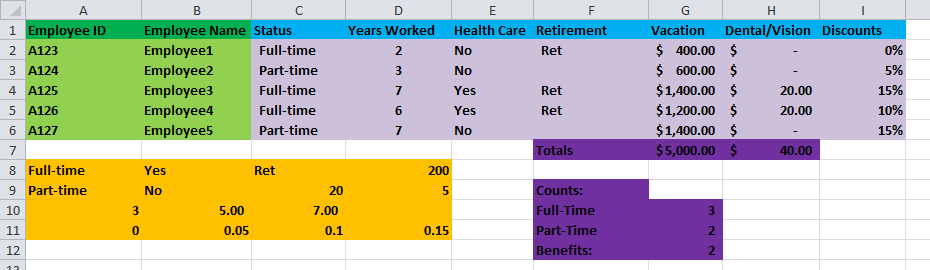
Your completed Benefits worksheet should look similar to the following:
-
Copy your Benefits worksheet to create another duplicate worksheet. Name the new worksheet Sales.
-
Delete the Benefits title data and and create the following titles in your new worksheet:
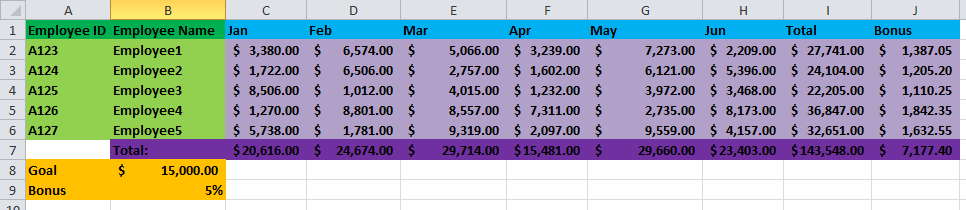
- Edit your employee sales data for six months as follows:
- Enter sales figures between $0 and $9,999 for all employees - Jan through Jun
- Enter formulas to total sales figures down and across
- Enter a formula to determine if an employee will be getting a bonus based on this criteria: "If an employee's 6-month total sales figures are greater than $15,000 (C1) then they receive 5% (C2) of their total sales as a bonus"
- Ensure your spreadsheet is dynamic and eye-catching.
- Ensure you have three tabs - Payroll, Benefits and Sales.
Vacation Dental/Vision Discounts 1 Employee ID 2 A123 3 A124 Employee Name Status Employee1 Employee2 Years Worked Health Care Retirement Full-time Part-time $400.00 $ 600.00 $ Ret 0% 5% No No Vacation Dental/Vision Discounts 1 Employee ID 2 A123 3 A124 4 A125 5 A126 Employee Name Status Employee1 Employee2 Employee3 Employee4 Employee5 Years Worked Health Care Retirement Full-time Part-time Full-time Full-time Part-time $400.00 $ 600.00 $ $1,400.00 $ $1,200.00 $ $1,400.00 $ Ret No No Yes Yes No 5% 15% 10% 15% Ret Ret 20.00 20.00 ota 8 Full-time 9 Part-time 10 Yes Ret No 20 7.00 0.1 unts: Full-Time Part-Time 5.00 0.05 0.1 12 Total 7,273.00 $ 2,209.00 27,741.00$ 1,387.05 6,121.00 $ 5,396.00 $ 24,104.00 1,205.20 3,972.00 3,468.00 22,205.00 $ 1,110.25 Feb May 1 Employee ID Employee Name Jan 2 A123 Mar Apr Jun Bonus Employee1 $ 3,380.00 6,574.00 5,066.00 3,239.00 A124 Employee21,722.00 6,506.00 2,757.00 1,602.00 $ 1,012.00 $ 4,015.00 $ 1,232.00 $ $8,506.00 1,012.00 4,015.00 1,232.00 4 A125 5 126 127 Employee3 Employee4 Employee5 Total: $ 15,000.00 5,738.00 1,781.00 9,319.00 2,097.00 $ $20,616.00 9,559.00 4,157.00 32,651.00 1,632.55 29,660.00 $23,403.00 $143,548.00 7,177.40 $24,674.00 29,714.00 $15,481.002 8 Goal 9 Bonus 5% Vacation Dental/Vision Discounts 1 Employee ID 2 A123 3 A124 Employee Name Status Employee1 Employee2 Years Worked Health Care Retirement Full-time Part-time $400.00 $ 600.00 $ Ret 0% 5% No No Vacation Dental/Vision Discounts 1 Employee ID 2 A123 3 A124 4 A125 5 A126 Employee Name Status Employee1 Employee2 Employee3 Employee4 Employee5 Years Worked Health Care Retirement Full-time Part-time Full-time Full-time Part-time $400.00 $ 600.00 $ $1,400.00 $ $1,200.00 $ $1,400.00 $ Ret No No Yes Yes No 5% 15% 10% 15% Ret Ret 20.00 20.00 ota 8 Full-time 9 Part-time 10 Yes Ret No 20 7.00 0.1 unts: Full-Time Part-Time 5.00 0.05 0.1 12 Total 7,273.00 $ 2,209.00 27,741.00$ 1,387.05 6,121.00 $ 5,396.00 $ 24,104.00 1,205.20 3,972.00 3,468.00 22,205.00 $ 1,110.25 Feb May 1 Employee ID Employee Name Jan 2 A123 Mar Apr Jun Bonus Employee1 $ 3,380.00 6,574.00 5,066.00 3,239.00 A124 Employee21,722.00 6,506.00 2,757.00 1,602.00 $ 1,012.00 $ 4,015.00 $ 1,232.00 $ $8,506.00 1,012.00 4,015.00 1,232.00 4 A125 5 126 127 Employee3 Employee4 Employee5 Total: $ 15,000.00 5,738.00 1,781.00 9,319.00 2,097.00 $ $20,616.00 9,559.00 4,157.00 32,651.00 1,632.55 29,660.00 $23,403.00 $143,548.00 7,177.40 $24,674.00 29,714.00 $15,481.002 8 Goal 9 Bonus 5%
Step by Step Solution
There are 3 Steps involved in it

Get step-by-step solutions from verified subject matter experts
 Study Help