







Question: ** Using java 8 Overview In this project students will develop routines to encode and decode data for images using run-length encoding (RLE). Students wll
** Using java 8
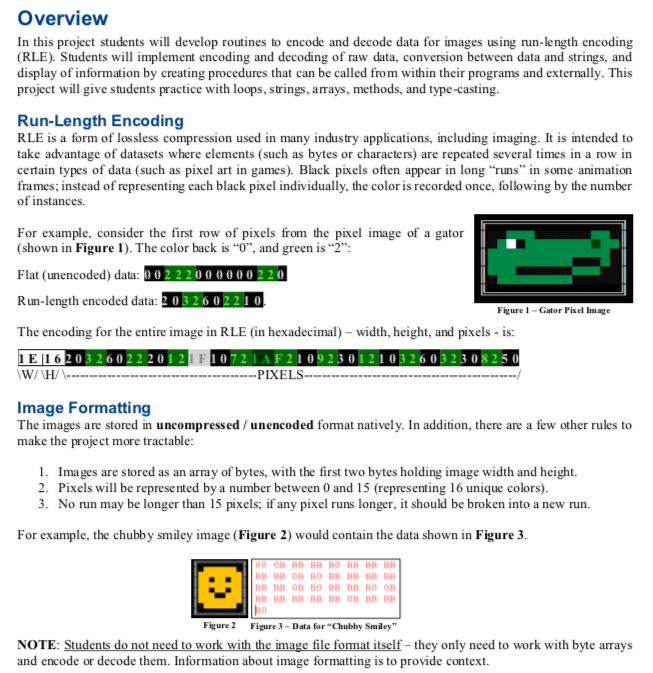
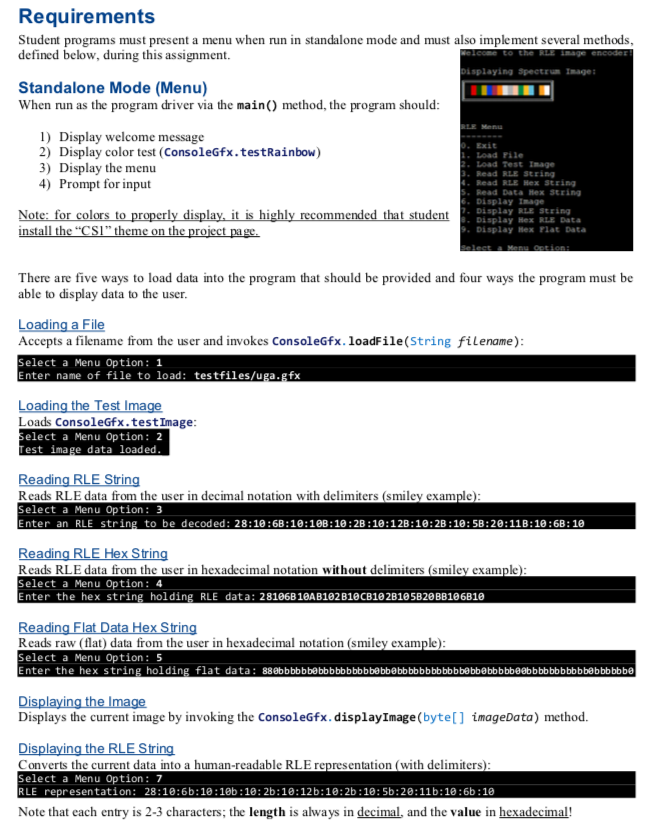
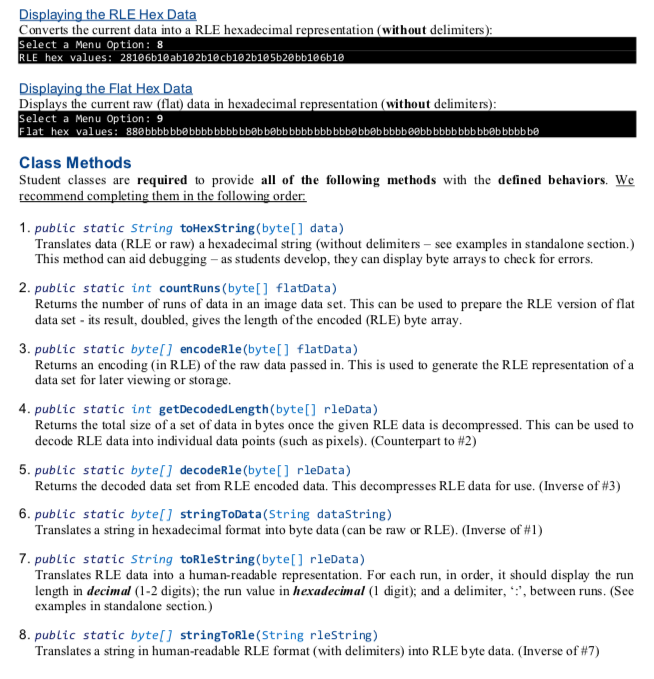
Overview In this project students will develop routines to encode and decode data for images using run-length encoding (RLE). Students wll implement encoding and decoding of raw data, conversion between data and strings, and display of information by creating procedures that can be called from within their programs and externally. This project will give students practice with loops, strings, arays, methods, and type-casting Run-Length Encoding RLE is a form of lossless compression used in take advantage of datasets where elements (such as bytes or characters) are repeated several times in a row in certain types of data (such as pixel art in games). Black pixels often appear in long "runs" in some animation frames; instead of representing each black pixel individually, the color is recorded once, following by the number of instances. man y industry applications, including imaging. It is intended to For example, consider the first row of pixels from the pixel image of a gator (shown in Figure 1). The color back is "0", and green is "2": R un-length encoded data: 2 The encoding for the entire image in RLE (in hexadecimal)- width, height, and pixels is: E 16203 2602220121F 10721AF210923 012103 26 03 23 0825 0326 02210 Figure1-Gator Piel Image PIXEL Image Formatting The images are stored in uncompressed/ unencoded format natively. In addition, there are a few other rules to make the project more tractable 1. Images are stored as an array of bytes, with the first two bytes holding image width and height. 2. Pixels will be represented by a number between 0 and 15 (representing 16 unique colors) 3. No run may be longer than 15 pixels; if any pixel runs longer, it should be broken into a new run. For example, the chubby smiley image (Figure 2) would contain the data shown in Figure 3 Figue2Figure3-Data for"Chubby Smiley" NOTE: Students do not need to work with the image file format itself- they only need to work with byte arrays and encode or decode them. Information about image formatting is to provide context. Overview In this project students will develop routines to encode and decode data for images using run-length encoding (RLE). Students wll implement encoding and decoding of raw data, conversion between data and strings, and display of information by creating procedures that can be called from within their programs and externally. This project will give students practice with loops, strings, arays, methods, and type-casting Run-Length Encoding RLE is a form of lossless compression used in take advantage of datasets where elements (such as bytes or characters) are repeated several times in a row in certain types of data (such as pixel art in games). Black pixels often appear in long "runs" in some animation frames; instead of representing each black pixel individually, the color is recorded once, following by the number of instances. man y industry applications, including imaging. It is intended to For example, consider the first row of pixels from the pixel image of a gator (shown in Figure 1). The color back is "0", and green is "2": R un-length encoded data: 2 The encoding for the entire image in RLE (in hexadecimal)- width, height, and pixels is: E 16203 2602220121F 10721AF210923 012103 26 03 23 0825 0326 02210 Figure1-Gator Piel Image PIXEL Image Formatting The images are stored in uncompressed/ unencoded format natively. In addition, there are a few other rules to make the project more tractable 1. Images are stored as an array of bytes, with the first two bytes holding image width and height. 2. Pixels will be represented by a number between 0 and 15 (representing 16 unique colors) 3. No run may be longer than 15 pixels; if any pixel runs longer, it should be broken into a new run. For example, the chubby smiley image (Figure 2) would contain the data shown in Figure 3 Figue2Figure3-Data for"Chubby Smiley" NOTE: Students do not need to work with the image file format itself- they only need to work with byte arrays and encode or decode them. Information about image formatting is to provide context
Step by Step Solution
There are 3 Steps involved in it

Get step-by-step solutions from verified subject matter experts
 Study Help