







Question: USING JAVA AND JDBC Create a class named ProductsForm and use it to create a form resembling the one shown in the image below: **
USING JAVA AND JDBC
Create a class named ProductsForm and use it to create a form resembling the one shown in the image below:
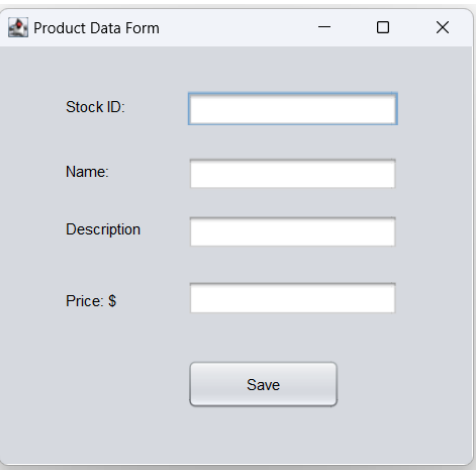
** Closing the form must not terminate the program! **
The form is to be coded by hand (drag and drop is NOT allowed) 9. The ProductsForm class should also have the following data members: a. a Product class object. b. a ProductActions class object.
10.Include a main method in the ProductsForm class, that creates a new ProductsForm instance when it is executed.
11. When the Submit button on the ProductsForm is clicked, the data entered in the forms fields are to be taken and used to populate the Product object. The ProductActions objects addAProduct method is to be called and given the Product object as an argument. The data in the object are to be written to the database.
12. Save at least three (3) product records to the database via the form. The form fields are to be cleared after each record is written.
Product Data Form x Stock ID: Name: Description Price: $ Save
Step by Step Solution
There are 3 Steps involved in it

Get step-by-step solutions from verified subject matter experts
 Study Help