







Question: Using Java. Implement the behaviors for the program below. create classes for both user and documents in a class that connects them in some sort
Using Java. Implement the behaviors for the program below. create classes for both user and documents in a class that connects them in some sort of class hierarchy, with wiki as the superclass. Use a linked list to keep track of them instead of an array as needed.
Sample document for testing USER mike CREATE Object_Oriented_Programming mike CREATE Operating_System mike CREATE Graph_Theory ali USER ali APPEND Object_Oriented_Programming mike OO programming is awesome. APPEND Object_Oriented_Programming ali I love OO programing. DELETE Object_Oriented_Programming mike 1 USERREPORT mike USERREPORT ali QUIT
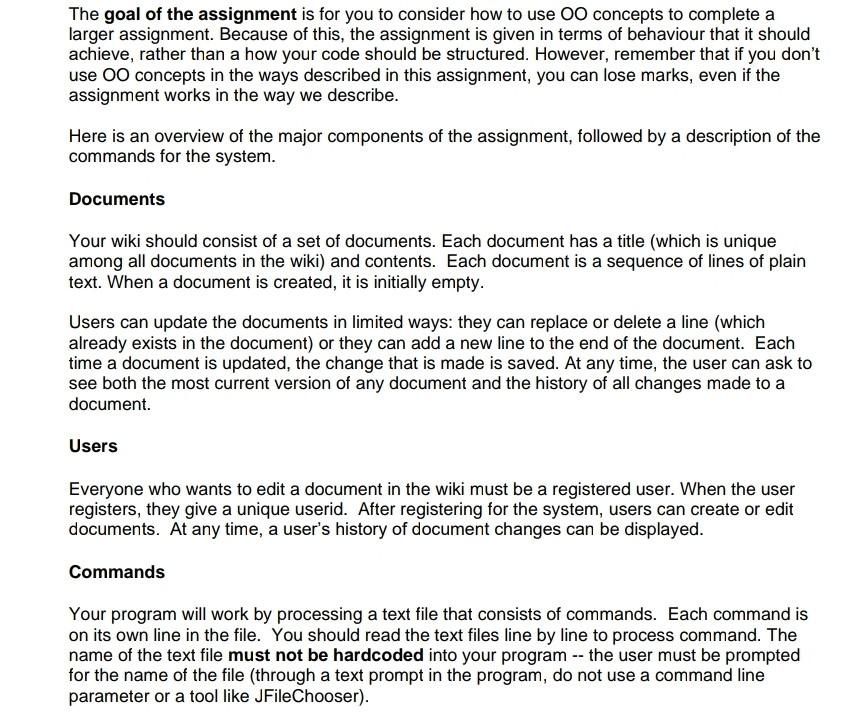
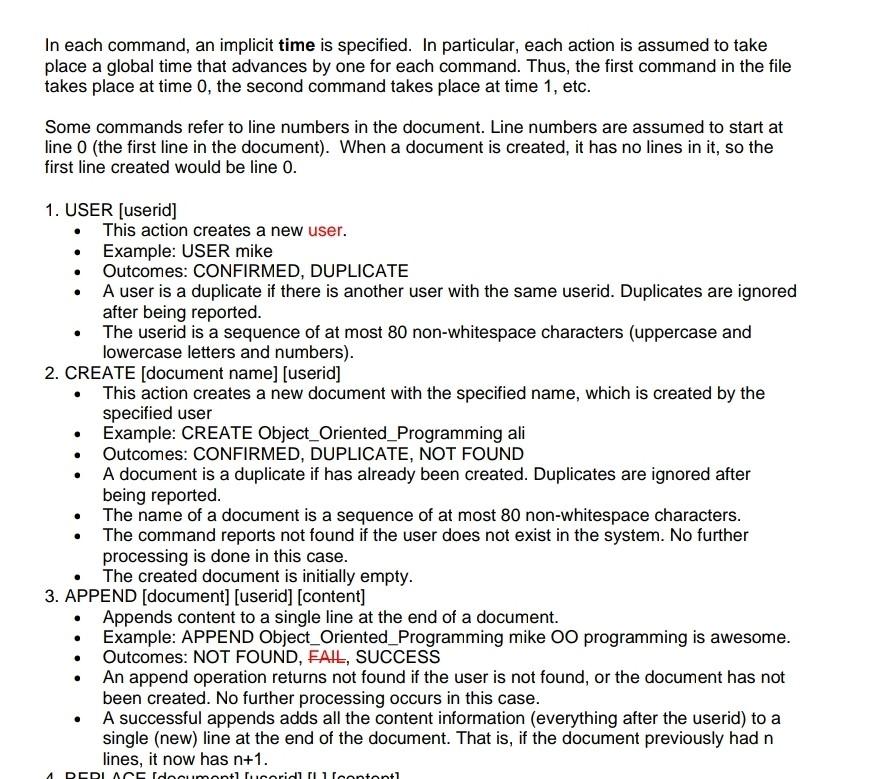
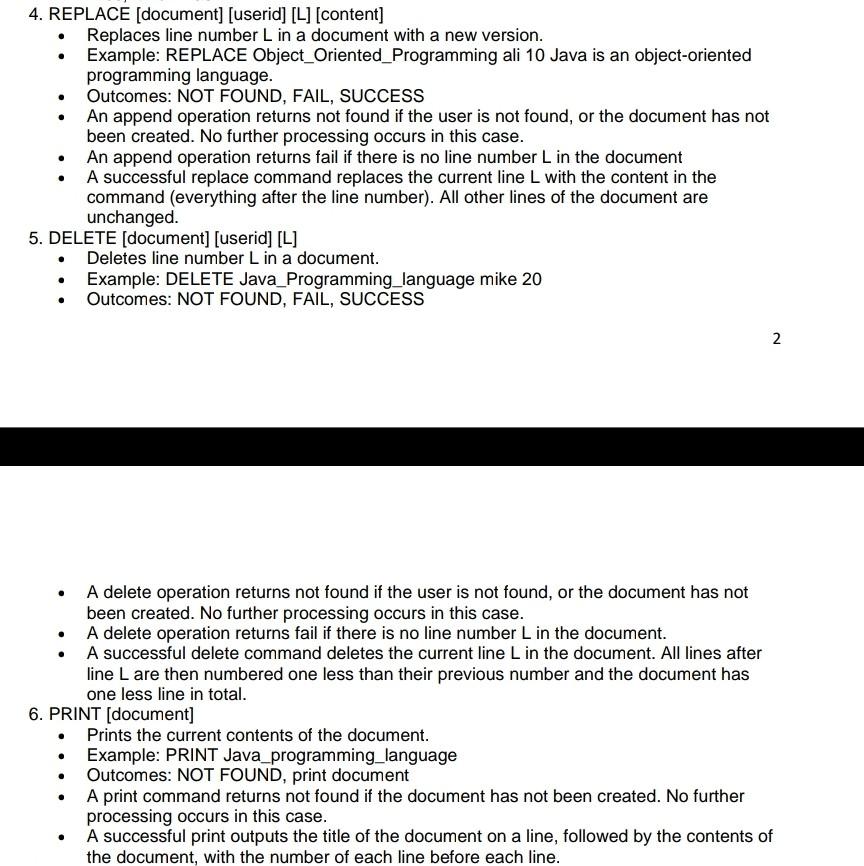
The goal of the assignment is for you to consider how to use OO concepts to complete a larger assignment. Because of this, the assignment is given in terms of behaviour that it should achieve, rather than a how your code should be structured. However, remember that if you don't use OO concepts in the ways described in this assignment, you can lose marks, even if the assignment works in the way we describe. Here is an overview of the major components of the assignment, followed by a description of the commands for the system. Documents Your wiki should consist of a set of documents. Each document has a title (which is unique among all documents in the wiki) and contents. Each document is a sequence of lines of plain text. When a document is created, it is initially empty. Users can update the documents in limited ways: they can replace or delete a line (which already exists in the document) or they can add a new line to the end of the document. Each time a document is updated, the change that is made is saved. At any time, the user can ask to see both the most current version of any document and the history of all changes made to a document. Users Everyone who wants to edit a document in the wiki must be a registered user. When the user registers, they give a unique userid. After registering for the system, users can create or edit documents. At any time, a user's history of document changes can be displayed. Commands Your program will work by processing a text file that consists of commands. Each command is on its own line in the file. You should read the text files line by line to process command. The name of the text file must not be hardcoded into your program -- the user must be prompted for the name of the file (through a text prompt in the program, do not use a command line parameter or a tool like JFileChooser). In each command, an implicit time is specified. In particular, each action is assumed to take place a global time that advances by one for each command. Thus, the first command in the file takes place at time 0, the second command takes place at time 1, etc. Some commands refer to line numbers in the document. Line numbers are assumed to start at line 0 (the first line in the document). When a document is created, it has no lines in it, so the first line created would be line 0. . . 1. USER (userid] This action creates a new user. Example: USER mike Outcomes: CONFIRMED, DUPLICATE A user is a duplicate if there is another user with the same userid. Duplicates are ignored after being reported. The userid is a sequence of at most 80 non-whitespace characters (uppercase and lowercase letters and numbers). 2. CREATE (document name) (userid] This action creates a new document with the specified name, which is created by the specified user Example: CREATE Object_Oriented_Programming ali Outcomes: CONFIRMED, DUPLICATE, NOT FOUND A document is a duplicate if has already been created. Duplicates are ignored after being reported. The name of a document is a sequence of at most 80 non-whitespace characters. The command reports not found if the user does not exist in the system. No further processing is done in this case. The created document is initially empty. 3. APPEND (document) (userid] (content] Appends content to a single line at the end of a document. Example: APPEND Object_Oriented_Programming mike OO programming is awesome. Outcomes: NOT FOUND, FAIL, SUCCESS An append operation returns not found if the user is not found, or the document has not been created. No further processing occurs in this case. A successful appends adds all the content information (everything after the userid) to a single (new) line at the end of the document. That is, if the document previously had n lines, it now has n+1. . DEDI Acidonmantlaridlileontontl . 4. REPLACE (document] [userid] [L] (content] Replaces line number L in a document with a new version. Example: REPLACE Object_Oriented_Programming ali 10 Java is an object-oriented programming language. Outcomes: NOT FOUND, FAIL, SUCCESS An append operation returns not found if the user is not found, or the document has not been created. No further processing occurs in this case. An append operation returns fail if there is no line number L in the document A successful replace command replaces the current line L with the content in the command (everything after the line number). All other lines of the document are unchanged. 5. DELETE (document] (userid] [L] Deletes line number L in a document. Example: DELETE Java_Programming_language mike 20 Outcomes: NOT FOUND, FAIL, SUCCESS 2. . . A delete operation returns not found if the user is not found, or the document has not been created. No further processing occurs in this case. A delete operation returns fail if there is no line number L in the document. A successful delete command deletes the current line L in the document. All lines after line L are then numbered one less than their previous number and the document has one less line in total. 6. PRINT (document] Prints the current contents of the document. Example: PRINT Java programming_language Outcomes: NOT FOUND, print document A print command returns not found if the document has not been created. No further processing occurs in this case. A successful print outputs the title of the document on a line, followed by the contents of the document, with the number of each line before each line
Step by Step Solution
There are 3 Steps involved in it

Get step-by-step solutions from verified subject matter experts
 Study Help