







Question: Using Java JCreator: Edit the coding below to show the figures import java.awt.Graphics; import javax.swing.JPanel; import javax.swing.JFrame; public class Test { public static void main(String[]
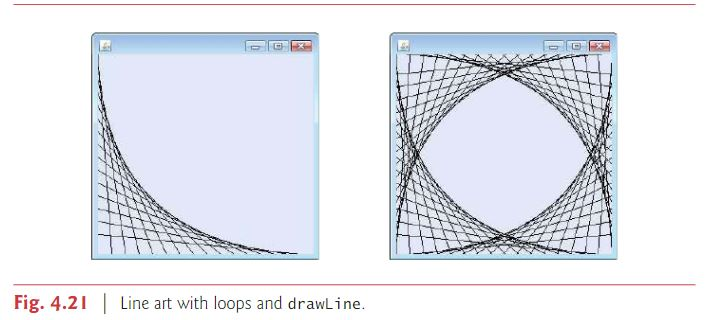
Using Java JCreator: Edit the coding below to show the figures
import java.awt.Graphics; import javax.swing.JPanel; import javax.swing.JFrame;
public class Test { public static void main(String[] args) { // Panel Test panel = new Test(); // Frame JFrame application = new JFrame(); application.setDefaultCloseOperation(JFrame.EXIT_ON_CLOSE);
application.add(panel); // add panel application.setSize(700, 700); // set size application.setVisible(true); // make visible } }
class Lines extends JPanel { public void paintComponent(Graphics g) { int width = getWidth(); int height = getHeight(); int x, y; int loopCount = 1; int xCount = 1; int yCount = 1; super.paintComponent(g); // Set to 15 lines x = width / 15; y = height / 15; while (loopCount Fig. 4.2Line art with loops and drawLine
Step by Step Solution
There are 3 Steps involved in it

Get step-by-step solutions from verified subject matter experts
 Study Help