







Question: using java JFrame , can you just do the buttons clearly 1. Using the Cellphone class in Lab 3, add a static member to the
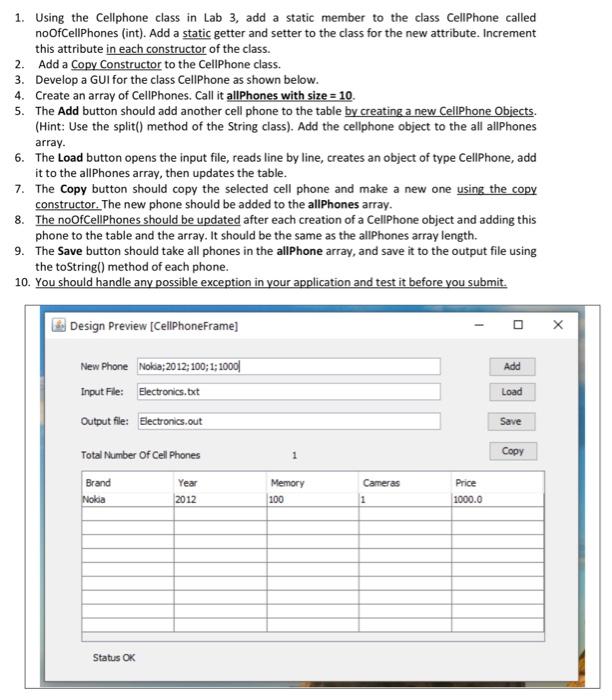
1. Using the Cellphone class in Lab 3, add a static member to the class Cellphone called noOfCellPhones (int). Add a static getter and setter to the class for the new attribute. Increment this attribute in each constructor of the class. 2. Add a Copy Constructor to the Cellphone class. 3. Develop a GUI for the class Cellphone as shown below. 4. Create an array of Cellphones. Call it allPhones with size = 10. 5. The Add button should add another cell phone to the table by creating a new CellPhone Objects. (Hint: Use the split() method of the String class). Add the cellphone object to the all allPhones array. 6. The Load button opens the input file, reads line by line, creates an object of type CellPhone, add it to the allPhones array, then updates the table. 7. The Copy button should copy the selected cell phone and make a new one using the copy constructor. The new phone should be added to the allPhones array. 8. The noOfCellPhones should be updated after each creation of a CellPhone object and adding this phone to the table and the array. It should be the same as the allPhones array length. 9. The Save button should take all phones in the allPhone array, and save it to the output file using the toString() method of each phone. 10. You should handle any possible exception in your application and test it before you submit. Design Preview [CellPhoneFrame) Add New Phone Nokia; 2012; 100; 1;1000|| Input File: Electronics.but Output file: Electronics.out Load Save Total Number of Cell Phones 1 Copy Brand Nolia Year 2012 Memory 100 Cameras 1 Price 1000.0 Status OK
Step by Step Solution
There are 3 Steps involved in it

Get step-by-step solutions from verified subject matter experts
 Study Help