







Question: Using JAVA NETBEANS PLEASE HELP ME TO DO THIS PROGRAM TYSM! PRACTICE ACTIVITY: 1.Create a project Pizza and add a JFrame form. 2.Create a sub
Using JAVA NETBEANS PLEASE HELP ME TO DO THIS PROGRAM TYSM!
PRACTICE ACTIVITY: 1.Create a project Pizza and add a JFrame form. 2.Create a sub class of Pizza named Supreme. 3.Add a radiobutton, label and a buttonBy default the names of the tools are as followsJRadioButton1 , JLabel1 and JButton1 4.Add the following code to Supreme class (Lets say prize = 280)
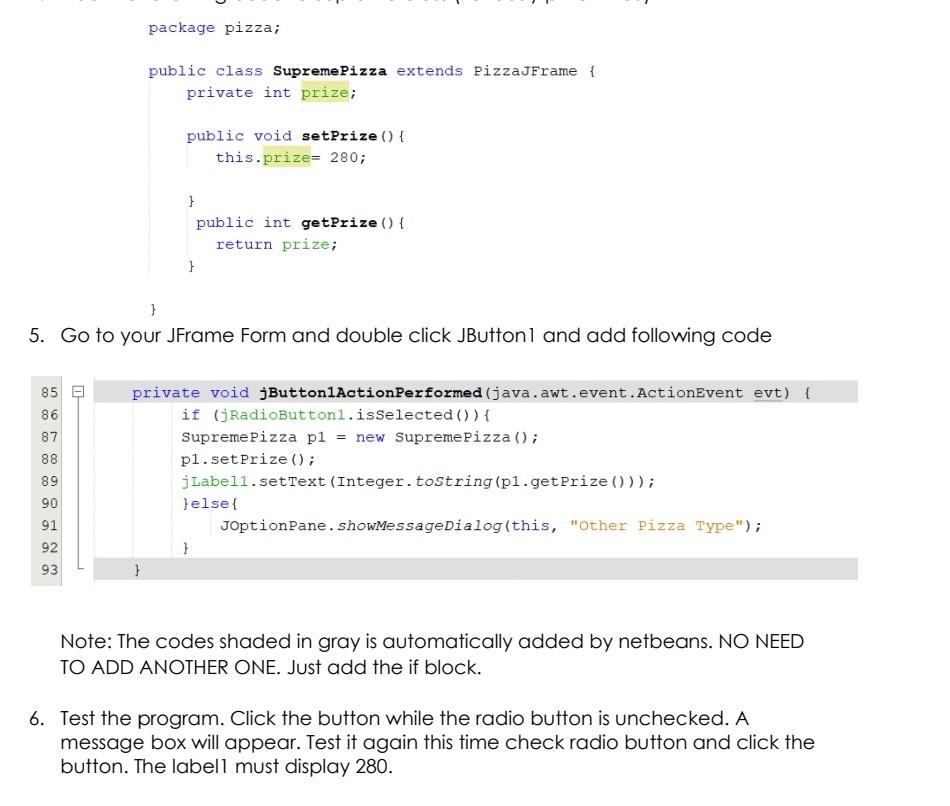
here is more information abt the question thankyou so much in advance!
package pizza; public class Supreme Pizza extends PizzaJFrame { private int prize; public void setPrize () { this.prize= 280; } public int getPrize() { return prize; 1 1 5. Go to your JFrame Form and double click JButtonl and add following code 8 8 85 86 87 88 89 90 91 92 93 private void JButton1ActionPerformed (java.awt.event.ActionEvent evt) { if (RadioButtonl.isSelected()) { Supreme Pizza pl = new Supreme Pizza (); pl.setPrize(); j Label1.setText (Integer.tostring(pl.getPrize ())); }else{ JoptionPane. showMessageDialog(this, "Other Pizza Type"); } } Note: The codes shaded in gray is automatically added by netbeans. NO NEED TO ADD ANOTHER ONE. Just add the if block. 6. Test the program. Click the button while the radio button is unchecked. A message box will appear. Test it again this time check radio button and click the button. The labell must display 280
Step by Step Solution
There are 3 Steps involved in it

Get step-by-step solutions from verified subject matter experts
 Study Help