







Question: USING JAVA PROGRAMMING . Your task is to compute the intensity histogram for each color channel of a given input image. Plot the histogram curves
USING JAVA PROGRAMMING .
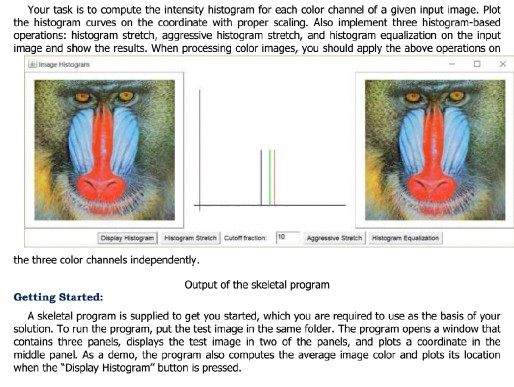
Your task is to compute the intensity histogram for each color channel of a given input image. Plot the histogram curves on the coordinate with proper scaling. Also implement three histogram-based operations: histogram stretch, aggressive histogram stretch, and histogram equalization on the input image and show the results. When processing color images, you should apply the above operations on Image Hsogra Aggressive Strech Histagram Equalizaton the three color channels independently. Output of the skeletal program Getting Started: A skeletal program is supplied to get you started, which you are required to use as the basis of your solution. To run the program, put the test image in the same folder. The program opens a window that contains three panels, displays the test image in two of the panels, and plots a coordinate in the middle panel. As a demo, the prograrm also computes the average image color and plots its location when the "Display Histogram" button is pressed Your task is to compute the intensity histogram for each color channel of a given input image. Plot the histogram curves on the coordinate with proper scaling. Also implement three histogram-based operations: histogram stretch, aggressive histogram stretch, and histogram equalization on the input image and show the results. When processing color images, you should apply the above operations on Image Hsogra Aggressive Strech Histagram Equalizaton the three color channels independently. Output of the skeletal program Getting Started: A skeletal program is supplied to get you started, which you are required to use as the basis of your solution. To run the program, put the test image in the same folder. The program opens a window that contains three panels, displays the test image in two of the panels, and plots a coordinate in the middle panel. As a demo, the prograrm also computes the average image color and plots its location when the "Display Histogram" button is pressed
Step by Step Solution
There are 3 Steps involved in it

Get step-by-step solutions from verified subject matter experts
 Study Help