







Question: Using Java Swing, develop a desktop application for viewing images, similar to Windows Photo Viewer (see screenshot below). Your application must: 1, Allow a user
Using Java Swing, develop a desktop application for viewing images, similar to Windows Photo Viewer (see screenshot below).
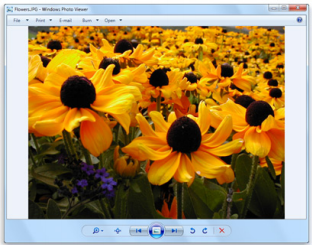
Your application must:
1, Allow a user to input/select/choose a folder (directory) containing image files that they want to view
2, Show the user one image at a time (you may show smaller previews of the next/previous or other images).
3. Provide the user with at least five (5) ways to change the currently viewed image to the next image within the selected folder. (For example, a button, a menubar item, keyboard shortcuts, etc.) Changing to the previous image vs. next image with the same kind of control (e.g. a button) does not count as two methods of changing the image.
4. Behave reasonably when the user resizes the application window (e.g. automatically resizing the image).
5. Behave reasonably when the image is larger (resolution) than the displayable area of the window/desktop (e.g. resizing, being pan-able)
6. Work on all three major platforms: Windows, Mac, *nix. This simply means you should not assume the separator between a directory and image is a backslash ( ) or forward slash (/), nor assume that directory and file names are not case sensitive.
7. Allow user to set a preference whether images retain their aspect ratio when resized for viewing vs. image being stretched to fill the full UI
NOTE: You do not need to support any image formats that are not supported by Java Swing innately. You do not need to provide any image editing capabilities (including deleting image files). I NEED JUST THE SOURCE CODE (not compiled class files, nor a JAR). THANKS
Step by Step Solution
There are 3 Steps involved in it

Get step-by-step solutions from verified subject matter experts
 Study Help