







Question: Using Java Swing: h . GUI for patient demographics i . GUI for family history. j . Automated interview for family history. e . GUI
Using Java Swing:
h GUI for patient demographics
i GUI for family history.
j Automated interview for family history.
e GUI for patient selection.
l Database table for patient demographics and associated stored procedures.
m Database table for family history and associated stored procedures.
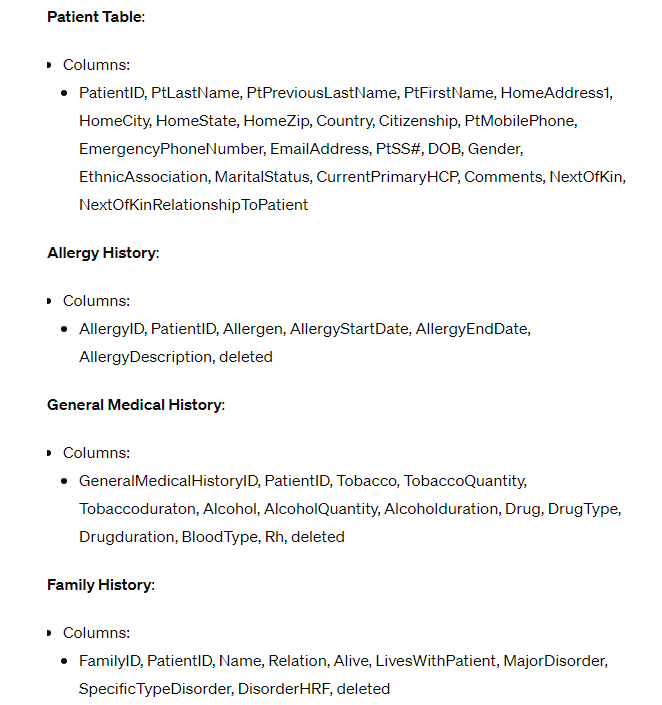
SQL Tables and Database already made.
Only do these tasks in the project, some of the directions are for extra credit. Only these tasks are needed. If possible, separate classes into different steps so it is easy for me to make different class files for organization purposes. And please leave as many comments as possible so I can understand the code. Thank you!
Develop an application that interviews a patient for their medical history using a binary tree to drive
the interview process. The data collected from the interview must be stored in a mySQL database and
a log file created to record the interview. Think of the interview as a digital physician that asks the
user questions regarding their medical history. A graphical userinterface GUI must be developed to
select a patient and perform CRUD record operations on the patients demographic information and
general medical history.
Implement the application using the Java programming language and the Java Swing library for
building the graphical user interface. Use a MySQL database to store the data and a text file for
recording the interview.
Scope of Work
Create a graphical userinterface GUI that includes forms for: Patient Selection, Patient
Demographics, General Medical History, Allergy History, and Family History using Java
Swing.
a GUI functionality:
i Each form must have individual fields to display all the data from each
associated database table patient general history, allergy history, family
history
ii The General Medical History form must display one record of information for
a selected patient.
iii. The Allergy History form must show zero to multiple allergies in a list or data
grid type control for a selected patient. Upon selection of an allergy from the
list, all the detail for that allergy must be displayed in individual text boxes on
the form where they then can be edited or new record added.
iv The Family History form must display all family history records in a gridview
type control associated with the selected patient. Upon selection of a family
history record from the list, all the detail for that family history must be
displayed in individual text boxes on the form where they then can be edited
or new records added.
v Each form that displays data from a database table must have buttons for
Edit, New, Save, and Delete.
vi Each form that displays data from a database table must open in a View
mode where the retrieved data can be viewed, but not edited the fields
should be locked The background of the text fields should be a light gray
color. When you click the Edit or New buttons, then the form changes to
Edit mode where the fields can be editable. Change the text field
background to white when in Edit mode.
vii. When the Save button is clicked, save changes or new record data to the
database and restore the mode of the form to View mode.
viii. Use database stored procedure calls in the Java code to perform SQL
operations with the database.
ix Create a separate directory or source package in the project called DBUtils
that holds classes with methods for interacting with each database table.
x Create a separate directory or source package in the project called Validation
that holds classes with methods to perform validation on at least two fields
per form.
xi Designate required fields with an asterisk on the GUI.
xii. When clicking the New button, the form must be set to Edit mode and all
the fields must be cleared of any data so that a new record of data can be
added.
xiii. The GUI must include the functionality to select a patient. Patient selection
can be done via a separate form or be included in the patient demographics
form. Upon selection of a patient, navigate to the patient demographics form
which automatically displays all the selected patients demographic
information. Patients must be able to be selected from a list using a list or
gridviewtype control and via a search box where a last name can be entered.
xiv. There must be capability to navigate to all forms from every form.
b Automated Interview functionality:
i The General Medical History form must have a button to start the automated
interview for specific general medical history data.
ii The Allergy History form must have a button to start the automated interview
for allergy history data see Allergy table
iii. The Family History form must have a button to start the automated interview
for family history.
iv The patient form must have a button that starts an interview for all medical
history including general medical history, allergy history, and family.
SQL data is in the attached photo. Thanks!
Step by Step Solution
There are 3 Steps involved in it
1 Expert Approved Answer
Step: 1 Unlock

Question Has Been Solved by an Expert!
Get step-by-step solutions from verified subject matter experts
Step: 2 Unlock
Step: 3 Unlock
 Study Help