







Question: using java to write line-based text editor. The command syntax is similar to the Unix line editor ed. The internal copy of the file is
using java to write line-based text editor. The command syntax is similar to the Unix line editor ed. The internal copy of the file is maintained as a linked list of lines. To be able to go up and down in the file, you have to maintain a doubly linked list. Most commands are represented by a one-character string. Some are two characters and require an argument (or two). Support the commands shown below:
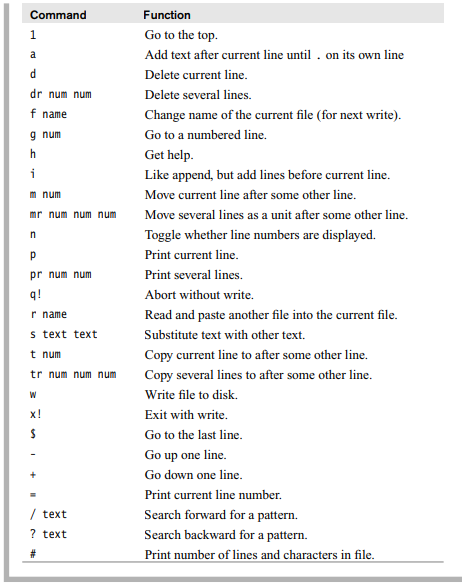
Command Function H Go to the top. PJ Add text after current line until . on its own line Delete current line. dr num num Delete several lines. f name Change name of the current file (for next write). 9 num Go to a numbered line. h Get help. Like append, but add lines before current line. mm num Move current line after some other line. mir num num num Move several lines as a unit after some other line. n Toggle whether line numbers are displayed. p Print current line. pr num num Print several lines. q! Abort without write. r name Read and paste another file into the current file. 5 text text Substitute text with other text. t num Copy current line to after some other line. tr num num num Copy several lines to after some other line. W Write file to disk. x! Exit with write. Go to the last line. Go up one line. Go down one line. Print current line number. / text Search forward for a pattern. ? text Search backward for a pattern. Print number of lines and characters in file
Step by Step Solution
There are 3 Steps involved in it

Get step-by-step solutions from verified subject matter experts
 Study Help