







Question: Using JAVA Write a program with a Graphical User Interface that takes in the name of a file to read from and the name of
Using JAVA
Write a program with a Graphical User Interface that takes in the name of a file to read from and the name of a file to write to including a relative or complete path to the file.
The GUI should also have 2 buttons and a status bar to inform the user when the operation is complete, or if any problems are encountered.
Example GUI using JFrame and nested JPanels
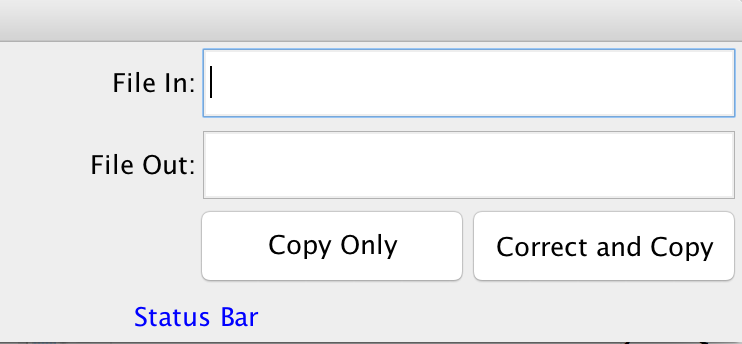
The program should do the following:
When Copy Only is clicked it should simply copy the content of the incoming file to the outgoing file and update the status in the GUI via the status label.
When Correct and Copy is clicked it should correct the formatting and punctuation according to the rules below.
Correct the spacing by assuring there are only single spaces in the corrected text file. (2 or more consecutive spaces should be replaced by a single blank space)
All sentences begin with an Uppercase letter.
After the first sentence in the text file, all sentences should follow a punctuation character plus the trailing white space that indicates the end of a sentence. (period, question mark, or an exclamation point)
Assure that the following acronyms are replaced with the correct text
lol - laughing out loud
ttyl - talk to you later
brb - be right back
Status should always be displayed so that the user does not think the program is broken if something goes wrong.
File In: File Out: Copy Only Correct and Copy Status Bar File In: File Out: Copy Only Correct and Copy Status Bar
Step by Step Solution
There are 3 Steps involved in it

Get step-by-step solutions from verified subject matter experts
 Study Help