







Question: Using Javascript , create a 400x400 canvas element. Draw a 400x50 green rectangle at the bottom of the canvas, representing the ground. Just above the
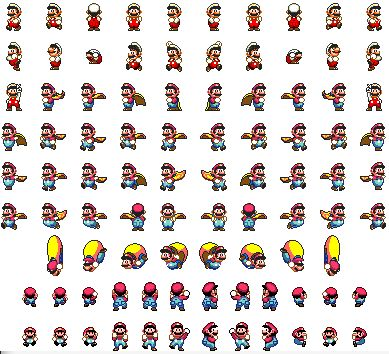
Using Javascript, create a 400x400 canvas element. Draw a 400x50 green rectangle at the bottom of the canvas, representing the ground. Just above the ground use the Mario sprite table to render a character, initially positioned in the center of the canvas, that can alk left or right and also jump, falling back to the ground. Use as many of the sprite table images as possible. The top of the jump should not exceed 2/3 the height of the canvas. The character should be blocked from moving out of the canvas, and of course should not be able to fall below the ground.
Please use mario sprite table:
usea tyr att efi dr elt opi @chnole elt dis eadindr dis dra, a 02 usea tyr att efi dr elt opi @chnole elt dis eadindr dis dra, a 02
Step by Step Solution
There are 3 Steps involved in it

Get step-by-step solutions from verified subject matter experts
 Study Help