







Question: Using Javascript, I have to create the image below but I am not sure on how to do it. How should I fix my code
Using Javascript, I have to create the image below but I am not sure on how to do it. How should I fix my code in order to make it look like the image?
Image
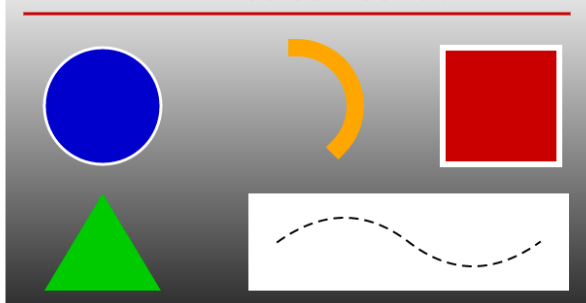
The image has to appear when I press the button stated on the code.
Code:
#content-wrapper {
width: 600px;
margin: 0 auto;
text-align: center;
}
#canvasRun {
background-color: #c00;
border: 0;
color: #fff;
}
// Canvas Drawing Code Here
//var x = document.title;
//document.getElementById("content-wrapper").innerHTML = x;
var canvas = document.getElementById('myCanvas');
if (canvas.getContext)
{
var context = myCanvas.getContext('2d');
context.beginPath();
context.moveTo(220,230);
context.lineTo(190,300);
context.lineTo(300,300);
context.fillStyle = "green";
context.fill();
}
//Rectangle Script ends
//Circle Script Starts
var c=document.getElementById("myCanvas");
var ctx=c.getContext("2d");
ctx.beginPath();
ctx.arc(240,75,50,0,2*Math.PI);
ctx.lineWidth = 10;
ctx.strokeStyle = "white";
ctx.fillStyle = "blue";
ctx.fill();
//Circle Script ends
//Arc Script Starts
var canvas = document.getElementById('myCanvas');
var context = canvas.getContext('2d');
context.beginPath();
context.arc(450, 115, 75, 3.455, 5.9690, false);
context.lineWidth = 10;
context.strokeStyle = 'orange'
context.stroke();
//Arc script ends
//Rectangle Script Starts
var c=document.getElementById("myCanvas");
var ctx=c.getContext("2d");
ctx.rect(600,45,150,90);
ctx.stroke();
var context = canvas.getContext('2d');
var x = canvas.width / 2;
var y = canvas.height / 2;
var radius = 75;
var startAngle = 1.1 * Math.PI;
var endAngle = 1.9 * Math.PI;
var counterClockwise = false;
context.beginPath();
context.arc(x, y, radius, startAngle, endAngle, counterClockwise);
context.lineWidth = 15;
context.strokeStyle = 'red';
context.stroke();
// Red rectangle
ctx.beginPath();
ctx.lineWidth="6";
ctx.strokeStyle="red";
ctx.rect(370,180,230,90);
ctx.stroke();
Step by Step Solution
There are 3 Steps involved in it

Get step-by-step solutions from verified subject matter experts
 Study Help