







Question: Using Jupyter notebook python3 Now that you have some examples of how to use these tools in-hand, you will use your skills to create a
 Using Jupyter notebook python3
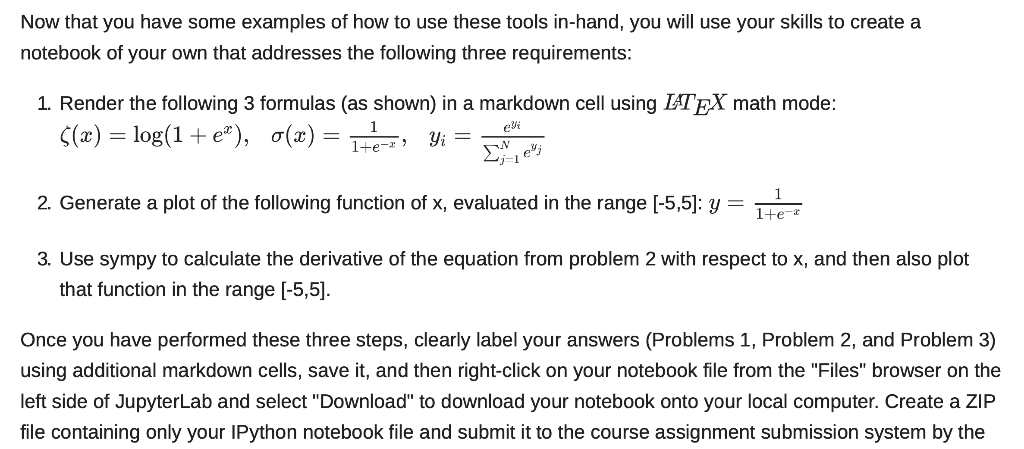
Now that you have some examples of how to use these tools in-hand, you will use your skills to create a notebook of your own that addresses the following three requirements:
- Render the following 3 formulas (as shown) in a markdown cell using math mode:
- Generate a plot of the following function of x, evaluated in the range [-5,5]:
- Use sympy to calculate the derivative of the equation from problem 2 with respect to x, and then also plot that function in the range [-5,5].
Once you have performed these three steps, clearly label your answers (Problems 1, Problem 2, and Problem 3) using additional markdown cells, save it, and then right-click on your notebook file from the "Files" browser on the left side of JupyterLab and select "Download" to download your notebook onto your local computer. Create a ZIP file containing only your IPython notebook
Now that you have some examples of how to use these tools in-hand, you will use your skills to create a notebook of your own that addresses the following three requirements: 1. Render the following 3 formulas (as shown) in a markdown cell using LATEX math mode: 5(x) = log(1 + e*), (x) = Yi = > 1+e- ie 2. Generate a plot of the following function of x, evaluated in the range [-5,5): y = 1+e- 3. Use sympy to calculate the derivative of the equation from problem 2 with respect to x, and then also plot that function in the range (-5,5). Once you have performed these three steps, clearly label your answers (Problems 1, Problem 2, and Problem 3) using additional markdown cells, save it, and then right-click on your notebook file from the "Files" browser on the left side of JupyterLab and select "Download" to download your notebook onto your local computer. Create a ZIP file containing only your IPython notebook file and submit it to the course assignment submission system by the
Step by Step Solution
There are 3 Steps involved in it

Get step-by-step solutions from verified subject matter experts
 Study Help