



Question: using LabView 2009 D4.1 Properties. Add the following information to the documentation: Finds age in Construct a subVI to calculate an age in years given
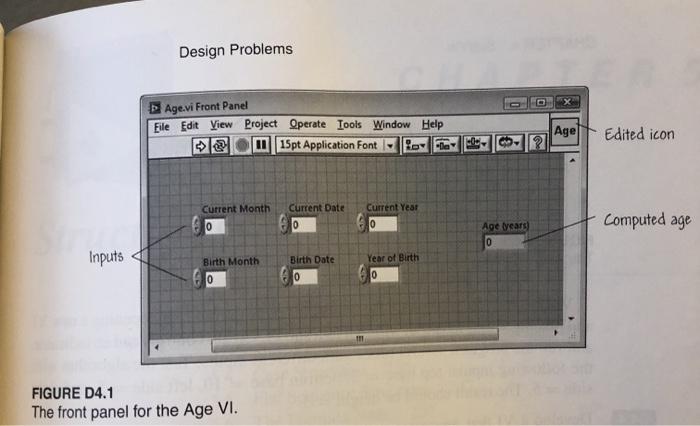
D4.1 Properties. Add the following information to the documentation: "Finds age in Construct a subVI to calculate an age in years given a birth date and the current date as inputs. Use Figure D4.1 as a guide for the front panel. You should use three separate integer controls to enter each date: one for the day of the month, one for the month, and one for the year. Enter months as numbers. For example, use the number 1 for January, the number 2 for February, and so forth. Be sure to create an icon for the VI and connect the output and inputs to terminals on the icon. When you are finished, create documentation for your VI under VI years of a person given the current date and the person's birth date as input." Design Problems Age.vi Front Panel Eile Edit View Project Operate Tools Window Help 15pt Application Font Agel Edited icon ? 2 Current Month 0 Current Date 0 Current Year 10 Computed age Age years) 0 Inputs Year of Birth Birth Month 10 Birth Date 0 111 FIGURE D4.1 The front panel for the Age VI
Step by Step Solution
There are 3 Steps involved in it

Get step-by-step solutions from verified subject matter experts