







Question: Using logixpro Your goal is to run a simulation which can operate in 3 different modes. The mode selector switch, labeled A, B, and C,
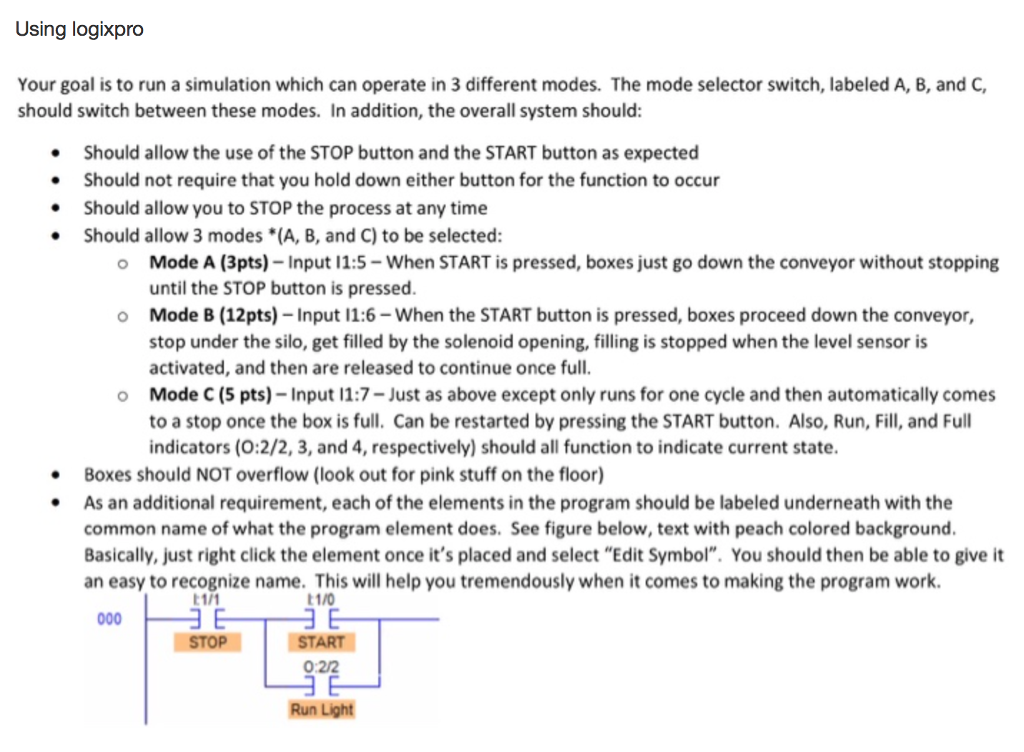
Using logixpro Your goal is to run a simulation which can operate in 3 different modes. The mode selector switch, labeled A, B, and C, should switch between these modes. In addition, the overall system should: Should allow the use of the STOP button and the START button as expected Should not require that you hold down either button for the function to occur Should allow you to STOP the process at any time Should allow 3 modes *(A, B, and C) to be selected: O Mode A (3pts) - Input 11:5- When START is pressed, boxes just go down the conveyor without stopping until the STOP button is pressed. o Mode B (12pts) - Input 11:6 - When the START button is pressed, boxes proceed down the conveyor, stop under the silo, get filled by the solenoid opening, filling is stopped when the level sensor is activated, and then are released to continue once full. O Mode C (5 pts) - Input 11:7- Just as above except only runs for one cycle and then automatically comes to a stop once the box is full. Can be restarted by pressing the START button. Also, Run, Fill, and Full indicators (0:2/2, 3, and 4, respectively) should all function to indicate current state. Boxes should NOT overflow (look out for pink stuff on the floor) As an additional requirement, each of the elements in the program should be labeled underneath with the common name of what the program element does. See figure below, text with peach colored background. Basically, just right click the element once it's placed and select "Edit Symbol". You should then be able to give it an easy to recognize name. This will help you tremendously when it comes to making the program work. (1/1 11/0 000 E E STOP START 0:22 Run Light Using logixpro Your goal is to run a simulation which can operate in 3 different modes. The mode selector switch, labeled A, B, and C, should switch between these modes. In addition, the overall system should: Should allow the use of the STOP button and the START button as expected Should not require that you hold down either button for the function to occur Should allow you to STOP the process at any time Should allow 3 modes *(A, B, and C) to be selected: O Mode A (3pts) - Input 11:5- When START is pressed, boxes just go down the conveyor without stopping until the STOP button is pressed. o Mode B (12pts) - Input 11:6 - When the START button is pressed, boxes proceed down the conveyor, stop under the silo, get filled by the solenoid opening, filling is stopped when the level sensor is activated, and then are released to continue once full. O Mode C (5 pts) - Input 11:7- Just as above except only runs for one cycle and then automatically comes to a stop once the box is full. Can be restarted by pressing the START button. Also, Run, Fill, and Full indicators (0:2/2, 3, and 4, respectively) should all function to indicate current state. Boxes should NOT overflow (look out for pink stuff on the floor) As an additional requirement, each of the elements in the program should be labeled underneath with the common name of what the program element does. See figure below, text with peach colored background. Basically, just right click the element once it's placed and select "Edit Symbol". You should then be able to give it an easy to recognize name. This will help you tremendously when it comes to making the program work. (1/1 11/0 000 E E STOP START 0:22 Run Light
Step by Step Solution
There are 3 Steps involved in it

Get step-by-step solutions from verified subject matter experts
 Study Help