







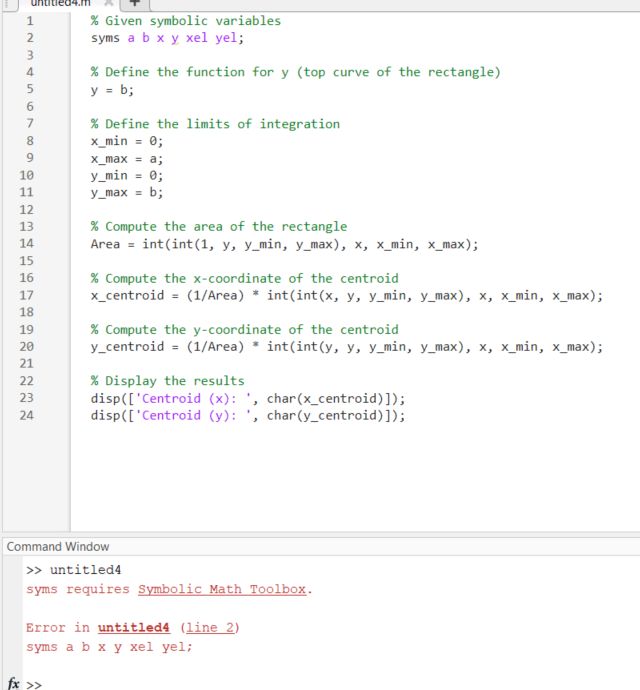
Question: Using Mathlab % Given symbolic variables syms a b x y xel yel; % Define the function for y ( top curve of the rectangle
Using Mathlab
Given symbolic variables
syms a b x y xel yel;
Define the function for y top curve of the rectangle
Define the limits of integration
xmin ;
xmax a;
ymin ;
ymax b;
Compute the area of the rectangle
Area intint y ymin, ymax x xmin, xmax;
Compute the xcoordinate of the centroid
xcentroid Area intint x y ymin, ymax x xmin, xmax;
Compute the ycoordinate of the centroid
ycentroid Area intinty y ymin, ymax x xmin, xmax;
Display the results
dispCentroid x: charxcentroid;
dispCentroid y: charycentroid;
Command Windowsyms requires Symbolic Math Toolbox.
Error in untitledline
syms a b x y xel yel;
Help me to fix this mistake?
Step by Step Solution
There are 3 Steps involved in it
1 Expert Approved Answer
Step: 1 Unlock

Question Has Been Solved by an Expert!
Get step-by-step solutions from verified subject matter experts
Step: 2 Unlock
Step: 3 Unlock
 Study Help