







Question: Using MatLab: 2.in bisection.m, we stopped iteration when Ea 0.0001% where -xr -rr+100%. Modify the m-file such that the iteration stops after the 10th iteration.
Using MatLab:
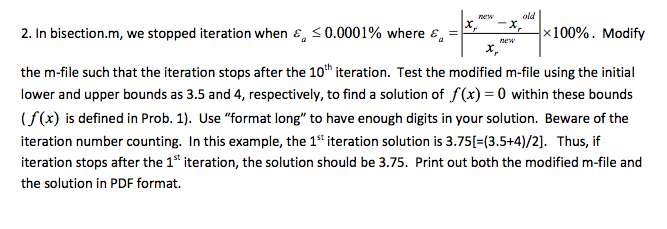
2.in bisection.m, we stopped iteration when Ea 0.0001% where -xr -rr+100%. Modify the m-file such that the iteration stops after the 10th iteration. Test the modified m-file using the initial lower and upper bounds as 3.5 and 4, respectively, to find a solution of f(x) 0 within these bounds (f(x) is defined in Prob. 1). Use "format long" to have enough digits in your solution. Beware of the iteration number counting. In this example, the 1st iteration solution is 3.75[-(3.5+4)/2]. Thus, if iteration stops after the 1t iteration, the solution should be 3.75. Print out both the modified m-file and the solution in PDF format. 2.in bisection.m, we stopped iteration when Ea 0.0001% where -xr -rr+100%. Modify the m-file such that the iteration stops after the 10th iteration. Test the modified m-file using the initial lower and upper bounds as 3.5 and 4, respectively, to find a solution of f(x) 0 within these bounds (f(x) is defined in Prob. 1). Use "format long" to have enough digits in your solution. Beware of the iteration number counting. In this example, the 1st iteration solution is 3.75[-(3.5+4)/2]. Thus, if iteration stops after the 1t iteration, the solution should be 3.75. Print out both the modified m-file and the solution in PDF format
Step by Step Solution
There are 3 Steps involved in it

Get step-by-step solutions from verified subject matter experts
 Study Help