







Question: using matlab and fprintf to show results. CANNOT USE LOOPS FOR THIS PROBLEM 5. Often, certain data entries in a data set can be missing,
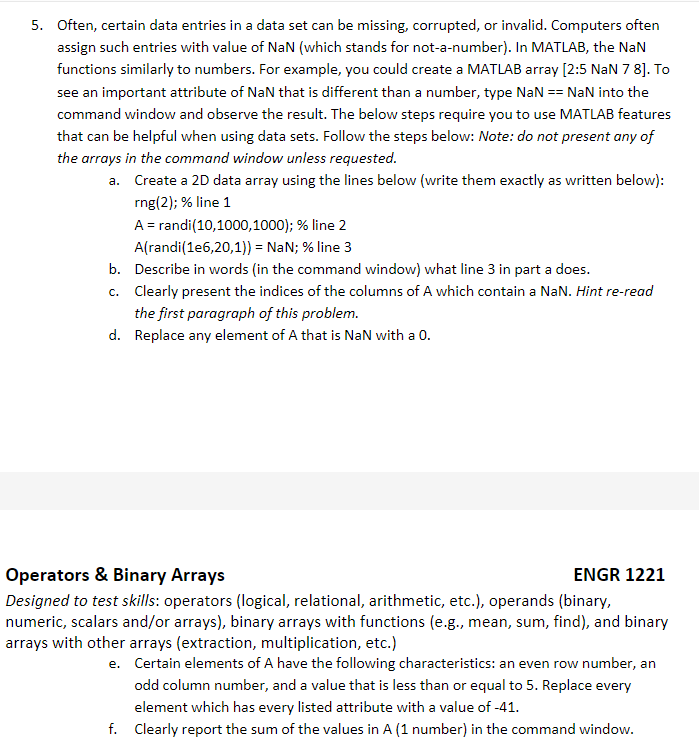
using matlab and fprintf to show results.
CANNOT USE LOOPS FOR THIS PROBLEM
5. Often, certain data entries in a data set can be missing, corrupted, or invalid. Computers often assign such entries with value of NaN (which stands for not-a-number). In MATLAB, the NaN functions similarly to numbers. For example, you could create a MATLAB array [2:5 NaN 7 8]. To see an important attribute of NaN that is different than a number, type NaN-NaN into the command window and observe the result. The below steps require you to use MATLAB features that can be helpful when using data sets. Follow the steps below: Note: do not present any of the arrays in the command window unless requested Create a 2D data array using the lines below (write them exactly as written below): mg(2); % line 1 A = rand(10, 1000, 1000); % line 2 A(randi(1e6,20,1)) = NaN; % line 3 Describe in words (in the command window) what line 3 in part a does Clearly present the indices of the columns of A which contain a NaN. Hint re-read the first paragraph of this problem. Replace any element of A that is NaN with a0 a. b. c. d. Operators & Binary Arrays Designed to test skills: operators (logical, relational, arithmetic, etc.), operands (binary, numeric, scalars and/or arrays), binary arrays with functions (e.g., mean, sum, find), and binary arrays with other arrays (extraction, multiplication, etc.) ENGR 1221 Certain elements of A have the following characteristics: an even row number, an odd column number, and a value that is less than or equal to 5. Replace every element which has every listed attribute with a value of -41 Clearly report the sum of the values in A (1 number) in the command window e. f. 5. Often, certain data entries in a data set can be missing, corrupted, or invalid. Computers often assign such entries with value of NaN (which stands for not-a-number). In MATLAB, the NaN functions similarly to numbers. For example, you could create a MATLAB array [2:5 NaN 7 8]. To see an important attribute of NaN that is different than a number, type NaN-NaN into the command window and observe the result. The below steps require you to use MATLAB features that can be helpful when using data sets. Follow the steps below: Note: do not present any of the arrays in the command window unless requested Create a 2D data array using the lines below (write them exactly as written below): mg(2); % line 1 A = rand(10, 1000, 1000); % line 2 A(randi(1e6,20,1)) = NaN; % line 3 Describe in words (in the command window) what line 3 in part a does Clearly present the indices of the columns of A which contain a NaN. Hint re-read the first paragraph of this problem. Replace any element of A that is NaN with a0 a. b. c. d. Operators & Binary Arrays Designed to test skills: operators (logical, relational, arithmetic, etc.), operands (binary, numeric, scalars and/or arrays), binary arrays with functions (e.g., mean, sum, find), and binary arrays with other arrays (extraction, multiplication, etc.) ENGR 1221 Certain elements of A have the following characteristics: an even row number, an odd column number, and a value that is less than or equal to 5. Replace every element which has every listed attribute with a value of -41 Clearly report the sum of the values in A (1 number) in the command window e. f
Step by Step Solution
There are 3 Steps involved in it

Get step-by-step solutions from verified subject matter experts
 Study Help