







Question: Using MATLAB, can someone please help Consider the matrix below (you can copy and past it into your matlab script 92 99 1 8 15
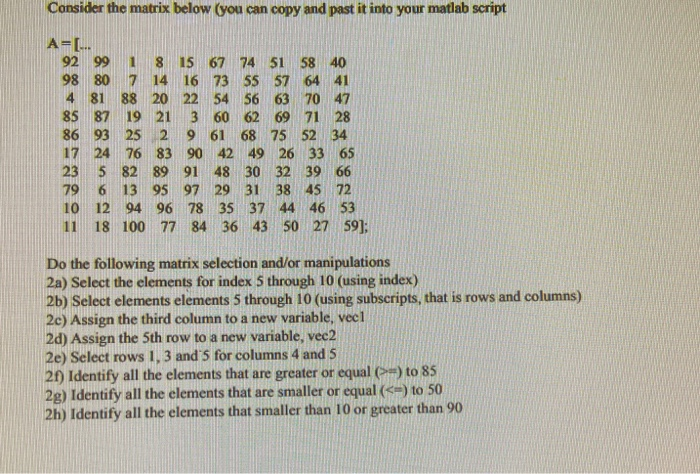
Consider the matrix below (you can copy and past it into your matlab script 92 99 1 8 15 67 74 51 58 40 98 80 7 14 16 73 55 57 64 41 4 81 88 20 22 54 56 63 70 47 85 87 19 21 3 60 62 69 71 28 86 93 25 2 9 61 68 75 52 34 17 24 76 83 90 42 49 26 33 65 23 5 82 89 91 48 30 32 39 66 79 6 13 95 97 29 31 38 45 72 10 12 94 96 78 35 37 44 46 53 18 100 77 84 36 43 50 27 59]; Do the following matrix selection and/or manipulations 2a) Select the elements for index 5 through 10 (using index) 2b) Select elements elements 5 through 10 (using subscripts, that is rows and columns) 2e) Assign the third column to a new variable, veel 2d) Assign the 5th row to a new variable, vec2 2e) Select rows 1, 3 and's for columns 4 and 5 21) Identify all the elements that are greater or equal (>) to 85 2g) Identify all the elements that are smaller or equal (e) to 50 2h) Identify all the elements that smaller than 10 or greater than 90
Step by Step Solution
There are 3 Steps involved in it

Get step-by-step solutions from verified subject matter experts
 Study Help