







Question: using matlab Create a file called planets.txt with the contents shown below and place it in your working directory: Part A Create a file called
using matlab
Create a file called planets.txt with the contents shown below and place it in your working directory:
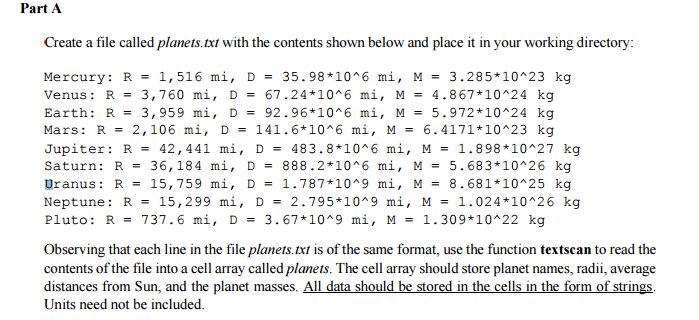
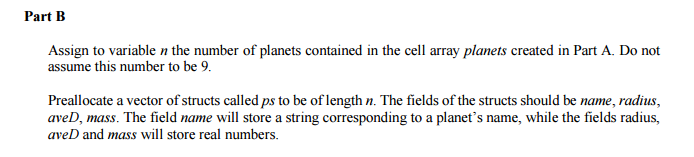
Part A Create a file called planets.xt with the contents shown below and place it in your working directory Mercury R 1,516 mi D 35.98 *10 6 mi M 3.285 10 23 kg Venus R 3,760 mi D 67.24 10 6 mi M 4.867 10 24 kg Earth R 3,959 mi D 92.96 10 6 mi M 5.972 10 24 kg Mars R 2,106 mi D 141.6 10 6 mi M 6.4171*10 23 kg Jupiter R 42,441 mi D 483.8 1016 mi M 1.898 *10 27 kg Saturn. R 36, 184 mi D 888.2 10A6 mi M 5.683 10 26 kg Uranus R 15,759 mi D 1.787 10 9 mi M 8.681 10 25 kg Neptune R 15, 299 mi D 2.795 10 9 mi M 1.024*10 26 kg Pluto R 737.6 mi D 3.67 1019 mi M 1.309 10 22 kg observing that each line in the file planets.txt of the same format, use function textscan to read the contents of the file intoacell array called planets. The ce array should store planet names, radii, average distances from Sun, and the planet masses. Al data should be stored in the cells in the form of strings. Units need not be included
Step by Step Solution
There are 3 Steps involved in it

Get step-by-step solutions from verified subject matter experts
 Study Help