







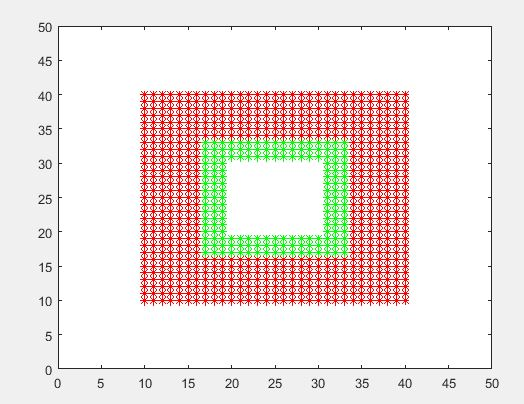
Question: using matlab how do i make outer box a circle and the inner white box a circle also? Outer red circle radius 15 centered at
using matlab how do i make outer box a circle and the inner white box a circle also?
Outer red circle radius 15 centered at x=y=25
inner white circle radius 5 centered at x=y=25
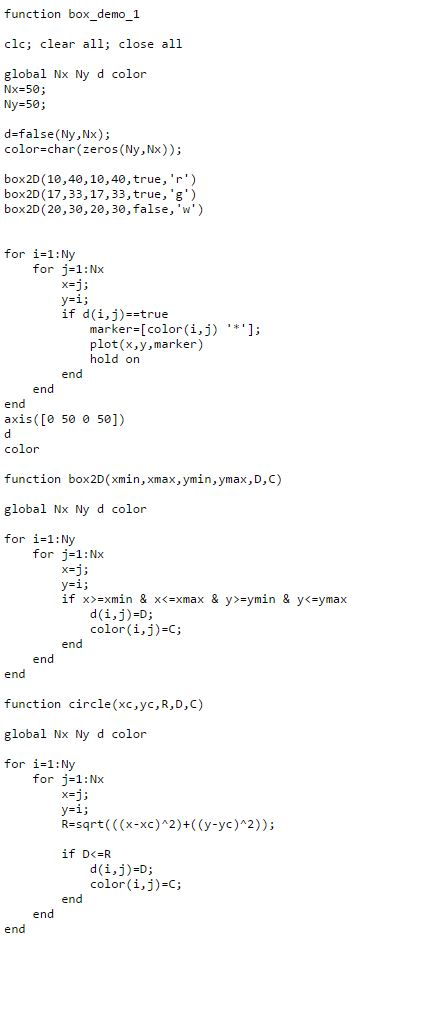
function box demo 1 clc, clear all, close all global Nx Ny d color Nx 50 Ny 50 d false (Ny,Nx); color char (zeros (Ny,Nx)); box2D (10,40, 10,40 true box2D 17,33 true, g (17,33, box2D (20,30, 20,30, false,'w') for 1: Ny Nx or J if d (i,j)> true mark [color (i,j) er plot (x,y,marker) hold on end end nd axis([0 500 501) color function box2D(xmin,xmax, ymin,ymax,D, c) global Nx Ny d color for i 1: Ny for j Nx d(i,j D; color (i, j C; end end nd function circle (xc,yc,R,D,C) global Nx Ny d color for i 1: Ny for j 1 Nx R sqrt(((x-xc) 2)+((y-yc) 2)) if D true mark [color (i,j) er plot (x,y,marker) hold on end end nd axis([0 500 501) color function box2D(xmin,xmax, ymin,ymax,D, c) global Nx Ny d color for i 1: Ny for j Nx d(i,j D; color (i, j C; end end nd function circle (xc,yc,R,D,C) global Nx Ny d color for i 1: Ny for j 1 Nx R sqrt(((x-xc) 2)+((y-yc) 2)) if D
Step by Step Solution
There are 3 Steps involved in it

Get step-by-step solutions from verified subject matter experts
 Study Help