







Question: Using MATLAB Instructions: For the following exercise, copy and paste into a text document the function M-files and the output obtained by running them. 5.
Using MATLAB
Instructions: For the following exercise, copy and paste into a text document the function M-files and the output obtained by running them.
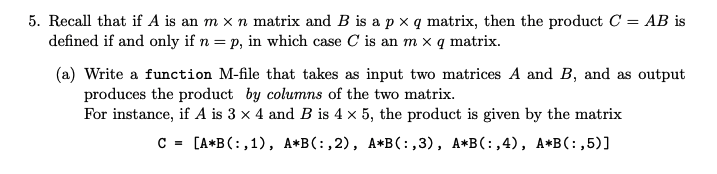
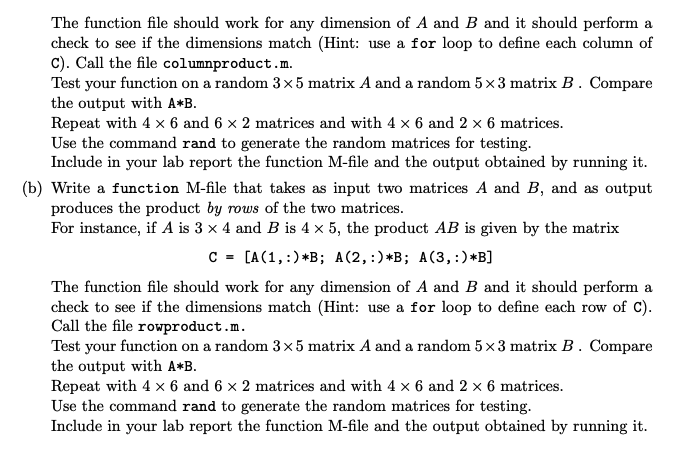
5. Recall that if A is an mxn matrix and B is a p xq matrix, then the product C = AB is defined if and only if n = p, in which case C is an m xq matrix. (a) Write a function M-file that takes as input two matrices A and B, and as output produces the product by columns of the two matrix. For instance, if A is 3 x 4 and B is 4 x 5, the product is given by the matrix C = [A*B(:,1), A*B(:,2), A*B(:,3), A*B(:,4), A*B(:,5)] The function file should work for any dimension of A and B and it should perform a check to see if the dimensions match (Hint: use a for loop to define each column of c). Call the file columnproduct.m. Test your function on a random 3 x 5 matrix A and a random 5 x 3 matrix B. Compare the output with A*B. Repeat with 4 x 6 and 6 x 2 matrices and with 4 x 6 and 2 x 6 matrices. Use the command rand to generate the random matrices for testing. Include in your lab report the function M-file and the output obtained by running it. (b) Write a function M-file that takes as input two matrices A and B, and as output produces the product by rows of the two matrices. For instance, if A is 3 x 4 and B is 4 x 5, the product AB is given by the matrix C = [A(1,:)*B; A(2,:)*B; A(3,:)*B] The function file should work for any dimension of A and B and it should perform a check to see if the dimensions match (Hint: use a for loop to define each row of C). Call the file rowproduct.m. Test your function on a random 3 x 5 matrix A and a random 5 x 3 matrix B. Compare the output with A B. Repeat with 4 x 6 and 6 x 2 matrices and with 4 x 6 and 2 x 6 matrices Use the command rand to generate the random matrices for testing. Include in your lab report the function M-file and the output obtained by running it
Step by Step Solution
There are 3 Steps involved in it

Get step-by-step solutions from verified subject matter experts
 Study Help