







Question: Using MATLAB language Create a row vector N with 5 elements that start at 10 and ending with 30. Perform the following mathematical operations in
Using MATLAB language
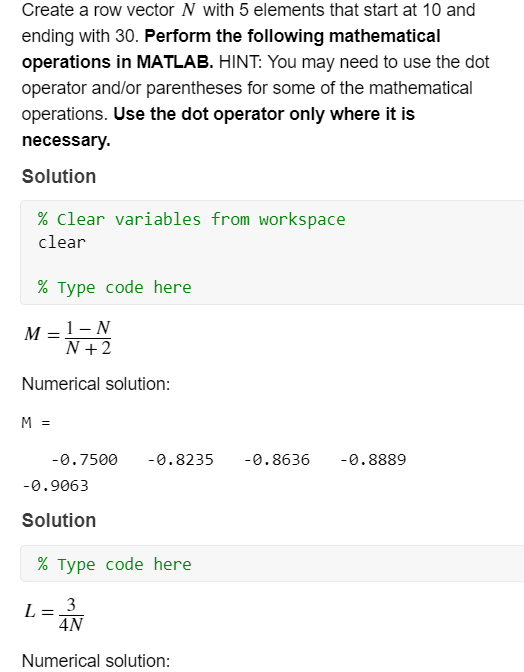
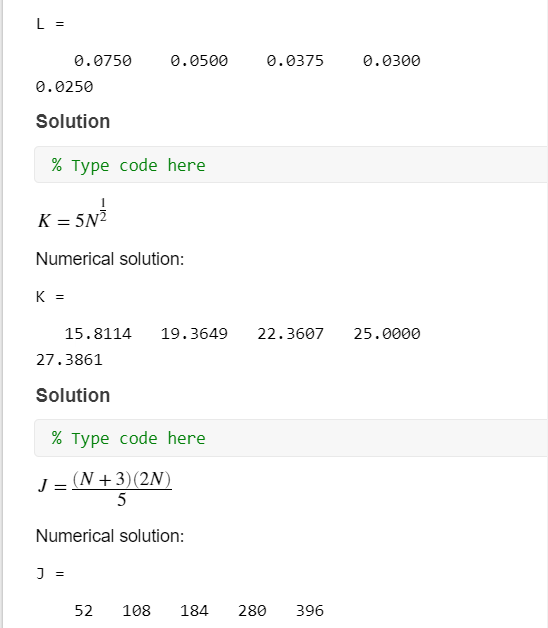
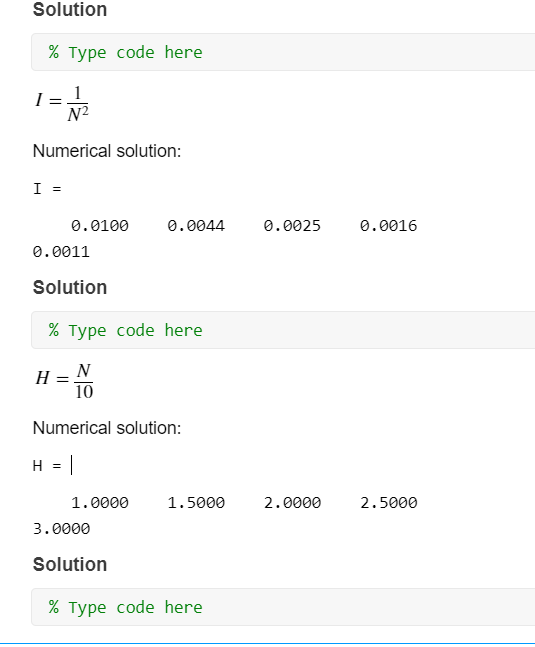
Create a row vector N with 5 elements that start at 10 and ending with 30. Perform the following mathematical operations in MATLAB. HINT: You may need to use the dot operator and/or parentheses for some of the mathematical operations. Use the dot operator only where it is necessary. Solution % clear variables from workspace clear % Type code here M =1-N N +2 Numerical solution: = -0.8235 -0.8636 -0.8889 -0.7500 -0.9063 Solution % Type code here LEAN Numerical solution: L = 0.0500 0.0375 0.0300 0.0750 0.0250 Solution % Type code here K = 5N Numerical solution: K = 19.3649 22.3607 25.0000 15.8114 27.3861 Solution % Type code here J = (N + 3) (2N) 5 Numerical solution: 52 108 184 280 396 Solution % Type code here I=1 N2 Numerical solution: I = 0.0100 0.0044 0.0025 0.0016 0.0011 Solution % Type code here H = N 10 Numerical solution: H = 1.5000 2.0000 2.5000 1.0000 3.0000 Solution % Type code here
Step by Step Solution
There are 3 Steps involved in it

Get step-by-step solutions from verified subject matter experts
 Study Help